
Free Printable Ruler – 12-Inch & 30-CM True Scale PDF
Download and print accurate, actual-size 12-inch (30 cm) and 8-inch (20 cm) rulers formatted for standard US Letter (8.5 × 11") and international A4 paper. Includes 100% scale verification markings and printing instructions.
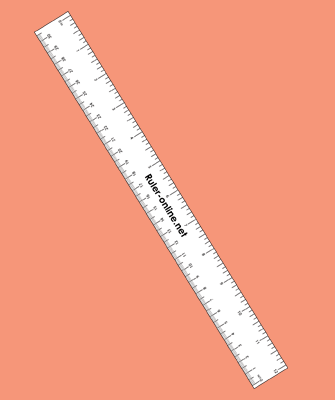
12-Inch / 30-Centimeter Standard Ruler
Full-size desk ruler featuring dual measurement scales: inches with 1/16" graduations on one edge, and centimeters with 1 mm markings on the opposite edge. Ideal for school, office, and crafting.
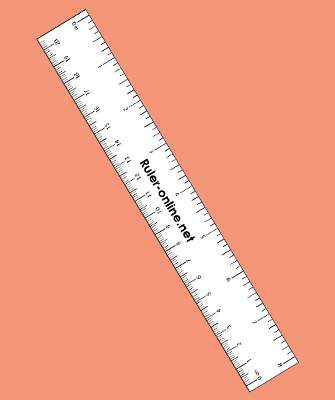
8-Inch / 20-Centimeter Compact Ruler
Compact ruler format designed to fit easily inside planners, notebooks, or pencil pouches. Includes crisp 1/16" and 1 mm graduations with cut lines for clean trimming.
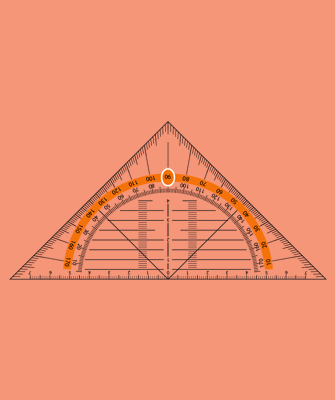
180-Degree Printable Protractor
High-precision 180° semi-circular protractor with dual degree scales (0° to 180° clockwise and counter-clockwise) and 1-degree resolution. Includes integrated 10 cm baseline scale.
Most PDF viewers (Adobe Acrobat, Chrome, Preview) default to "Fit to Printable Area" or "Shrink to Fit". You must disable auto-scaling to prevent distorted measurements.
- Select "Actual Size" or set Scale to 100% in your printer settings.
- Uncheck "Fit to Page", "Shrink Oversized Pages", or "Scale to Fit".
- Ensure your printer paper matches the PDF format you downloaded (US Letter for 8.5 × 11" or A4 for 210 × 297 mm).
Why Use a Printable Vector PDF Ruler?
There are times when measuring on a computer monitor or phone screen is awkward or impossible—such as measuring a curved surface, cutting fabric, checking architectural blueprints, or sending school assignments with children. A printable PDF ruler gives you the speed of immediate digital access combined with the tactile convenience of a physical paper ruler.
Unlike raster image files (such as JPEGs or PNGs) which can become blurry, pixelated, or distorted during printing, our printable rulers are built using pure PostScript vector geometry. Vector PDF lines remain razor-sharp regardless of your printer's resolution (300 DPI, 600 DPI, or 1200 DPI). Every 1/16-inch tick mark, millimeter stroke, and numeral is rendered with laser-grade precision.
How to Verify Printed Ruler Accuracy in 5 Seconds
Before using your freshly printed paper ruler for critical carpentry, tailoring, or school projects, verify its accuracy using one of these common household reference items:
- Standard Credit Card / Driver's License: Exactly 85.60 mm (3.370 inches) wide by 53.98 mm (2.125 inches) tall. Place your card against the printed ruler; the 3 3/8" mark should align almost perfectly with the card's width.
- US Quarter Dollar ($0.25): Exactly 0.955 inches (24.26 mm) in diameter—just under one full inch.
- US Nickel ($0.05): Exactly 0.835 inches (21.21 mm) in diameter.
- Standard US Dollar Bill: Exactly 6.14 inches (156.0 mm) long by 2.61 inches (66.3 mm) wide.
If your credit card or dollar bill matches the printed measurements, your printer scale is 100% accurate. If the printed scale is slightly smaller than the real object, your printer driver likely applied an automatic margin reduction (such as 94% or 96% scaling). Simply re-print with "Actual Size / 100%" explicitly enabled.
US Letter vs. International A4 Paper Dimensions
Paper formats differ depending on geographic location:
- US Letter (8.5 × 11 inches / 215.9 × 279.4 mm): The official standard paper size across the United States, Canada, Mexico, the Philippines, and parts of Central America. Our 12-inch ruler is strategically aligned along the diagonal and lengthwise edge to ensure standard margins remain intact on standard US office printers.
- ISO A4 (8.27 × 11.69 inches / 210 × 297 mm): The global standard used throughout Europe, the United Kingdom, Australia, Asia, and South America. A4 paper is slightly narrower and taller than US Letter.
Tips for Making a Long-Lasting DIY Paper Ruler
Plain printer paper can bend or tear easily. Here are three quick ways to make your printable paper ruler sturdier and more durable:
- Print on Heavy Cardstock: Use 65 lb or 80 lb cardstock instead of standard 20 lb copy paper. Cardstock holds its shape and creates a clean, rigid edge for drawing straight lines.
- Laminate or Tape the Edges: Run clear shipping tape over both sides of the printed ruler before trimming. This makes the paper water-resistant and prevents the measurement markings from smudging.
- Mount onto a Wooden or Cardboard Base: Glue the printed ruler onto a wooden paint-stirring stick, strip of corrugated cardboard, or strip of acrylic plastic using a glue stick or double-sided tape.
Frequently Asked Questions About Printable Rulers
Related Measurement Tools
Discover our complete collection of free web-based precision measurement calculators and printable templates.

Online Ruler (Actual Size)
Accurate on-screen physical ruler supporting inches, centimeters, millimeters, fraction graduations, and custom screen calibration.
Open Tool
PPI Calculator (Pixel Density)
Calculate display pixel density (PPI), pixel pitch, diagonal pixel count, aspect ratio, and physical display dimensions instantly.
Open Tool
Online Interactive Protractor
Measure angles with an interactive 180° and 360° protractor arm. Includes degree readout, angle classification, touch controls, and printable templates.
Open Tool
Length & Distance Unit Converter
Instantly convert lengths between inches, centimeters, millimeters, feet, yards, meters, miles, and kilometers with step-by-step conversion formulas.
Open Tool