
SQL Joins Visual Guide: Relational Algebra & Join Types
In normalized relational databases, data is intentionally segregated into separate, logical tables to avoid duplicate entries (e.g., storing customer data in customers and order data in orders). A SQL JOIN connects these tables together on the fly based on a shared relationship (typically Primary Key = Foreign Key).
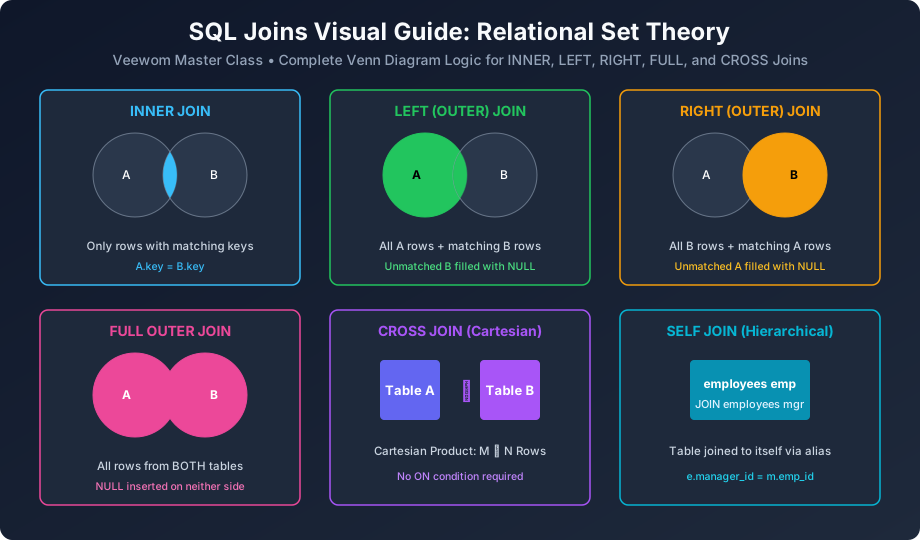
Figure 3.1: Visual Venn diagram guide to INNER, LEFT, RIGHT, FULL OUTER, CROSS, and SELF Joins.
The 5 Core SQL Join Types At a Glance
| Join Type | Relational Logic & Row Inclusion | Direct Class Link |
|---|---|---|
| INNER JOIN | Returns only rows that have matching values in both tables. | Learn INNER JOIN » |
| LEFT (OUTER) JOIN | Returns all rows from the left table, plus matched values from the right table (NULL if no match). | Learn LEFT JOIN » |
| RIGHT (OUTER) JOIN | Returns all rows from the right table, plus matched values from the left table (NULL if no match). | Learn RIGHT JOIN » |
| FULL OUTER JOIN | Returns all records when there is a match in either left or right table. | Learn FULL JOIN » |
| CROSS & SELF JOIN | Cartesian product ((M \times N)) or joining a table to itself hierarchically. | Learn CROSS & SELF JOIN » |
Sample Tables for Our Joins Masterclass
Throughout this module, we will work with two related university tables: departments (parent) and students (child):
-- Sample departments (3 rows)
-- dept_id: 10 (IT), 20 (Business), 30 (Arts - No students yet!)

-- Sample students (4 rows)
-- Aman (dept_id 10), Pooja (dept_id 20), Rohan (dept_id 10), Vikram (dept_id NULL - Unassigned!)
Let us start with the most widely used join: SQL INNER JOIN!


You may also like this!
© Veewom.com. | Managed by PinePL
