
SQL Syntax, Rules & Industry Coding Conventions
Writing correct, performant SQL begins with mastering its structural rules and syntactic anatomy. In this class, we break down SQL statement structure, clauses, keywords, whitespace rules, literal string formatting, and professional coding conventions recommended by industry database administrators.
Anatomy of a SQL Statement
A SQL statement is a complete command sent to the database engine. Every query statement is composed of several distinct clauses that execute in a defined logical order:
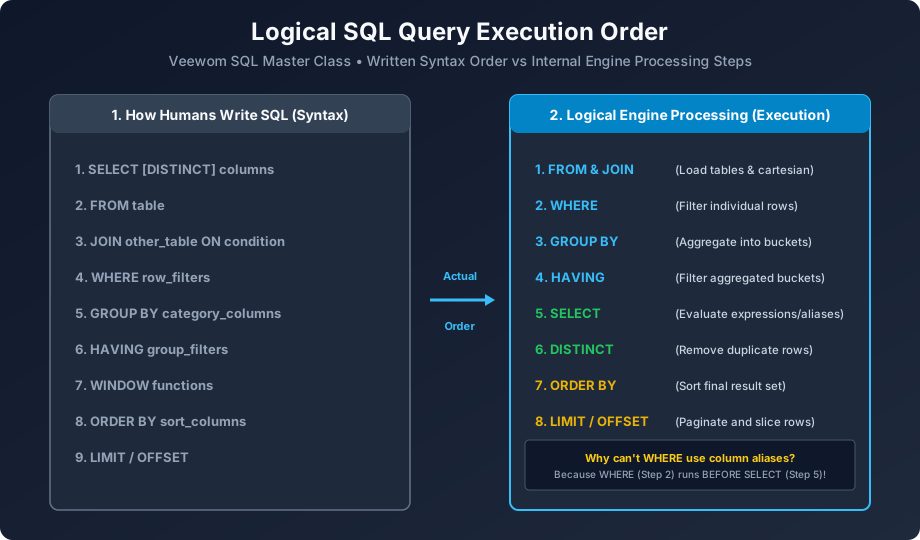
Figure 1.3: Comparison between the syntactic order written by programmers vs the logical execution order performed by the RDBMS engine.
SELECT [DISTINCT] column1, column2      -- Clause 1: Select projection
FROM table_name                         -- Clause 2: Data source table
WHERE filter_condition                  -- Clause 3: Row filter condition
GROUP BY grouping_column                -- Clause 4: Grouping aggregation
HAVING aggregate_condition              -- Clause 5: Aggregate filter
ORDER BY sort_column [ASC|DESC]         -- Clause 6: Sorting sequence
LIMIT row_count;                        -- Clause 7: Pagination limit
The 5 Golden Rules of SQL Syntax
• Rule 1: SQL Keywords are Case-Insensitive (Convention is UPPERCASE):
The engine interprets select, Select, and SELECT identically. However, professional SQL style guides (such as SQLFluff and GitLab SQL guidelines) mandate writing all SQL keywords in UPPERCASE and all database table/column names in lowercase_snake_case.
• Rule 2: String Literals Use Single Quotes ('...'):
In standard ANSI SQL, text strings and dates must always be enclosed in single quotation marks: 'BCA', '2026-11-06'. Double quotation marks ("...") are reserved for escaping table or column identifiers in ANSI SQL and PostgreSQL.
• Rule 3: Whitespace, Line Breaks & Tabs Are Ignored:
The SQL compiler treats multiple spaces, newlines, and tabs as a single whitespace token. You can break complex queries across multiple lines to maximize human readability:
-- Poor formatting (hard to maintain)
SELECT id,name,salary FROM employees WHERE salary>50000 AND dept='IT' ORDER BY salary DESC;

-- Professional formatting (clean, maintainable)
SELECT
    id,
    name,
    salary
FROM employees
WHERE salary > 50000
  AND dept = 'IT'
ORDER BY salary DESC;
• Rule 4: Semicolon Terminates Every Statement:
Always conclude every SQL statement with a semicolon (;). This prevents syntax ambiguity when multiple statements execute sequentially in a migration script or transaction batch.
• Rule 5: Escaping Reserved Keywords:
If you must name a column after a reserved keyword (e.g., naming a column order or group), you must escape it using backticks in MySQL (`order`) or double quotes in PostgreSQL ("order").
SELECT) and DML (modifying data with INSERT, UPDATE, DELETE). We will study each category in depth!
Next, let us explore the diverse range of SQL Data Types used to define table columns accurately!


You may also like this!
© Veewom.com. | Managed by PinePL
