
PHP Data Types: Scalar, Compound, Special & Type Casting in PHP 8
Variables in PHP can store different types of data, and different data types perform different operations. For example, you can perform arithmetic multiplication on integers and floats, but not on strings. PHP automatically determines the data type of a variable upon assignment. In this comprehensive guide, we explore all 8 primary PHP data types, inspection utilities like var_dump(), explicit type casting, and modern PHP 8 strict type declarations.
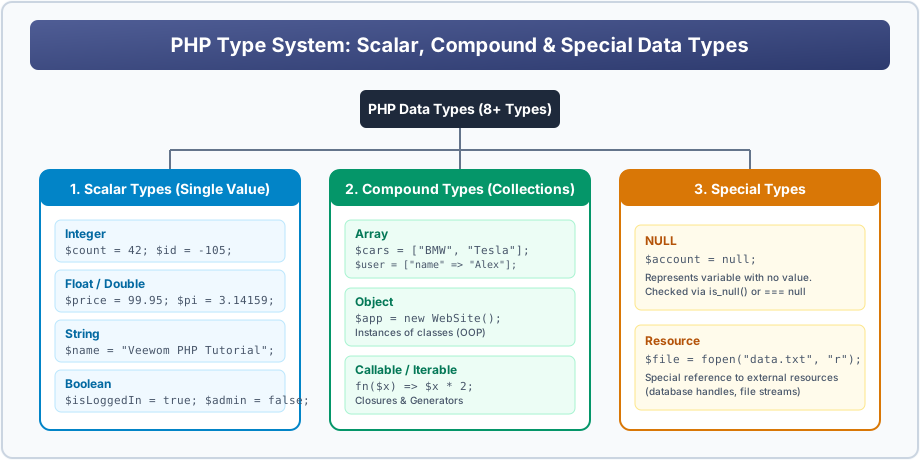
Figure 2: Complete taxonomy of PHP's Scalar, Compound, and Special Data Types.
The Three Families of PHP Data Types
1. Scalar Types (Hold a Single Atomic Value)
- String: A sequence of characters wrapped in quotes:
$name = "Veewom"; - Integer: A non-decimal whole number between -2,147,483,648 and +2,147,483,647 (on 32-bit systems) or larger (on 64-bit systems):
$age = 21; - Float (Floating Point Number / Double): A number containing a fractional decimal point or exponent:
$price = 199.95; - Boolean: Represents two truth values:
trueorfalse(case-insensitive):$isActive = true;
2. Compound Types (Hold Multiple Values or Logic)
- Array: A structured variable that can store multiple values under a single name:
$languages = ["PHP", "Python", "JavaScript"]; - Object: An instance of a programmer-defined class storing both state (properties) and behavior (methods):
$user = new Student(); - Callable: A callback function or closure that can be invoked dynamically.
3. Special Types
- NULL: A special data type that has only one value:
null. It signifies that a variable has no value or has been emptied. - Resource: A special reference holding a handle to an external resource (such as an open file stream or database connection cursor):
$handle = fopen("data.txt", "r");
Inspecting Data Types: var_dump() vs gettype()
When debugging code or grading student assignments, two built-in functions provide immediate inspection of any variable:
<?php
    $studentName = "Deepak Verma";
    $marks = 94;
    $gpa = 3.88;
    $isPassed = true;
    $hobbies = ["Coding", "Cricket", "Blogging"];
    $certifications = null;

    // gettype() returns just the type name string
    echo gettype($studentName) . "<br>"; // string

    // var_dump() outputs type, size, and structure
    var_dump($studentName); // string(12) "Deepak Verma"
    echo "<br>";
    var_dump($marks);       // int(94)
    echo "<br>";
    var_dump($gpa);         // float(3.88)
    echo "<br>";
    var_dump($isPassed);    // bool(true)
    echo "<br>";
    var_dump($hobbies);     // array(3) { [0]=> string(6) "Coding" ... }
    echo "<br>";
    var_dump($certifications); // NULL
?>
Explicit Type Casting in PHP
You can explicitly convert a variable from one data type to another using casting operators:
(int)or(integer)— Casts to Integer(float)or(double)— Casts to Float(string)— Casts to String(bool)or(boolean)— Casts to Boolean(array)— Casts to Array
<?php
    $priceStr = "149.99";
    $intPrice = (int)$priceStr;   // 149 (truncates decimals)
    $floatPrice = (float)$priceStr; // 149.99

    $counter = 0;
    $isTrue = (bool)$counter;     // false (0 evaluates to false in boolean cast)
?>
Modern PHP 8 Strict Type Enforcement
By default, PHP coerces data types automatically (e.g. passing numeric string "25" into a function expecting int works seamlessly). However, for mission-critical software, PHP supports strict typing:
<?php
declare(strict_types=1); // MUST be the very first statement in the file

function calculateArea(int $width, int $height): int {
    return $width * $height;
}

echo calculateArea(10, 20); // Valid: outputs 200

// calculateArea("10", 20);
// Fatal Error: Uncaught TypeError: calculateArea(): Argument #1 ($width) must be of type int, string given!
?>
BCA / CS University Exam Corner
Semester Exam Question:
Q: What are falsy values in PHP?
A: When cast to boolean, the following values evaluate to false:
The boolean false, integer 0, float 0.0, empty string "", string zero "0", empty array [], and null.
Interactive Student Practice Session
Exercise 6.1: Declare variables representing an item in an online bookstore: title (string), ISBN (string), price (float), inStock (boolean), tags (array). Use var_dump() to inspect all five.
Exercise 6.2: Write a script with declare(strict_types=1); that defines a function getDiscount(float $price, float $percent): float and test valid and invalid argument types.


You may also like this!
© Veewom.com. | Managed by PinePL
