
Production Deployment - Multi-Stage Docker Builds, PM2 Process Manager & Nginx
Writing functional server code is only half the battle; deploying hardened, zero-downtime services to the cloud is what transforms you into a complete engineer. In this tutorial, you will master production deployments with Multi-Stage Docker builds, PM2 Process Manager, and Nginx Reverse Proxying.
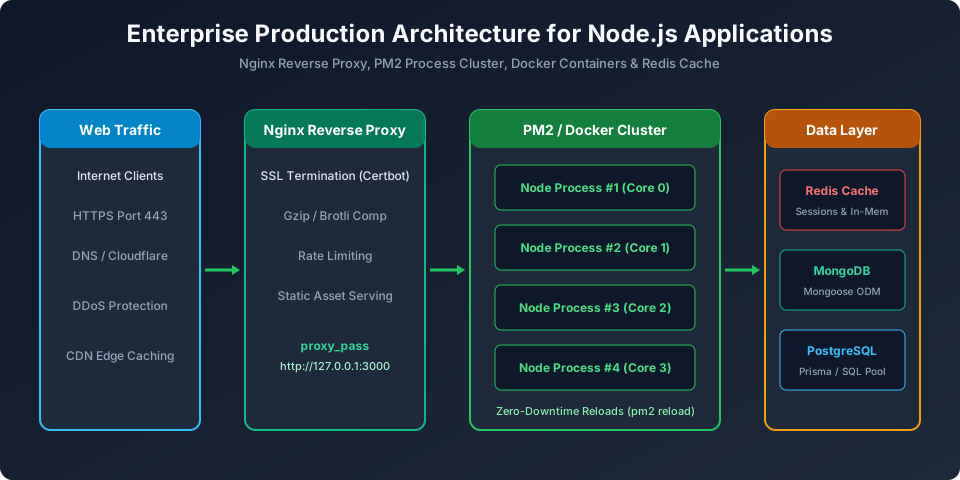
Figure 9: Enterprise Production Architecture: Nginx Reverse Proxy > PM2 Process Cluster > Containerized Node.js Microservices
1. Production Multi-Stage Dockerfile
# --- STAGE 1: Dependency Installation & Build ---
FROM node:22-alpine AS builder
WORKDIR /app

# Copy dependency manifests first to leverage Docker layer caching
COPY package*.json ./
RUN npm ci

# Copy source code and build
COPY . .

# Prune devDependencies to keep image lean
RUN npm prune --production

# --- STAGE 2: Lightweight Production Runtime ---
FROM node:22-alpine AS runner
WORKDIR /app

ENV NODE_ENV=production
ENV PORT=3000

# Security: Run as unprivileged non-root user bundled in node:alpine
USER node

# Copy only production artifacts from builder stage
COPY --chown=node:node --from=builder /app/package*.json ./
COPY --chown=node:node --from=builder /app/node_modules ./node_modules
COPY --chown=node:node --from=builder /app .

EXPOSE 3000

CMD ["node", "server.js"]
2. PM2 Production Process Management (ecosystem.config.js)
module.exports = {
  apps: [{
    name: 'veewom-api',
    script: 'server.js',
    instances: 'max',       // Utilize all available CPU cores automatically!
    exec_mode: 'cluster',   // Cluster mode
    autorestart: true,      // Restart if application crashes
    watch: false,           // Never watch files in production
    max_memory_restart: '1G', // Restart if RAM exceeds 1GB
    env_production: {
      NODE_ENV: 'production',
      PORT: 3000
    }
  }]
};
Essential PM2 Commands:
pm2 start ecosystem.config.js --env production  # Start cluster
pm2 reload veewom-api                           # Zero-downtime rolling reload!
pm2 status                                      # Inspect CPU/RAM of all workers
pm2 logs veewom-api                             # Stream aggregated logs
3. Nginx Reverse Proxy Configuration
server {
    listen 80;
    server_name api.veewom.com;

    location / {
        proxy_pass http://127.0.0.1:3000;
        proxy_http_version 1.1;
        proxy_set_header Upgrade $http_upgrade;
        proxy_set_header Connection 'upgrade';
        proxy_set_header Host $host;
        proxy_set_header X-Real-IP $remote_addr;
        proxy_set_header X-Forwarded-For $proxy_add_x_forwarded_for;
        proxy_set_header X-Forwarded-Proto $scheme;
        proxy_cache_bypass $http_upgrade;
    }
}
Frequently Asked Questions (FAQ) - Student & Interview Review
Q1. What is PM2 and why is it used for Node.js production servers?
PM2 is a production process manager for Node.js applications. It keeps your app alive forever by auto-restarting on unexpected crashes, manages multi-core clustering out-of-the-box ('pm2 start app.js -i max'), enables zero-downtime reloads, and handles log rotation.
Q2. Why should you use multi-stage Docker builds for Node.js?
Multi-stage builds separate the build environment (compiling TypeScript, installing devDependencies) from the lean runtime image. The final image contains only production dependencies and compiled artifacts, reducing image size from 1GB down to ~120MB and eliminating security attack surfaces.
Q3. Why must you run Node.js containers as a non-root user?
By default, Docker containers run as the root superuser. If an attacker discovers a Remote Code Execution (RCE) vulnerability in an NPM package, they gain root privileges on the container and potentially the host VM. Creating and running as a 'node' user mitigates this vulnerability.
Explore Related Node.js Tutorials & Next Steps
Boost your server-side JavaScript proficiency by studying these closely connected core modules:
Cluster Module & Multi-Core
PM2 automates clustering across all CPU cores.
Security Best Practices
Run containers as non-root users.
Logging & Monitoring
Stream logs in production container environments.


You may also like this!
© Veewom.com. | Managed by PinePL
