
JWT Authentication & Password Hashing - Building Stateless Secure Auth in Node.js
Stateless authentication using JSON Web Tokens (JWT) is the standard authentication model for modern web APIs, single-page React/Angular applications, and mobile apps. In this tutorial, you will implement secure password hashing with bcrypt and build complete authentication workflows.
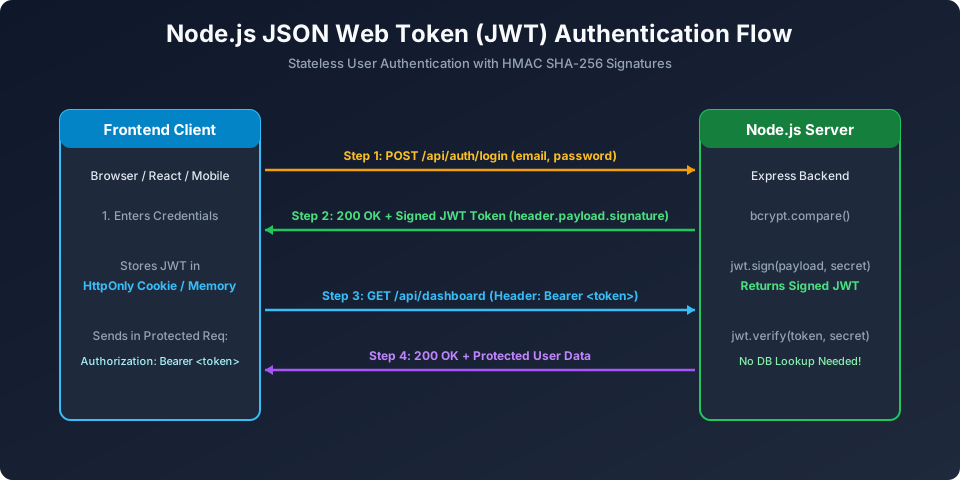
Figure 8: Complete Stateless Authentication Flow with bcrypt Password Hashing & Signed JWT Tokens
Installing Dependencies
npm install jsonwebtoken bcrypt1. Secure Password Hashing with bcrypt
const bcrypt = require('bcrypt');

// Hash password with 12 salt rounds before saving to database
async function hashUserPassword(plainPassword) {
  const saltRounds = 12;
  const hashedPassword = await bcrypt.hash(plainPassword, saltRounds);
  return hashedPassword;
}

// Compare user-submitted login password with stored hash
async function verifyPassword(plainPassword, storedHash) {
  const isMatch = await bcrypt.compare(plainPassword, storedHash);
  return isMatch; // Returns true or false
}
2. Generating Signed JWT Tokens
const jwt = require('jsonwebtoken');

const JWT_SECRET = process.env.JWT_SECRET || 'super_secret_university_key_2026';
const JWT_EXPIRES_IN = '1h'; // Token valid for 1 hour

function signToken(userId, role) {
  return jwt.sign(
    { id: userId, role: role }, // Claims Payload
    JWT_SECRET,                 // Secret Key
    { expiresIn: JWT_EXPIRES_IN }
  );
}
3. Protecting Routes with JWT Verification Middleware
// middleware/verifyToken.js
const jwt = require('jsonwebtoken');

const protect = (req, res, next) => {
  let token;

  // Extract Bearer token from Authorization Header
  if (req.headers.authorization && req.headers.authorization.startsWith('Bearer')) {
    token = req.headers.authorization.split(' ')[1];
  }

  if (!token) {
    return res.status(401).json({ success: false, error: 'Access denied: No token provided' });
  }

  try {
    // Verify token signature and expiration
    const decoded = jwt.verify(token, process.env.JWT_SECRET);
    req.user = decoded; // Attach authenticated user payload to request
    next();             // Proceed to protected route controller
  } catch (err) {
    return res.status(401).json({ success: false, error: 'Invalid or expired token' });
  }
};

module.exports = protect;
Frequently Asked Questions (FAQ) - Student & Interview Review
Q1. What is a JSON Web Token (JWT) and what are its three parts?
A JWT is a compact, URL-safe means of representing claims securely between two parties. It consists of three Base64URL-encoded parts separated by dots: 1) Header (token type and signing algorithm), 2) Payload (claims such as userId, role, expiration), and 3) Signature (HMAC or RSA signature ensuring data cannot be tampered with).
Q2. Why should passwords never be hashed with plain SHA-256 or MD5?
General-purpose hashing algorithms like SHA-256 and MD5 were engineered for high execution speed. Modern GPUs can calculate billions of SHA-256 hashes per second, making them vulnerable to brute-force and rainbow table attacks. Password algorithms like bcrypt and Argon2 intentionally introduce cryptographic salts and configurable work factors (salt rounds), slowing down hashing to make brute-forcing mathematically infeasible.
Q3. Where is the most secure place to store JWTs on the client?
Storing JWTs in localStorage or sessionStorage leaves them vulnerable to Cross-Site Scripting (XSS) attacks. The most secure storage method is an 'HttpOnly', 'Secure', 'SameSite=Strict' HTTP cookie, which completely prevents client-side JavaScript from reading or stealing the token.
Explore Related Node.js Tutorials & Next Steps
Boost your server-side JavaScript proficiency by studying these closely connected core modules:
Security Best Practices
Protect tokens from XSS and CSRF attacks.
Express Middleware Deep Dive
Build route-guard middleware with jwt.verify.
Crypto & Hashing
Underlying HMAC SHA-256 signatures in JWT.


You may also like this!
© Veewom.com. | Managed by PinePL
