
WordPress Template Hierarchy: Complete Visual Map & Fallback Logic
When a visitor navigates to a URL on a WordPress website (such as example.com/category/tutorials/ or example.com/about/), how does WordPress decide which PHP template file in your active theme directory should render the page? It follows a strictly deterministic, visual decision tree known as the WordPress Template Hierarchy. Understanding this hierarchy allows theme developers to craft bespoke layouts for specific categories, authors, custom post types, or individual landing pages with surgical precision.
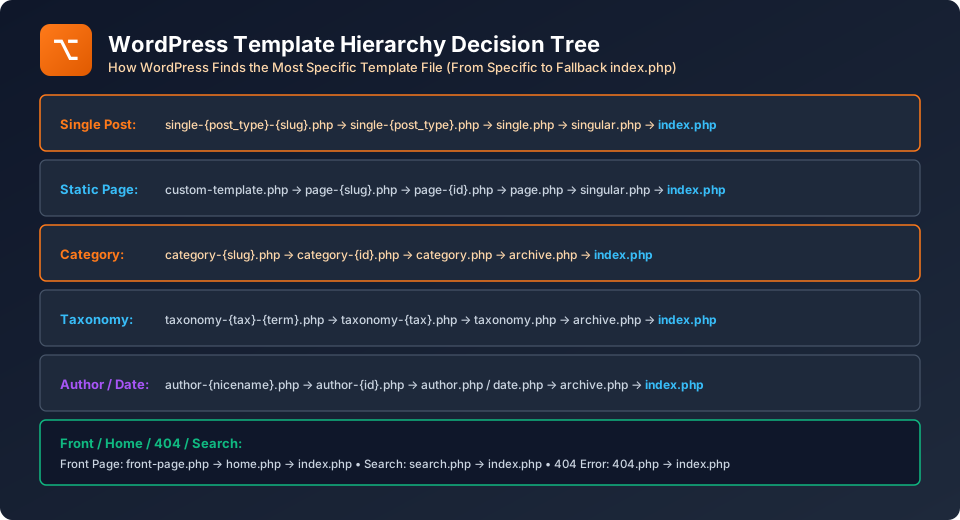
Figure 30.1: WordPress Template Hierarchy Resolution Flowchart
The Fundamental Fallback Philosophy
The Template Hierarchy works on a simple principle: from most specific to most generic. WordPress first searches your active theme directory for the most specific file name matching the query. If that file is absent, it moves down the branch to a slightly broader template, continuing down until it reaches the ultimate universal fallback: index.php.
The 7 Primary Template Branches
1. Single Blog Post (Singular Post Page)
When viewing a single blog article (e.g. example.com/learn-php/), WordPress traverses this chain:
single-post-{post-slug}.php(e.g.,single-post-learn-php.php)single-post.php(Targeting all standard posts)single.php(Targeting all single items, including CPTs)singular.php(Shared fallback for both single posts and static pages)index.php
2. Static Page Hierarchy
When viewing a static page (e.g. example.com/about-us/ with page ID 42):
- Custom Page Template: If the author selected a custom template from the Page Attributes dropdown (e.g.
template-fullwidth.php). page-{slug}.php(e.g.,page-about-us.php)page-{id}.php(e.g.,page-42.php)page.phpsingular.phpindex.php
3. Category Archive Hierarchy
When viewing a category archive (e.g. example.com/category/news/ with term ID 7):
category-{slug}.php(e.g.,category-news.php)category-{id}.php(e.g.,category-7.php)category.phparchive.php(Universal archive for categories, tags, authors, and dates)index.php
4. Custom Post Type (CPT) Hierarchy
If you register a custom post type called portfolio:
- Single CPT Item:
single-portfolio-{slug}.php→single-portfolio.php→single.php→singular.php→index.php. - CPT Archive (
/portfolio/):archive-portfolio.php→archive.php→index.php.
5. Front Page vs. Home Page (The Subtle Difference)
| Template File | When It Executes | Fallback Order |
|---|---|---|
front-page.php |
Always executes for the Root Domain (example.com/), regardless of whether you set Homepage to "Your latest posts" or "A static page". |
Falls back to home.php (if blog) or page.php (if static). |
home.php |
Executes for the Blog Posts Index Page (e.g. example.com/blog/). |
Falls back to index.php. |
404.php |
Executes whenever a visitor requests a non-existent URL. | Falls back to index.php. |
search.php |
Executes when viewing internal search results (example.com/?s=php). |
Falls back to index.php. |
BCA University Viva Voce Gold Question
Examiners love this exact scenario: "If a theme contains both front-page.php and home.php, which template renders when a user visits the root domain?" The answer is front-page.php! front-page.php always holds the absolute highest priority for the root domain.
Frequently Asked Questions (FAQ) - Student & Interview Review
Q1. What is singular.php used for?
Q2. How does template resolution work in modern Block Themes?
Q3. Can I inspect which template file is currently rendering my page?
Explore Related WordPress Tutorials & Next Steps
Expand your CMS mastery by studying these tightly integrated WordPress development topics:
Build index.php, header.php, single.php, and page.php from ground up.
Safely override parent theme templates in child theme folders.
Create single-{cpt}.php and archive-{cpt}.php template files.
Master the PHP query loop running inside every template file.


You may also like this!
© Veewom.com. | Managed by PinePL
