
CSS Programming & Web Design Tutorial
Welcome to the Complete CSS & Modern Web Design Master Class Tutorial on Veewom. Cascading Style Sheets (CSS) is the foundational styling and presentation language of the World Wide Web, maintained by the World Wide Web Consortium (W3C). First proposed by Håkon Wium Lie in 1994 and co-created with Bert Bos, CSS transforms raw semantic HTML markup into visually stunning, responsive, and interactive user interfaces across billions of devices worldwide.
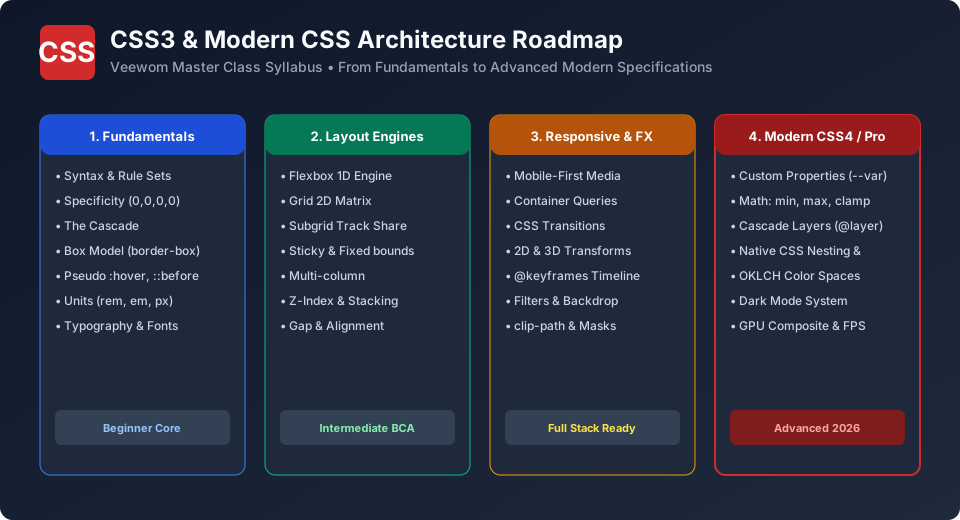
Whether you are a beginner BCA, BSc Computer Science, or B.Tech student preparing for university web design semester examinations, a tech blogger polishing frontend aesthetics, or an aspiring software engineer preparing for frontend technical interviews, this comprehensive 47-class curriculum takes you from absolute fundamentals to cutting-edge 2026 modern CSS features including Flexbox, CSS Grid, Subgrid, Container Queries, Cascade Layers, and OKLCH color spaces.
Why Master CSS in 2026?
The Core Pillar of Frontend Engineering: Alongside HTML and JavaScript, CSS forms the indispensable triumvirate of frontend web development. Every website, mobile app webview, and design system relies on CSS for layout, colors, typography, and motion.
Revolutionary Modern Features: Gone are the days of fragile float hacks and vendor prefixes. Modern CSS boasts native Nesting, CSS Variables (Custom Properties), Container Queries (@container), Cascade Layers (@layer), and fluid math functions (clamp()) that make third-party preprocessors and heavy CSS frameworks optional.
Hardware-Accelerated 60 FPS Performance: CSS transforms and opacity animations execute directly on the device GPU composite layer, running smoother and consuming far less battery than JavaScript-driven DOM manipulation.
University BCA & B.Tech Core Syllabus: Web technologies and internet programming courses mandate complete mastery of CSS box model, positioning, flexbox, grid, and responsive media queries for lab practicals and viva voce.
CSS vs HTML vs JavaScript: Separation of Concerns
Understanding how web technologies collaborate is fundamental to writing maintainable software architectures:
| Technology | Analogy (Human Body) | Primary Responsibility | Standard Example |
|---|---|---|---|
| HTML5 | Skeleton & Bones | Semantic structure, text elements, media tags, links, and forms. | <button>Submit Application</button> |
| CSS3 / Modern CSS | Skin, Clothes & Aesthetics | Colors, typography, layout geometry, spacing, responsive viewports, and visual transitions. | button { background: #d22b2b; color: #fff; border-radius: 6px; } |
| JavaScript (ES6+) | Muscles & Nervous System | Interactivity, state management, API data fetching, and event handling. | btn.addEventListener('click', () => validateForm()); |
Complete 47-Class Curriculum & Learning Roadmap
Our synchronized, class-by-class curriculum is structured into 9 comprehensive pedagogical modules:
Module 1: CSS Fundamentals & Setup
Class 01: CSS Home & Complete Architectural Roadmap (Course Overview & Learning Strategy)
Class 02: History & Evolution of CSS (From CSS1 in 1996 to W3C Modular CSS3 & CSS4 Specs)
Class 03: CSS Syntax, Anatomy & Rule Sets (Selectors, Properties, Value Types & Declarations)
Class 04: 3 Ways to Apply CSS (Inline, Internal, External & @import Performance)
Class 05: CSS Comments & Code Style Guides (Formatting, Documentation & Linting Rules)
Module 2: Selectors & Specificity Hierarchy
Class 06: CSS Selectors & Combinators (Type, Class, ID, Descendant, Child & Sibling)
Class 07: CSS Pseudo-Classes (State :hover, Structural :nth-child & Modern :has, :is, :where)
Class 08: CSS Pseudo-Elements (::before, ::after, ::marker, ::first-letter & ::selection)
Class 09: CSS Attribute Selectors (Exact, Substring, Prefix & Suffix Matching)
Class 10: Specificity, Cascade & Inheritance (Weight Calculator 0,0,0,0 & !important)
Module 3: Colors, Backgrounds & Typography
Class 11: CSS Colors & OKLCH Gamuts (HEX, RGB, HSL, Modern OKLCH & color-mix)
Class 12: CSS Backgrounds & Gradients (Linear, Radial, Conic, Multiple Layers & clip)
Class 13: Web Fonts & @font-face (Google Fonts, Variable Fonts, Font Display & FOUT)
Class 14: CSS Text Effects & Wrapping (Line-height, Letter-spacing, Shadows & Hyphenation)
Module 4: The CSS Box Model & Core Layout
Class 15: The CSS Box Model (Content, Padding, Border, Margin & box-sizing: border-box)
Class 16: Margin Collapsing & Padding Techniques (Vertical Margin Trap & Auto Centering)
Class 17: Borders, Rounded Corners & Box Shadows (border-radius, outline vs border, box-shadow)
Class 18: CSS Display Property (block, inline, inline-block, none vs visibility:hidden)
Class 19: CSS Units & Measurements (px, rem, em, %, vh, vw, dvh, cqw & Accessibility)
Module 5: Positioning, Floats, Flexbox & Grid
Class 20: CSS Positioning Schemes (Static, Relative, Absolute, Fixed & Sticky)
Class 21: Z-Index & Stacking Contexts (Layering Rules, Isolation & Stacking Bugs)
Class 22: CSS Overflow & Clipping (visible, hidden, scroll, auto & overscroll-behavior)
Class 23: Floats & Clearfix (Historical Layouts, float property, and clearfix micro-hacks)
Class 24: CSS Flexbox Complete Guide (Flex Container, Main/Cross Axis, Alignment & Gap)
Class 25: CSS Grid 2D Layout Matrix (Grid Tracks, fr units, repeat, minmax & Template Areas)
Class 26: Modern CSS Subgrid (Parent Track Inheritance & Multi-Card Alignment)
Class 27: CSS Multi-Column Layout (column-count, column-gap, column-rule & Magazine Flows)
Module 6: Responsive Web Design & Modern Queries
Class 28: Responsive Web Design Principles (Fluid Grids, Viewport Meta & Mobile-First)
Class 29: CSS Media Queries & Breakpoints (Modern Range Syntax, Orientations & Print Styles)
Class 30: Modern Container Queries (@container) (Component-Driven Responsive Layouts)
Class 31: Responsive Images & Aspect Ratios (object-fit, object-position & aspect-ratio)
Module 7: Visual Effects, Transforms & Animation
Class 32: CSS Transitions (transition shorthand, cubic-bezier timing curves & delays)
Class 33: 2D & 3D Transforms (translate, rotate, scale, skew, perspective & matrix)
Class 34: CSS Keyframe Animations (@keyframes timeline, iterations, alternate & fill-modes)
Class 35: CSS Filters & Blend Modes (blur, brightness, backdrop-filter & mix-blend-mode)
Class 36: CSS Masks & clip-path (Polygons, Circles, Ellipses & SVG Shape Masks)
Module 8: Modern CSS & Next-Gen Architecture
Class 37: CSS Custom Properties (Variables) (--var-name, Scoping, Fallbacks & Themes)
Class 38: CSS Math Functions (calc(), min(), max(), clamp(), round() & Fluid Design)
Class 39: Cascade Layers (@layer) (Architecture Priority, Unlayered Rules & Resets)
Class 40: Native CSS Nesting (The & Selector, Browser Performance vs Preprocessors)
Class 41: Dark Mode & Color Schemes (prefers-color-scheme, light-dark() & accent-color)
Class 42: BEM & Scalable Architecture (Block Element Modifier, Clean Naming & Modular CSS)
Class 43: CSS Rendering Performance (Critical CSS, Reflows, Repaints & content-visibility)
Module 9: Practice Sessions, Interview Prep & Resources
Class 44: CSS Lab Projects & Exercises (Responsive Card, Sticky Header, Hero Banner, Grid Gallery)
Class 45: 100+ CSS Interview Questions & Answers (Comprehensive Viva & Technical Screening)
Class 46: CSS Traps, Debugging & Common Mistakes (Margin Traps, Z-Index Pitfalls, Overflow Bugs)
Class 47: Quick CSS Syntax Cheat Sheet (Property Reference Matrix & Value Shorthands)
Interactive Beginner Practice & University Viva Session
Every single class in this tutorial series features hands-on practice questions designed specifically for university exams and frontend screening:
BCA University Examination Highlight
Question: Explain the term "Cascading" in Cascading Style Sheets. Which factors resolve conflicting declarations?
Model Answer: "Cascading" refers to the deterministic algorithm browsers execute when multiple CSS rules target the exact same HTML element. The conflict is resolved through three sequential stages: (1) Origin & Importance (User Agent < User < Author < !important), (2) Specificity Weight (Inline 1,0,0,0 > ID 0,1,0,0 > Class 0,0,1,0 > Element 0,0,0,1), and (3) Order of Appearance (if specificity is tied, the rule appearing latest in the source code wins).
Hands-On Lab Exercise: First Responsive Card
Problem Statement: Create a card component with a 1px border, 20px internal padding, and a subtle drop shadow that never overflows its 300px target width.
/* Universal Box-Sizing Reset */
*, *::before, *::after {
  box-sizing: border-box;
}

/* Card Component */
.profile-card {
  width: 300px;
  padding: 20px;
  background-color: #ffffff;
  border: 1px solid #e2e8f0;
  border-radius: 8px;
  box-shadow: 0 4px 6px -1px rgba(0, 0, 0, 0.1);
  font-family: system-ui, -apple-system, sans-serif;
}
Feedback & Continuous Improvement
This course is actively maintained and reviewed against the latest W3C CSS specifications (CSS Cascading and Inheritance Level 5, CSS Grid Level 2, CSS Color Level 5). If you discover any typo, broken snippet, or have suggestions for additional university lab exercises, please contact us at info@veewom.com.
Explore Related CSS Tutorials & Next Steps
Boost your CSS and front-end development proficiency by exploring these closely connected topics:
Understand margins, borders, padding, content and the universal box-sizing fix.
Master 1D alignment, justify-content, align-items, flex-wrap and responsive flow.
Build powerful two-dimensional grid layouts with template areas and fr units.
Eliminate styling conflicts and master selector weights from 0,0,0,1 to !important.
Frequently Asked Questions (FAQ) - Student & Interview Review
Q1. What is CSS and what does it stand for?
Q2. Can I learn CSS without knowing HTML?
Q3. What is the difference between CSS and CSS3?
Q4. Do I still need preprocessors like SASS or Less in 2026?
Q5. What makes Veewom's CSS tutorial best for BCA and CS students?


You may also like this!
© Veewom.com. | Managed by PinePL
