
- Home
- Tutorials
- JavaScript
- Web Storage (LocalStorage)
JavaScript Web Storage: LocalStorage, SessionStorage & Client-Side Cookies
Modern web applications frequently need to store user state locally on the client machine—such as UI dark/light themes, authentication tokens, shopping cart items, and draft form entries. HTML5 introduced the Web Storage API (LocalStorage and SessionStorage) to replace the ancient, 4KB-limited HTTP cookie mechanism.
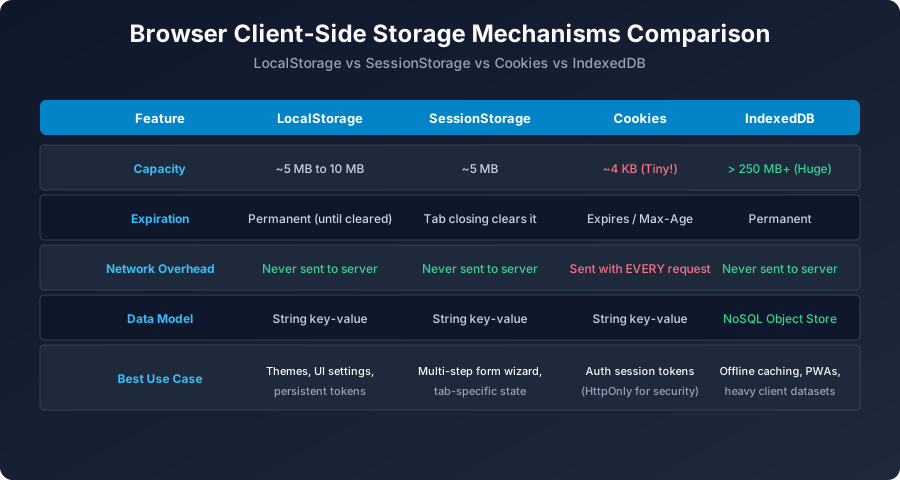
Figure 8: Side-by-side comparison of LocalStorage, SessionStorage, Cookies, and IndexedDB storage quotas and lifetimes.
Using window.localStorage (Permanent Storage)
// 1. Storing primitive data
localStorage.setItem("themePreference", "dark");

// 2. Storing Objects / Arrays (Requires JSON.stringify)
const userSession = {
    username: "vikram99",
    role: "student",
    lastLogin: Date.now()
};
localStorage.setItem("currentUser", JSON.stringify(userSession));

// 3. Retrieving and Deserializing data
const rawData = localStorage.getItem("currentUser");
if (rawData) {
    const user = JSON.parse(rawData);
    console.log("Welcome back,", user.username);
}

// 4. Removing items and Clearing
localStorage.removeItem("themePreference");
// localStorage.clear(); // Clears all keys for current origin!
Using window.sessionStorage (Tab Session Storage)
Has identical API methods (setItem, getItem, removeItem), but all data is discarded the moment the user closes the browser tab. Perfect for multi-step form wizards!
University Exam Corner (BCA / MCA Notes)
Exam Question: "Compare Cookies and LocalStorage on capacity, lifetime, and network overhead."
| Property | HTTP Cookies | LocalStorage |
|---|---|---|
| Capacity Limit | ~4 Kilobytes (Tiny) | ~5 to 10 Megabytes |
| Network Overhead | Sent with EVERY HTTP request header | Never transmitted to server automatically |
| Expiration | Set by server/client Max-Age | Permanent until cleared explicitly |
Next Step
How do you delay execution or run periodic background loops? Proceed to: JavaScript Timers: setTimeout & setInterval →


You may also like this!
© Veewom.com. | Managed by PinePL
