
- Home
- Tutorials
- JavaScript
- Fetch API & HTTP Requests
JavaScript Fetch API: HTTP Requests, Response Streams & REST APIs
The Fetch API provides a modern, promise-based interface for fetching network resources across the web. It completely replaces the cumbersome legacy XMLHttpRequest API, integrating seamlessly with async/await and modern JSON REST architectures.
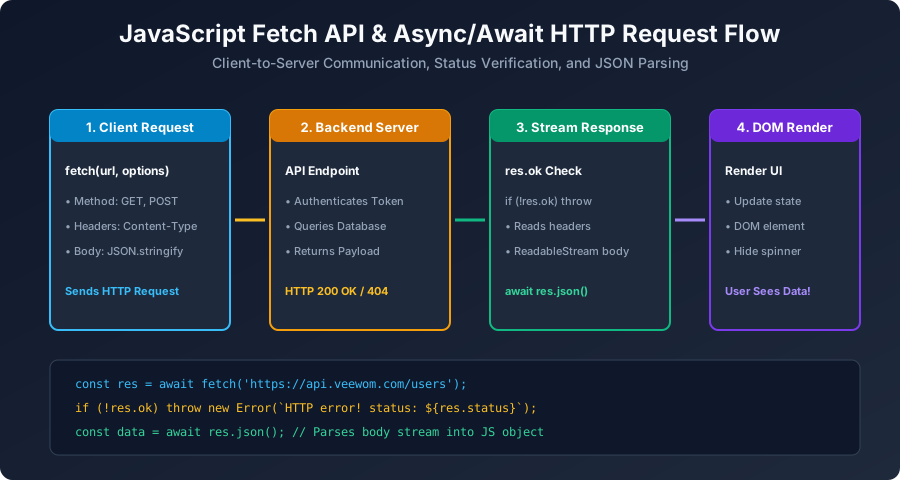
Figure 10: Step-by-step HTTP Request Lifecycle using modern Fetch API and Async/Await.
1. Making HTTP GET Requests with Status Verification
async function getStudentDirectory() {
    try {
        const response = await fetch("https://api.veewom.com/students");

        // CRITICAL CHECK: Always verify response.ok!
        if (!response.ok) {
            throw new Error(`HTTP Network Error: ${response.status} ${response.statusText}`);
        }

        // Stream reading & JSON deserialization
        const students = await response.json();
        console.log("Students Loaded Successfully:", students);
        return students;
    } catch (err) {
        console.error("Fetch request failed:", err.message);
    }
}
2. Making HTTP POST Requests with JSON Payloads
To transmit new records to a server, specify the HTTP method, request headers, and serialized body:
async function createNewStudent(studentPayload) {
    try {
        const response = await fetch("https://api.veewom.com/students", {
            method: "POST",
            headers: {
                "Content-Type": "application/json",
                "Authorization": "Bearer token_xyz_123"
            },
            body: JSON.stringify(studentPayload) // Must serialize to string!
        });

        if (!response.ok) {
            throw new Error(`Failed to create record. Status: ${response.status}`);
        }

        const newRecord = await response.json();
        console.log("Student Record Created:", newRecord);
        return newRecord;
    } catch (error) {
        console.error("Submission failed:", error.message);
    }
}
University Exam Corner (BCA Examination Notes)
Exam Question: "What are the different Response body methods available on the Fetch Response object?"
response.json(): Parses body stream into a genuine JavaScript object.response.text(): Resolves body stream as raw plain text/HTML string.response.blob(): Resolves raw binary data (images, PDFs, media files).response.formData(): Resolves multipart form data submissions.
Next Step
What preceded the Fetch API in early web development? Proceed to: JavaScript AJAX & XMLHttpRequest (XHR) →


You may also like this!
© Veewom.com. | Managed by PinePL
