
- Home
- Tutorials
- JavaScript
- Bubbling, Capturing & Delegation
JavaScript Event Propagation: Capturing, Bubbling & Event Delegation
When an event occurs on a DOM element, it does not execute in isolation. The event travels through the document hierarchy in a process known as Event Propagation. Understanding event propagation unlocks Event Delegation—the single most important performance optimization in frontend web development.
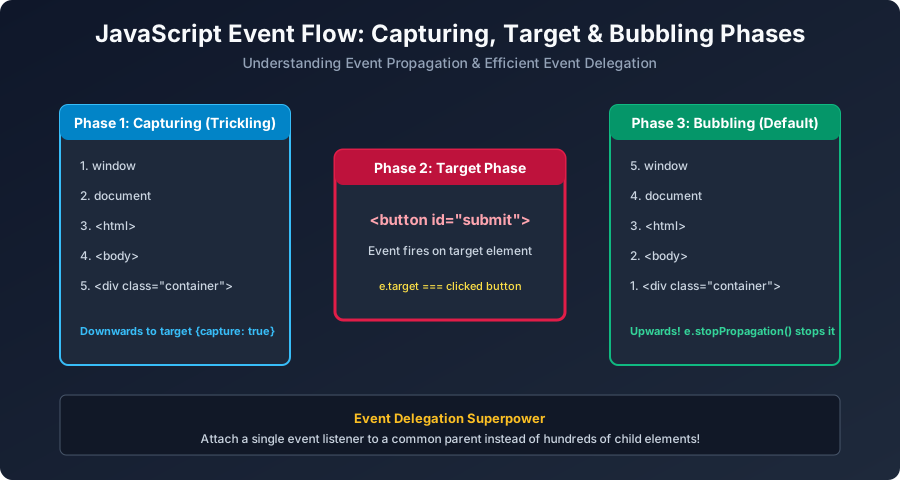
Figure 7: The 3 phases of event flow: Phase 1 Capturing (Downwards) -> Phase 2 Target -> Phase 3 Bubbling (Upwards).
The Three Phases of Event Flow
- Capturing Phase (Trickling): The event originates at the top (
window) and travels downwards throughdocument,<html>,<body>, reaching towards the target. (Captured via{ capture: true }). - Target Phase: The event arrives at the originating element where the user clicked.
- Bubbling Phase (Default): The event bubbles up from the target element back up to the
window, triggering any listener registered on ancestor elements.
Event Delegation: The Professional Performance Pattern
Imagine an e-commerce table or shopping cart with 1,000 product rows. Attaching 1,000 separate event listeners wastes massive memory. With Event Delegation, you attach ONE listener to the parent <table>:
// HTML Structure:
// <table id="product-table">
//   <tr><td>Book</td><td><button class="btn-delete" data-id="1">Delete</button></td></tr>
//   <tr><td>Pen</td><td><button class="btn-delete" data-id="2">Delete</button></td></tr>
// </table>

const table = document.getElementById("product-table");

// A SINGLE listener handles clicks for ALL existing and FUTURE rows!
table.addEventListener("click", (e) => {
    // Check if clicked element was a delete button:
    if (e.target.classList.contains("btn-delete")) {
        const productId = e.target.getAttribute("data-id");
        console.log(`Deleting Product #${productId} from inventory!`);

        // Remove row from DOM
        const tableRow = e.target.closest("tr");
        tableRow.remove();
    }
});
University Exam Corner (BCA Examination Notes)
Exam Question: "What are the benefits of Event Delegation?"
- Drastic Memory Savings: Replaces hundreds/thousands of listeners with a single parent handler.
- Automatic Handling of Dynamic Elements: Newly added DOM nodes (via AJAX/Fetch) automatically have click handling without needing to bind new listeners.
- Cleaner Code: Centralizes business logic into one clean controller function.
Next Step
How do you validate user form input in real-time before sending data to backends? Proceed to: JavaScript Form Validation & Input Handling →


You may also like this!
© Veewom.com. | Managed by PinePL
