
- Home
- Tutorials
- JavaScript
- DOM Architecture & Selectors
JavaScript DOM Architecture: Document Tree Hierarchy & Modern Selectors
When a web browser downloads an HTML document, it parses the markup and constructs an in-memory, object-oriented representation called the Document Object Model (DOM). Through the DOM API, JavaScript acts as the interactive brain of the web page—dynamically altering content, styles, animations, and structures in response to user actions.
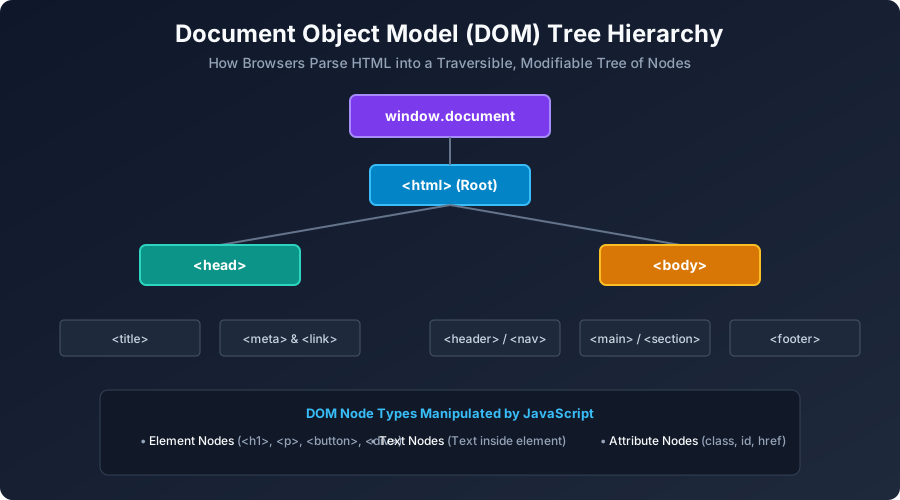
Figure 6: Hierarchical DOM Tree structure showing Window -> Document -> HTML -> Head/Body -> Elements & Text Nodes.
The 4 Primary DOM Node Types
- Document Node: The root entry point representing the entire web page (
window.document). - Element Nodes: HTML tags such as
<div>,<h1>,<p>,<button>. - Text Nodes: The actual textual characters enclosed between opening and closing tags.
- Attribute Nodes: Metadata properties on tags (e.g.
href,class,id,src).
Selecting DOM Elements: Classical vs. Modern Methods
| Selector Method | Return Type | Syntax Example |
|---|---|---|
document.getElementById(id) |
Single Element (or null) | document.getElementById("main-nav") |
document.querySelector(css) |
First Matching Element | document.querySelector(".card > button.active") |
document.querySelectorAll(css) |
Static NodeList |
document.querySelectorAll("ul.nav-list li") |
document.getElementsByClassName(cls) |
Live HTMLCollection |
document.getElementsByClassName("btn-primary") |
// Selecting single element with CSS selector:
const mainTitle = document.querySelector("#page-heading");
console.log(mainTitle.textContent);

// Selecting all matching elements & iterating:
const menuItems = document.querySelectorAll(".nav-link");
menuItems.forEach((link, idx) => {
    console.log(`Link #${idx + 1}: ${link.href}`);
});
University Exam Corner (BCA Examination Notes)
Exam Question: "Explain the difference between innerText, textContent, and innerHTML."
textContent: Returns the raw text content of all elements (including hidden elements and<script>). Hyper-fast and secure against XSS.innerText: Returns only human-visible rendered text, respecting CSS styling (ignoresdisplay: none). Triggers expensive browser reflow.innerHTML: Returns or parses complete raw HTML markup. Warning: Susceptible to Cross-Site Scripting (XSS) attacks if used with unsanitized user inputs.
Next Step
Now that you know how to select elements, let us modify their attributes, create new elements, and update CSS styles dynamically. Proceed to: JavaScript DOM Manipulation & Mutations →


You may also like this!
© Veewom.com. | Managed by PinePL
