
- Home
- Tutorials
- Artificial Intelligence
- MLOps, Docker & vLLM Serving
MLOps and Production AI Model Serving: Docker, vLLM, and Quantization
Developing a machine learning model inside a local Jupyter Notebook is straightforward. Deploying that model into a high-availability production environment that handles thousands of concurrent requests with sub-100ms latency, automatic horizontal scaling, zero-downtime rolling updates, and continuous telemetry is the domain of MLOps (Machine Learning Operations).
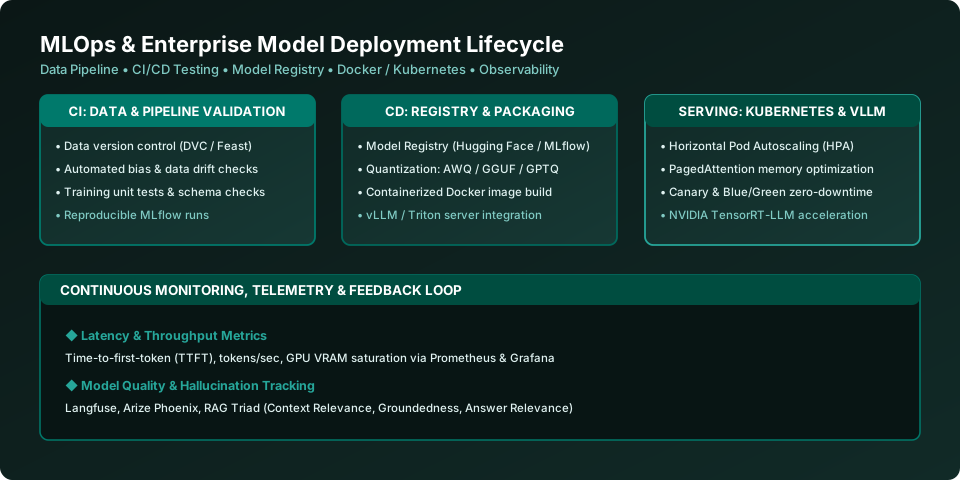
Figure 45.1: The Production MLOps Lifecycle — Continuous Integration (CI), Continuous Delivery (CD), High-Throughput vLLM Serving, and Telemetry Monitoring.
Model Quantization: Squeezing Models onto Production GPUs
Standard foundation models are trained in 16-bit floating point precision (FP16 / BF16), requiring 2 bytes of VRAM per parameter. A 70-billion parameter model requires ( 70 imes 2 = 140 ext{ GB} ) of GPU memory just to load its weights into VRAM! Quantization maps continuous 16-bit float weights into lower-precision integers (8-bit or 4-bit) with negligible perplexity degradation:
| Quantization Format | Bits Per Weight | Primary Hardware & Tool | Key Features |
|---|---|---|---|
| GGUF (formerly GGML) | 2-bit to 8-bit integer | CPU + GPU Offloading (llama.cpp, Ollama) | Single-file binary format. Allows split memory execution: offloads layers partially to GPU and leaves remainder in system CPU RAM! |
| AWQ (Activation-aware Weight Quantization) | 4-bit integer | High-End GPUs (vLLM, TensorRT-LLM) | Protects the 1% most salient outlier activation channels; achieves near-lossless FP16 accuracy at 3x inference speeds on datacenter GPUs. |
| GPTQ | 4-bit / 8-bit integer | GPU Inference (AutoGPTQ, ExLlamaV2) | Second-order Taylor approximation calibration; extremely fast token generation. |
High-Throughput Model Serving: vLLM & PagedAttention
Traditional naive serving frameworks process requests sequentially. If five users submit prompts simultaneously, user 5 waits in a queue until user 1's generation finishes. vLLM (UC Berkeley) revolutionized LLM serving through two architectural breakthroughs:
- PagedAttention: Traditional systems allocate contiguous blocks of GPU memory for each request's KV-cache, resulting in 60-80% memory waste due to internal and external fragmentation. PagedAttention borrows the concept of virtual memory paging from operating systems: it divides the KV-cache into discrete non-contiguous blocks, boosting GPU memory utilization to over 96%!
- Continuous Batching (Iteration-Level Scheduling): Instead of waiting for all requests in a batch to complete, vLLM dynamically injects incoming requests into the active batch at every token generation step. This yields a 10x to 24x throughput increase over standard Hugging Face pipelines!
Containerizing AI Services with Docker
Production AI models require specific CUDA drivers, cuDNN libraries, and PyTorch builds. Containerizing with Docker guarantees identical execution across local development, testing, and production Kubernetes clusters:
Production Dockerfile for a FastAPI AI Microservice
# Use official lightweight Python CUDA runtime base image
FROM python:3.11-slim

WORKDIR /app

# Install system dependencies
RUN apt-get update && apt-get install -y --no-install-recommends     build-essential     && rm -rf /var/lib/apt/lists/*

# Install Python requirements
COPY requirements.txt .
RUN pip install --no-cache-dir -r requirements.txt

# Copy application source code
COPY . .

# Expose HTTP port
EXPOSE 8000

# Run FastAPI using production Uvicorn ASGI server with 4 worker processes
CMD ["uvicorn", "main:app", "--host", "0.0.0.0", "--port", "8000", "--workers", "4"]
Deploying a Private Model with vLLM in One Command
Launching an OpenAI-Compatible vLLM Server
To spin up an enterprise high-throughput model server serving Llama 3 with full OpenAI API compatibility on your GPU server:
# Install vLLM
pip install vllm

# Launch high-throughput server with AWQ 4-bit quantization and multi-GPU tensor parallelism
python -m vllm.entrypoints.openai.api_server     --model casperhansen/llama-3-70b-instruct-awq     --quantization awq     --tensor-parallel-size 2     --dtype float16     --port 8000     --max-model-len 8192
Frequently Asked Questions (FAQ) - Student & Interview Review
Q1. What is PagedAttention in vLLM?
Q2. What is the difference between Ollama and vLLM?
Q3. What is Continuous Batching?
Q4. How do you monitor AI models in production?
Explore Related Artificial Intelligence Tutorials & Next Steps
Broaden your foundational and advanced AI knowledge across our curriculum:
Serving custom API endpoints compatible with OpenAI client SDKs.
Serving dynamically swapped LoRA adapters at high throughput with vLLM.
Diagnosing GPU VRAM saturation, CUDA out-of-memory, and latency bottlenecks.
PagedAttention mechanics, continuous batching, and Docker containerization.


You may also like this!
© Veewom.com. | Managed by PinePL
