
- Home
- Tutorials
- Cybersecurity
- TLS 1.3 Protocol
SSL/TLS Protocol Internals: The TLS 1.3 Handshake & HTTPS Hardening
When you enter a URL with https:// in your browser, your communication is wrapped inside the Transport Layer Security (TLS) protocol (the modern successor to legacy SSL). TLS operates between the TCP transport layer and the HTTP application layer, encrypting all web traffic, URLs, headers, and cookies to protect them from ISP surveillance, coffee shop Wi-Fi snooping, and packet injection.
TLS 1.2 vs. TLS 1.3: A Revolutionary Leap Forward
Published in 2018 under RFC 8446, TLS 1.3 represents the most significant cryptographic upgrade in internet history. It streamlined security by eliminating dangerous legacy algorithms and cutting connection latency in half:
- Reduced Latency (1-RTT Handshake): TLS 1.2 required 2 full round-trips (2-RTT) before application data could be sent. TLS 1.3 completes the handshake in just 1-RTT (and even supports 0-RTT for returning visitors).
- Purged Insecure Primitives: TLS 1.3 completely removed RSA key exchange, static Diffie-Hellman, RC4, DES, 3DES, MD5, SHA-1, and CBC block cipher modes.
- Mandatory Perfect Forward Secrecy: TLS 1.3 strictly requires ephemeral key exchange (ECDHE or DHE).
- Encrypted Handshake Headers: Server certificates and extensions are encrypted on the wire; external sniffers cannot see which certificate is being presented!
Dissecting the TLS 1.3 1-RTT Handshake Lifecycle
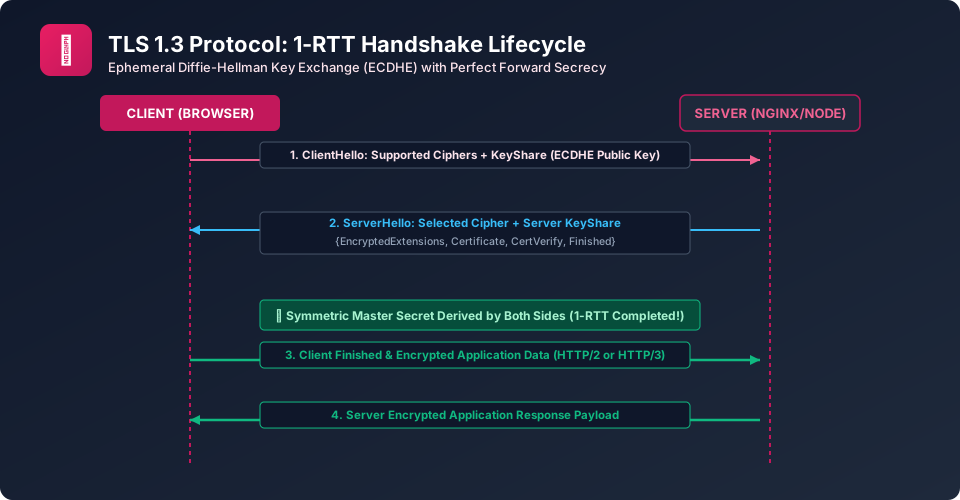
Figure 19.1: The TLS 1.3 1-RTT Handshake Flow showing ClientHello, ServerHello, and Key Derivation
- ClientHello: The client sends supported protocol versions, a list of supported AEAD cipher suites, and an ECDHE Key Share (the client's ephemeral public key).
- ServerHello: The server chooses a matching cipher suite and returns its own ECDHE Key Share. Both sides now possess everything required to compute the shared secret!
- Encrypted Server Payload: Using keys derived from the shared secret, the server encrypts its remaining handshake:
EncryptedExtensions,Certificate, andCertificateVerify. - Finished: Both sides exchange HMAC Finished messages verifying handshake integrity. Encrypted HTTP application data begins flowing immediately!
Production HTTPS Web Server Hardening (Nginx)
To achieve an A+ rating on SSL Labs, configure your Nginx web server with modern TLS 1.3 parameters and HTTP Strict Transport Security:
Production Nginx Hardened SSL Configuration
# Enable ONLY modern secure TLS protocols
ssl_protocols TLSv1.2 TLSv1.3;

# Restrict to robust AEAD ciphersuites
ssl_ciphers 'TLS_AES_256_GCM_SHA384:TLS_CHACHA20_POLY1305_SHA256:ECDHE-ECDSA-AES256-GCM-SHA384';
ssl_prefer_server_ciphers off;

# Enable Session Caching & OCSP Stapling
ssl_session_cache shared:SSL:10m;
ssl_session_timeout 1d;
ssl_stapling on;
ssl_stapling_verify on;

# Enforce HSTS (HTTP Strict Transport Security) for 1 Year
add_header Strict-Transport-Security "max-age=31536000; includeSubDomains; preload" always;
Frequently Asked Questions (FAQ) - Student & Interview Review
Q1. What is HSTS (HTTP Strict Transport Security)?
Q2. What is 0-RTT Early Data in TLS 1.3 and what is its security risk?
Explore Related Cybersecurity Tutorials & Next Steps
Broaden your defensive and offensive security knowledge across our curriculum:
Certificate authorities, root trust stores, and revocation lists (OCSP stapling).
Enforcing HTTPS using HTTP Strict Transport Security (HSTS) headers.
Deciphering TLS handshakes and decrypting traffic using SSLKEYLOGFILE.
OpenSSL CLI commands for generating CSRs, verifying certificates, and checking ciphers.


You may also like this!
© Veewom.com. | Managed by PinePL
