
- Home
- Difference
- XML vs HTML
Difference Between XML and HTML
Quick Summary: Both XML (Extensible Markup Language) and HTML (Hypertext Markup Language) are markup languages originating from SGML (Standard Generalized Markup Language). However, they serve completely opposite purposes: XML is designed to store and transport structured data independently of software or hardware (focusing on what data is), whereas HTML is designed to format and display content inside web browsers (focusing on how data looks).
In modern web architectures, XML and HTML frequently work in tandem: XML (or JSON) handles back-end data interchange, enterprise messaging (SOAP), and cross-platform configurations, while HTML5 creates the responsive user interfaces rendered on smartphones, tablets, and desktops.
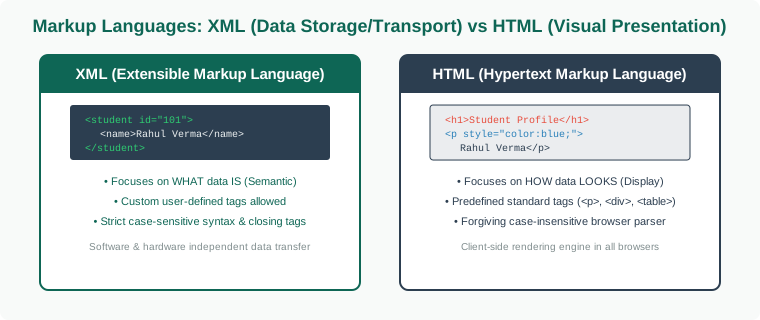
Understanding XML and HTML
To grasp why both technologies exist, it helps to examine their design philosophies:
- XML (Extensible Markup Language): Introduced by the W3C in 1998 to solve data interchange problems. XML does not do anything by itself; it is a pure text-based information wrapper with strictly enforced nesting rules. Authors define their own meaningful tags (e.g.,
<price currency="USD">99</price>) and can validate schemas using XSD (XML Schema Definition) or DTD. - HTML (Hypertext Markup Language): Created by Tim Berners-Lee in 1991 to share scientific documents across the Internet. HTML provides a fixed vocabulary of tags (such as
<h1>,<p>,<table>,<img>) that browsers recognize out-of-the-box to construct the Document Object Model (DOM) and paint pixels to the screen.
Side-by-Side Comparison: XML vs HTML
XML (Extensible Markup Language) |
HTML (Hypertext Markup Language) |
|---|---|
XML stands for Extensible Markup Language. |
HTML stands for Hypertext Markup Language. |
XML was designed to be a software and hardware independent tool used to transport and store data, with a focus on what data is. |
HTML was designed to display data on web pages, with a focus on how data looks. |
XML is neither a programming language nor a presentation language; it is a universal data format. |
HTML is a markup and presentation language for web browsers. |
XML provides an extensible meta-framework for defining custom markup languages (e.g., SVG, MathML, RSS). |
HTML is a predefined markup language itself with standard specification tags. |
XML is strictly case-sensitive ( |
HTML is case-insensitive ( |
XML is used basically to transport data between applications, services, and databases. |
HTML is used for designing web page structures to be rendered on the client browser. |
What makes XML flexible is that custom tags can be defined and invented by the author of the document. |
HTML has its own predefined tags governed by W3C and WHATWG standards. |
XML makes it mandatory to close every tag that has been opened (e.g., |
HTML is lenient and not strict if void elements or certain closing tags are omitted (e.g., |
XML is about carrying information and payload state, hence inherently dynamic. |
HTML is about displaying structural and static document layout. |
XML preserves white space characters exactly as authored. |
HTML collapses multiple whitespace characters into a single space by default. |
XML documents must be "Well-Formed" and can be strictly validated against XSD or DTD schemas. |
HTML documents are parsed using error-recovery rules; browsers will render even poorly written code. |
Parsed via DOM or streaming SAX parsers without rendering. |
Parsed by browser layout engines (Blink, WebKit, Gecko) to render interactive visual trees. |
Key Conceptual Takeaways
- Complementary, Not Competitors: XML and HTML solve two distinct problems. XML structures and stores data; HTML presents that data with fonts, styles, and links.
- Strict vs Lenient: A single missing closing tag in an XML document causes a fatal parsing halt. In contrast, modern web browsers gracefully recover from syntax mistakes in HTML.
- Extensibility: If you need to invent domain-specific vocabularies (e.g., medical records, financial invoices, vectors), XML gives you infinite freedom to invent custom tags.
Side-by-Side Code Examples
Observe how the same student entity is represented in XML (data description) versus HTML (browser presentation):
<!-- 1. XML: Describing the data structure without presentation -->
<?xml version="1.0" encoding="UTF-8"?>
<university>
    <student id="CS-2026-042">
        <fullName>Alexander Morgan</fullName>
        <major>Computer Science</major>
        <gpa>3.85</gpa>
        <enrolled>true</enrolled>
    </student>
</university>
<!-- 2. HTML: Presenting the student data to human website visitors -->
<!DOCTYPE html>
<html lang="en">
<head>
    <title>Student Record Card</title>
</head>
<body>
    <article class="student-card">
        <h1>Alexander Morgan</h1>
        <p><strong>ID:</strong> CS-2026-042</p>
        <p><strong>Major:</strong> Computer Science</p>
        <p><strong>GPA:</strong> 3.85 <span style="color:green;">(Dean's List)</span></p>
    </article>
</body>
</html>
What About JSON vs XML?
While XML remains the international standard for document validation (Office Open XML .docx, .xlsx), configuration files (Android AndroidManifest.xml, Spring Boot), and enterprise web services (SOAP), lightweight RESTful web APIs have largely transitioned to JSON (JavaScript Object Notation). JSON offers lower serialization overhead and maps natively to JavaScript objects without requiring heavy DOM parsing.
Interactive Practice Session (MCQs)
1. Which of the following statements about XML tag names is TRUE?
A) XML tags are predefined in the XML 1.0 standard
B) XML tags are case-insensitive
C) XML tags are invented by the author and are strictly case-sensitive
D) XML tags must always start with an underscore or number
Explanation: XML is extensible because authors create custom tags representing their specific domain data. Case sensitivity is strictly enforced.
2. How does a web browser handle an unclosed <p> tag in HTML versus an unclosed <paragraph> tag in XML?
A) HTML throws a fatal error, while XML automatically closes it
B) HTML renders the page with error-recovery; XML parser halts with a fatal parsing error
C) Both crash the browser window
D) Both ignore the error and display raw text
Explanation: XML specifications require parsers to abort immediately upon encountering any well-formedness violation (draconian error handling). HTML engines use lenient fault tolerance.
3. Which XML parsing technique processes documents sequentially line-by-line with minimal memory footprint?
A) DOM (Document Object Model)
B) SAX (Simple API for XML)
C) CSS Grid parser
D) SQL Query optimizer
Explanation: SAX is an event-driven streaming parser that reads the XML document sequentially without loading the entire tree into memory, making it ideal for massive gigabyte-sized files.
Viva Voce & Technical Interview Questions
Q1: What does "Well-Formed XML" mean?
Answer: An XML document is "Well-Formed" if it satisfies all basic XML syntax rules: exactly one root element, all opening tags have matching closing tags, tags are properly nested without overlapping, attribute values are quoted, and reserved entity characters (such as <, >, &) are escaped.
Q2: What is the difference between a Well-Formed XML document and a Valid XML document?
Answer: A "Well-Formed" XML document simply follows generic XML syntax rules. A "Valid" XML document is both well-formed AND adheres strictly to the structural and data type definitions specified in an associated DTD (Document Type Definition) or XSD (XML Schema Definition).
Q3: What is CDATA in XML and why is it used?
Answer: CDATA (Character Data) sections, written as <![CDATA[ ... ]]>, tell the XML parser to treat the enclosed text as pure character data rather than markup. This allows developers to embed code snippets, HTML tags, or characters like < and & without escaping them.
Q4: Why does HTML collapse consecutive whitespaces while XML preserves them?
Answer: HTML is designed for layout formatting where line breaks and multiple spaces in code shouldn't distort document typography (developers use CSS or <pre> for whitespace control). XML is designed for raw data storage where spaces inside a value (such as a multi-line cryptographic key or formatted address) must be preserved identically.
Q5: How does XSLT relate to XML and HTML?
Answer: XSLT (Extensible Stylesheet Language Transformations) is a specialized language used to transform XML documents into other formats, most commonly transforming raw XML data into styled HTML pages for display in browsers.
Related Difference Classes
Explore synchronized companion classes across our computer science and web development series:
Frequently Asked Questions (FAQ)
<header>, <article>, <nav>), native audio and video playback without plugins, the <canvas> API for 2D/3D graphics, local storage capabilities, and modern responsive features.
pom.xml), Microsoft Office file formats (DOCX/XLSX), SOAP financial web services, SVG vector graphics, and RSS/Atom syndicated feeds.


You may also like this!
© Veewom.com. | Managed by PinePL
