About Veewom Base64 Encoder / Decoder
Base64 is a binary-to-text encoding scheme that translates arbitrary binary data or UTF-8 text into an ASCII string format using an alphabet of 64 printable characters (A-Z, a-z, 0-9, +, /) with `=` used as padding. Base64 is universally employed in modern web engineering to embed small images directly into CSS and HTML as Data URIs, transmit binary attachments in email (MIME), encode API credentials in HTTP Basic Authentication headers, and serialize JWT web tokens.
The Veewom Base64 Encoder / Decoder provides instantaneous, standards-compliant RFC 4648 encoding and decoding directly in your web browser with full support for UTF-8 multi-byte characters and international emoji scripts.
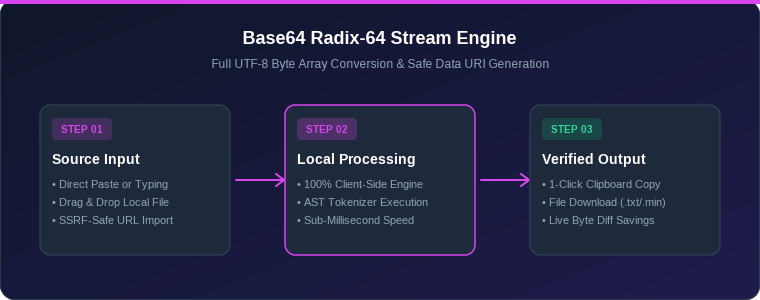
Under the Hood: How the Base64 Encoder / Decoder Engine Works
Standard browser JavaScript functions (`btoa` and `atob`) fail with `DOMException: The string contains characters outside of the Latin1 range` when handling characters above code point 255. The Veewom Base64 engine solves this natively:
1. UTF-8 Byte Array Conversion: Uses the native `TextEncoder` API to convert input text into an array of 8-bit unsigned integers (Uint8Array), fully supporting international scripts and emojis.
2. Radix-64 Bit Splitting: Groups sequential 8-bit bytes (24 bits total) into four 6-bit chunks. Each 6-bit chunk maps directly to one of the 64 characters in the Base64 index table.
3. Padding Reconciliation: If the byte length is not a multiple of 3, appends `=` padding characters to maintain 4-character alignment.
4. Robust Decoding: Decodes Base64 strings using `TextDecoder` to guarantee flawless UTF-8 text recovery without broken or garbled characters.
Live Code Transformation Example
Observe how the engine transforms unformatted or raw input into optimized, standardized output:
Veewom Developer Tools 2026 - High-Performance Online Code Formatter & Beautifier for Modern Web Engineers. 🚀VmVld29tIERldmVsb3BlciBUb29scyAyMDI2IC0gSGlnaC1QZXJmb3JtYW5jZSBPbmxpbmUgQ29kZSBGb3JtYXR0ZXIgJiBCZWF1dGlmaWVyIGZvciBNb2Rlcm4gV2ViIEVuZ2luZWVycy4g8J+agA==Performance, Bandwidth & Core Web Vitals Impact
Base64 encoding is an indispensable utility across modern tech stacks:
- CSS Data URIs: Small icons, vector SVGs, and web fonts can be encoded into Base64 strings and embedded directly into stylesheets, eliminating extra HTTP roundtrips.
- HTTP Basic Authentication: Header authentication strings require the format `Authorization: Basic base64(username:password)`.
- Webhooks & API Payloads: Safely transmit binary file hashes, cryptographic signatures, and serialized data across JSON endpoints.
Industry Best Practices for Base64 Encoder / Decoder
- Remember that Base64 encoding increases data byte size by approximately 33%. Avoid using Base64 for large media files.
- Use Base64 Data URIs only for small icons (< 2KB) where eliminating an HTTP request outweighs the 33% size penalty.
- Base64 is an encoding format, NOT encryption. Never store sensitive passwords in Base64 expecting them to be secure.
- Ensure URL-safe Base64 variants replace + with - and / with _ when transmitting in URL query strings.
- Always use UTF-8 aware decoders to avoid garbling multi-byte international text.
Step-by-Step Guide to Using This Tool
- Input Code: Paste your code directly into the left editor pane, click Sample Code to load an example template, upload a local file, or fetch a remote resource via our SSRF-safe URL import tool.
- Set Preferences: Adjust your preferred indentation width (2 spaces, 4 spaces, or Tab) in the toolbar.
- Trigger Action: Click the primary action button (or press Ctrl + Enter) to process your code instantaneously.
- Review & Export: Inspect the live difference stats badge, then click Copy to copy to clipboard or Download to save the file locally.
Frequently Asked Questions
Does Base64 encoding encrypt my data?
No. Base64 is an encoding format designed for safe data transmission, not encryption. Anyone can decode a Base64 string back to its original plain text in seconds.
Why does Base64 make files 33% larger?
Base64 represents 3 binary bytes (24 bits) using 4 ASCII characters (32 bits). This 4/3 ratio creates an approximate 33% increase in data payload size.
Can this tool encode emojis and non-English text?
Yes. Our tool utilizes UTF-8 TextEncoder pipelines, fully supporting emojis, Asian characters, and accented international letters.
Can I use this tool to generate CSS Data URIs?
Yes. Copy the encoded Base64 output and format it as `url("data:image/svg+xml;base64,...")` directly in your CSS.
Are my encoded credentials safe on this website?
Yes. All conversions happen entirely in your local browser memory. No credentials or data are ever transmitted to our servers.