About Veewom JavaScript Minifier
JavaScript payload size is one of the single biggest determinants of modern web application speed. Unlike static image files that only require network bandwidth to download, JavaScript consumes double the resources: network bandwidth to download, followed by extensive CPU cycles to parse, compile, and execute in the browser V8/SpiderMonkey/JavaScriptCore engine.
The Veewom JavaScript Minifier reduces JavaScript file size by eliminating comments, superfluous whitespace, carriage returns, and non-essential statement separators while strictly preserving string literals, regular expressions, and variable scopes.
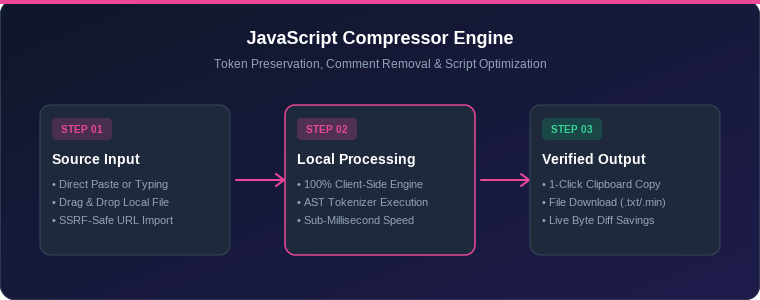
Under the Hood: How the JavaScript Minifier Engine Works
The minification process applies multi-pass token compaction:
1. Comment Stripping: Purges single-line (`//`) and multi-line (`/* ... */`) comments, eliminating internal developer documentation from public distribution.
2. Whitespace Compaction: Collapses spaces around operators (`=`, `+`, `-`, `*`, `/`, `===`, `&&`, `||`), parentheses, brackets, and curly braces down to zero characters where unambiguous.
3. String & Regex Isolation: String literals (enclosed in single quotes, double quotes, or backticks) and regular expression literals (`/.../g`) are isolated in protective tokens to prevent whitespace corruption within string values.
4. Line Feed Elimination: Joins statements onto unified lines while ensuring terminating semicolons are preserved to prevent Automatic Semicolon Insertion (ASI) runtime regressions.
Live Code Transformation Example
Observe how the engine transforms unformatted or raw input into optimized, standardized output:
// Order Total Calculator
function computeOrderTotal(items, discountRate = 0) {
  let subtotal = 0;
  for (let i = 0; i < items.length; i++) {
    subtotal += items[i].price * items[i].quantity;
  }

  const discountAmount = subtotal * discountRate;
  const finalTotal = subtotal - discountAmount;

  return {
    subtotal: subtotal.toFixed(2),
    discount: discountAmount.toFixed(2),
    total: finalTotal.toFixed(2)
  };
}function computeOrderTotal(items,discountRate=0){let subtotal=0;for(let i=0;i<items.length;i++){subtotal+=items[i].price*items[i].quantity}const discountAmount=subtotal*discountRate;const finalTotal=subtotal-discountAmount;return{subtotal:subtotal.toFixed(2),discount:discountAmount.toFixed(2),total:finalTotal.toFixed(2)}}Performance, Bandwidth & Core Web Vitals Impact
Minifying JavaScript delivers direct improvements to Google Core Web Vitals:
- Interaction to Next Paint (INP): By eliminating unnecessary bytes, script evaluation completes faster, freeing up the main thread to respond instantly to user clicks and taps.
- Total Blocking Time (TBT): Shorter files reduce script compilation overhead in the browser V8 engine, directly minimizing main-thread blocking time during page boot.
- Battery & Memory Consumption: Smaller payloads reduce mobile memory usage and CPU thermal throttling during mobile web browsing.
Industry Best Practices for JavaScript Minifier
- Always generate Source Maps (.js.map) during production builds so you can debug minified stack traces in production error loggers.
- Ensure all statements end with explicit semicolons to prevent ASI hazards when code is merged onto single lines.
- Use tree-shaking in modern bundlers to remove unused library exports before minifying.
- Serve minified JavaScript over HTTP/2 or HTTP/3 with Brotli compression enabled.
- Defer non-critical scripts using defer or async attributes to avoid blocking initial DOM painting.
Step-by-Step Guide to Using This Tool
- Input Code: Paste your code directly into the left editor pane, click Sample Code to load an example template, upload a local file, or fetch a remote resource via our SSRF-safe URL import tool.
- Set Preferences: Adjust your preferred indentation width (2 spaces, 4 spaces, or Tab) in the toolbar.
- Trigger Action: Click the primary action button (or press Ctrl + Enter) to process your code instantaneously.
- Review & Export: Inspect the live difference stats badge, then click Copy to copy to clipboard or Download to save the file locally.
Frequently Asked Questions
What is the difference between JavaScript minification and obfuscation?
Minification strips whitespace and comments to reduce file size without altering code structure. Obfuscation intentionally scrambles variable names, flattens control flow, and encrypts strings to protect intellectual property from reverse engineering.
Will minifying my JavaScript code break variable names?
No. This minifier preserves your variable and function names while stripping formatting whitespace and comments.
Does this tool preserve regular expressions and strings?
Yes. All string literals, template strings, and regex patterns are shielded in protected buffers during minification.
How much file size reduction can I expect?
Typically between 20% and 40% reduction depending on comment density and formatting whitespace.
Can I run this minifier offline?
Yes. Once the page is loaded, all processing runs client-side inside your browser with zero network dependencies.