About Veewom XML Beautifier
Extensible Markup Language (XML) remains the cornerstone of enterprise data integration, configuration schemas (Android manifest, Spring, Maven POM), SOAP web services, SVG vector graphics, and web syndication feeds (RSS 2.0, Atom, XML Sitemaps). Because XML documents often represent deeply nested hierarchies with extensive namespaces and attributes, unformatted XML is notoriously difficult to read and maintain.
The Veewom XML Beautifier reorganizes unformatted or minified XML, SVG, and RSS documents into structured hierarchies with standardized indentation, tag alignment, and syntax color highlighting.
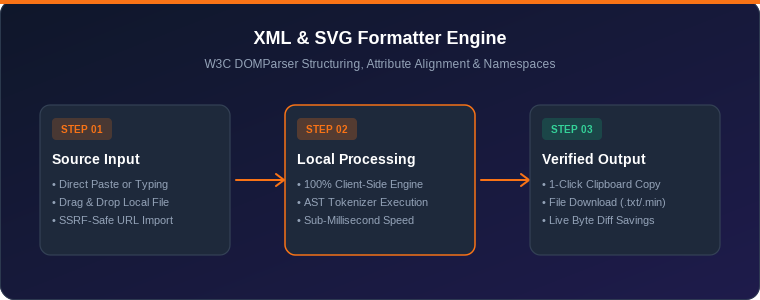
Under the Hood: How the XML Beautifier Engine Works
The XML formatting engine operates using native browser DOMParser XML engines and standards-compliant AST serializers:
1. Document Well-Formedness Check: Verifies that the XML markup is well-formed according to W3C XML 1.0 recommendations, ensuring every opening tag matches a closing tag.
2. Namespace Preservation: Fully respects XML namespaces (`xmlns:prefix="..."`), ensuring enterprise schemas and SOAP envelopes retain their semantic bindings.
3. CDATA Block Protection: Protects `<![CDATA[ ... ]]>` unparsed character blocks, ensuring embedded HTML, scripts, or raw symbols are not corrupted during re-indentation.
4. Attribute Alignment & Self-Closing Tags: Formats self-closing elements (`<element />`) cleanly and wraps long attribute lists for optimal readability.
Live Code Transformation Example
Observe how the engine transforms unformatted or raw input into optimized, standardized output:
<?xml version="1.0" encoding="UTF-8"?><catalog xmlns:v="https://veewom.com"><v:tool id="t101" category="formatter"><v:name>HTML Beautifier</v:name><v:license type="free"/><v:description><![CDATA[Format <HTML> & XML with zero errors.]]></v:description></v:tool></catalog><?xml version="1.0" encoding="UTF-8"?>
<catalog xmlns:v="https://veewom.com">
<v:tool id="t101" category="formatter">
<v:name>HTML Beautifier</v:name>
<v:license type="free"/>
<v:description><![CDATA[Format <HTML> & XML with zero errors.]]></v:description>
</v:tool>
</catalog>Performance, Bandwidth & Core Web Vitals Impact
Beautifying XML is vital across multiple developer disciplines:
- SVG Vector Graphic Optimization: Allows graphic designers and UI developers to inspect SVG path coordinates, viewboxes, and fill attributes directly.
- XML Sitemap Auditing: Format sitemap.xml files to verify URL locations, last modification timestamps, and change frequency tags before submitting to Google Search Console.
- Enterprise SOAP & SAML Debugging: Inspect encrypted assertion blocks, security signatures, and authentication tokens in enterprise SSO integrations.
Industry Best Practices for XML Beautifier
- Always declare the XML declaration header (<?xml version="1.0" encoding="UTF-8"?>) at the very top of your document.
- Use self-closing tags (<tag />) for elements without child nodes to keep markup concise.
- Wrap arbitrary text containing reserved characters (<, >, &) inside <![CDATA[ ... ]]> blocks.
- Maintain consistent naming conventions for element tags and attribute keys (e.g. kebab-case or camelCase).
- Verify well-formedness before loading XML into server-side XML parsers to prevent XML Entity Expansion (Billion Laughs) attacks.
Step-by-Step Guide to Using This Tool
- Input Code: Paste your code directly into the left editor pane, click Sample Code to load an example template, upload a local file, or fetch a remote resource via our SSRF-safe URL import tool.
- Set Preferences: Adjust your preferred indentation width (2 spaces, 4 spaces, or Tab) in the toolbar.
- Trigger Action: Click the primary action button (or press Ctrl + Enter) to process your code instantaneously.
- Review & Export: Inspect the live difference stats badge, then click Copy to copy to clipboard or Download to save the file locally.
Frequently Asked Questions
Can this XML beautifier format SVG files?
Yes. SVG vector graphic files are valid XML documents and format cleanly with structured path coordinates and group elements.
Does it preserve XML namespaces and CDATA blocks?
Yes. All XML namespaces (xmlns attributes) and CDATA raw data blocks are preserved intact without modification.
What happens if my XML document is missing a closing tag?
The XML engine detects well-formedness violations and flags the exact line where the closing tag is missing.
Can I format RSS and Atom feeds?
Yes. RSS 2.0 and Atom XML feeds format beautifully, allowing you to audit feed items and metadata.
Is there any server-side logging of my XML files?
No. All processing occurs locally within your web browser. No files or data are transmitted to our servers.