About Veewom CSS Beautifier
Cascading Style Sheets (CSS) define the visual presentation, responsive layouts, and animations of modern web applications. In large-scale web engineering, stylesheets quickly accumulate thousands of rules, media queries, and utility classes. When multiple developers contribute or when debugging production bugs from third-party vendor bundles, compressed or inconsistent CSS becomes virtually impossible to audit or edit.
The Veewom CSS Beautifier restructures unorganized, minified, or single-line CSS into cleanly formatted, human-readable stylesheets. By enforcing consistent declaration block indentation, single-line property declarations, and distinct selector separation, developers can immediately comprehend stylesheet inheritance and cascade hierarchies.
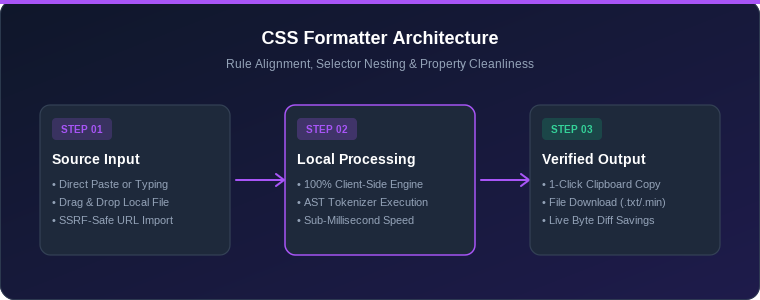
Under the Hood: How the CSS Beautifier Engine Works
The formatting engine processes CSS through an Abstract Syntax Tree (AST) lexical parser designed specifically for modern CSS3 and CSS4 specifications:
1. Tokenization & At-Rule Detection: Identifies `@charset`, `@import`, `@namespace`, `@media`, `@supports`, `@keyframes`, and `@layer` rules, creating isolated block scopes for nested rule evaluation.
2. Selector Normalization: Trims redundant spaces around pseudo-classes (`:hover`, `:focus-visible`, `:nth-child()`), combinators (`>`, `+`, `~`), and attribute selectors (`[data-theme="dark"]`).
3. Declaration Block Formatting: Encloses declaration sets within curly braces `{ ... }`, placing each property-value pair on a fresh indented line terminated with a semicolon.
4. Value & Function Parsing: Standardizes spacing within complex CSS functions such as `calc()`, `min()`, `max()`, `clamp()`, and color definitions (`rgba()`, `hsl()`, `oklch()`).
5. Comment Restoration: Preserves block comments (`/* ... */`) and section banners, ensuring team documentation remains aligned with corresponding selector groups.
Live Code Transformation Example
Observe how the engine transforms unformatted or raw input into optimized, standardized output:
:root{--primary:#4f46e5;--bg:#f8fafc}*{box-sizing:border-box;margin:0;padding:0}body{font-family:'Plus Jakarta Sans',sans-serif;background:var(--bg);color:#0f172a}.card{display:flex;flex-direction:column;padding:1.5rem;border-radius:12px;background:#fff;border:1px solid #e2e8f0;transition:transform .2s ease}.card:hover{transform:translateY(-2px);box-shadow:0 10px 15px -3px rgba(0,0,0,.1)}@media(max-width:768px){.card{padding:1rem}}:root {
--primary: #4f46e5;
--bg: #f8fafc;
}
* {
box-sizing: border-box;
margin: 0;
padding: 0;
}
body {
font-family: 'Plus Jakarta Sans', sans-serif;
background: var(--bg);
color: #0f172a;
}
.card {
display: flex;
flex-direction: column;
padding: 1.5rem;
border-radius: 12px;
background: #fff;
border: 1px solid #e2e8f0;
transition: transform .2s ease;
}
.card:hover {
transform: translateY(-2px);
box-shadow: 0 10px 15px -3px rgba(0, 0, 0, .1);
}
@media (max-width: 768px) {
.card {
padding: 1rem;
}
}Performance, Bandwidth & Core Web Vitals Impact
While beautified CSS is larger in byte count than minified CSS, formatting is essential for developer velocity, code reviews, and debugging render-blocking CSS:
- Fast Specificity Auditing: In an unformatted CSS file, duplicate selectors and conflicting specificity declarations are easily missed. Formatted CSS allows developers to track down why an unexpected rule is overriding their styles.
- Git Collaboration Hygiene: When CSS properties are formatted one per line, git diffs isolate the exact modified property rather than showing that the entire stylesheet was changed.
- Media Query Inspection: Clear indentation within `@media` blocks allows developers to audit breakpoint boundaries (e.g. 768px, 1024px, 1280px) and eliminate layout regressions.
Industry Best Practices for CSS Beautifier
- Group custom properties (:root variables) at the top of your stylesheet for immediate theme configurability.
- Adopt consistent declaration ordering (e.g. Positioning -> Box Model -> Typography -> Visual -> Misc).
- Always write property names in lowercase (e.g., `background-color` rather than `Background-Color`).
- Format nested @keyframes and @media blocks with dedicated indentation levels to preserve visual nesting.
- Use CSS variables and clamp() functions instead of excessive hardcoded media queries.
Step-by-Step Guide to Using This Tool
- Input Code: Paste your code directly into the left editor pane, click Sample Code to load an example template, upload a local file, or fetch a remote resource via our SSRF-safe URL import tool.
- Set Preferences: Adjust your preferred indentation width (2 spaces, 4 spaces, or Tab) in the toolbar.
- Trigger Action: Click the primary action button (or press Ctrl + Enter) to process your code instantaneously.
- Review & Export: Inspect the live difference stats badge, then click Copy to copy to clipboard or Download to save the file locally.
Frequently Asked Questions
Can I beautify SCSS, SASS, or LESS stylesheets with this tool?
Yes. The parser understands SCSS/LESS nested rules, variables, and mixin declarations, formatting them with standard indentation and clean brace placement.
Does beautifying alter CSS property cascade order?
No. CSS property order within each rule is strictly maintained to prevent unintended cascade and specificity overrides.
Does this tool support modern CSS features like CSS Grid, Flexbox, and oklch colors?
Yes. It supports modern CSS Grid properties, subgrid, Flexbox, CSS custom properties (variables), container queries (@container), and modern color spaces.
Why does properly formatted CSS improve team velocity?
Clear line breaks and indentation reduce cognitive fatigue during code reviews, eliminate accidental syntax omissions like missing semicolons, and clarify parent-child cascade relationships.
Can I configure between 2 spaces, 4 spaces, and tabs?
Yes. Use the indentation dropdown in the editor toolbar to switch between 2 spaces, 4 spaces, or Tab characters.