About Veewom JSON Beautifier
JavaScript Object Notation (JSON) is the universal lingua franca of modern data exchange, powering REST APIs, GraphQL responses, NoSQL databases (MongoDB, CouchDB), and configuration files (package.json, tsconfig.json). However, production APIs deliver JSON payloads stripped of all whitespace to minimize network latency. When testing endpoints, reviewing server responses, or crafting test fixtures, dense raw JSON is unreadable.
The Veewom JSON Beautifier parses raw or minified JSON strings and formats them into an elegantly indented, structured hierarchy with customizable 2-space or 4-space tab stops and syntax color coding.
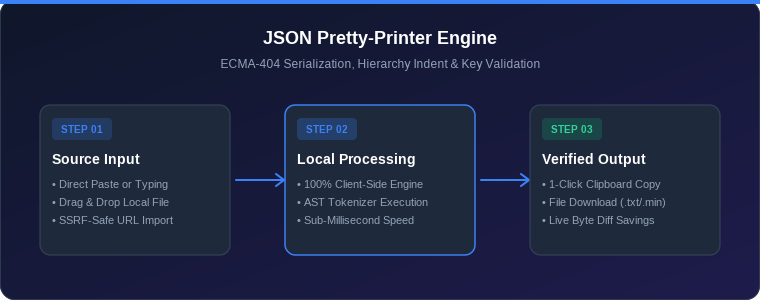
Under the Hood: How the JSON Beautifier Engine Works
The JSON Beautifier utilizes browser-native ECMAScript JSON engines coupled with strict ECMA-404 specification validation:
1. Strict Syntactic Validation: Validates the payload against RFC 8259 specifications, detecting common syntax errors like trailing commas, single-quoted keys, unquoted identifiers, or missing closing brackets.
2. Object & Array Nesting: Recursively traverses nested dictionaries, key-value mappings, and arrays, assigning each nesting level an incremented indentation depth.
3. Type Preservation: Accurately preserves all JSON primitive data types: Strings, Numbers, Booleans (`true`, `false`), Null (`null`), Arrays `[]`, and Objects `{}`.
4. Unicode & Character Escaping: Automatically handles UTF-8 characters, emoji sequences, and escaped control characters (`\n`, `\t`, `\"`) without data corruption.
Live Code Transformation Example
Observe how the engine transforms unformatted or raw input into optimized, standardized output:
{"status":"success","code":200,"data":{"user":{"id":1042,"name":"Alex Rivera","email":"alex@example.com","verified":true},"roles":["developer","admin"],"settings":{"theme":"dark","notifications":{"email":true,"sms":false}}}}{
"status": "success",
"code": 200,
"data": {
"user": {
"id": 1042,
"name": "Alex Rivera",
"email": "alex@example.com",
"verified": true
},
"roles": [
"developer",
"admin"
],
"settings": {
"theme": "dark",
"notifications": {
"email": true,
"sms": false
}
}
}
}Performance, Bandwidth & Core Web Vitals Impact
Beautifying JSON accelerates API development and quality assurance workflows:
- Instant Bug Isolation: Quickly identifies missing fields, misspelled object keys, or incorrect data types (such as numbers passed as strings).
- Log Inspection: Production microservice logs output dense JSON strings. Formatting allows engineers to trace distributed trace IDs and error payloads instantly.
- Documentation & Mocking: Easily generate human-readable API mock data for Postman collections, Swagger specs, and OpenAPI schemas.
Industry Best Practices for JSON Beautifier
- Always use double quotes for both keys and string values; single quotes are illegal in JSON.
- Never leave a trailing comma after the last item in an array or object.
- Use standardized key casing (such as camelCase or snake_case) consistently throughout your schema.
- Validate JSON payloads before saving them to disk or feeding them into database ingestion pipelines.
- Store formatted JSON in repository configuration files to make code reviews readable.
Step-by-Step Guide to Using This Tool
- Input Code: Paste your code directly into the left editor pane, click Sample Code to load an example template, upload a local file, or fetch a remote resource via our SSRF-safe URL import tool.
- Set Preferences: Adjust your preferred indentation width (2 spaces, 4 spaces, or Tab) in the toolbar.
- Trigger Action: Click the primary action button (or press Ctrl + Enter) to process your code instantaneously.
- Review & Export: Inspect the live difference stats badge, then click Copy to copy to clipboard or Download to save the file locally.
Frequently Asked Questions
Why does JSON strictly forbid trailing commas?
The ECMA-404 and RFC 8259 JSON standards strictly prohibit trailing commas to ensure unambiguous parsing across diverse programming language implementations (C++, Java, Python, Go).
Can I format large multi-megabyte JSON files?
Yes. Because processing runs in-memory using your local browser engine, you can format multi-megabyte payloads in sub-second time without server timeouts.
Does this tool validate JSON syntax automatically?
Yes. If your JSON contains a syntax fault (such as a missing bracket or unquoted key), the editor highlights the exact error line immediately.
Can I choose between 2-space and 4-space indentation?
Yes. Select your preferred indentation format from the toolbar dropdown menu.
Is my confidential API data safe when formatted here?
Yes, 100% private. All formatting executes locally on your machine. No data is ever transmitted over the network.