About Veewom JSON Validator
JSON syntax is notoriously unforgiving. A single misplaced comma, a single-quoted key, or an unclosed bracket will trigger an immediate `SyntaxError: Unexpected token` exception in JavaScript, breaking API calls, failing CI/CD test suites, and crashing microservices.
The Veewom JSON Validator inspects JSON data against the official ECMA-404 standard in real time. It reports exact line numbers, column positions, and descriptive explanations of any syntax anomalies, allowing engineers to diagnose and resolve malformed data instantly.
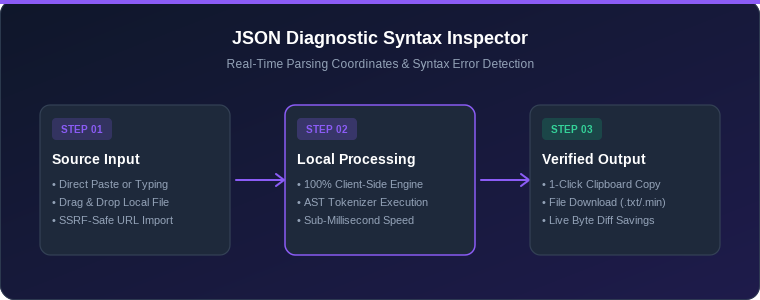
Under the Hood: How the JSON Validator Engine Works
The validation architecture provides comprehensive structural diagnostics:
1. Lexical Token Inspection: Scans tokens sequentially, checking for illegal characters, unescaped control codes, and malformed numeric literals (e.g. leading zeros like `05`).
2. Coordinate Pinpointing: Calculates the exact row and column offset where parsing fails, highlighting the problem directly in the CodeMirror editor.
3. Common Error Remediation: Identifies common developer mistakes including:
- Trailing commas in arrays `[1, 2,]` or objects `{"a": 1,}`.
- Single quotes instead of double quotes like 'key': 'value'.
- Unquoted keys `{key: "value"}`.
- Missing colons or commas between object pairs.
4. One-Click Automated Fix: When possible, provides automated formatting corrections to convert sloppy JSON into strict, valid RFC 8259 format.
Live Code Transformation Example
Observe how the engine transforms unformatted or raw input into optimized, standardized output:
{
  "title": "Veewom Tools",
  "active": true,
  "version": 2.4,
  // Notice the trailing comma below
  "tags": ["developer", "tools",],
}{
"title": "Veewom Tools",
"active": true,
"version": 2.4,
"tags": [
"developer",
"tools"
]
}Performance, Bandwidth & Core Web Vitals Impact
Validating JSON prevents catastrophic production runtime outages:
- CI/CD Gatekeeping: Validating configuration files before build steps prevents broken releases and failed container startups.
- Webhook Debugging: When third-party webhook integrations fail mysteriously, validating the raw payload exposes malformed headers or payloads immediately.
- Fast Diagnostics: Saves hours of tedious manual inspection by pinpointing the exact character offset of parsing errors.
Industry Best Practices for JSON Validator
- Always run JSON validation before passing user-supplied input into JSON.parse().
- Enforce strict JSON schema validation for API request bodies to prevent unexpected payload injection.
- Use linting tools in your IDE to catch JSON syntax mistakes in real time.
- Never permit unvalidated JSON strings to be executed with eval().
- Ensure text encoding is explicitly set to UTF-8 to prevent character decoding errors.
Step-by-Step Guide to Using This Tool
- Input Code: Paste your code directly into the left editor pane, click Sample Code to load an example template, upload a local file, or fetch a remote resource via our SSRF-safe URL import tool.
- Set Preferences: Adjust your preferred indentation width (2 spaces, 4 spaces, or Tab) in the toolbar.
- Trigger Action: Click the primary action button (or press Ctrl + Enter) to process your code instantaneously.
- Review & Export: Inspect the live difference stats badge, then click Copy to copy to clipboard or Download to save the file locally.
Frequently Asked Questions
What is the most common reason JSON parsing fails?
The most common mistake is a trailing comma after the final property in an object or array, followed closely by using single quotes instead of standard double quotes.
Does this validator check for schema rules as well as syntax?
This tool validates strict syntax compliance with ECMA-404 and RFC 8259 specifications. For schema validation, you can pair it with JSON Schema draft validators.
Can this tool fix invalid JSON automatically?
Yes. Clicking the Beautify button will automatically attempt to sanitize common errors like trailing commas and single quotes.
Is it safe to validate confidential production JSON?
Yes. Validation executes 100% client-side in your browser memory. No data is transmitted to external servers.
Does this tool support JSON5 or JSON with Comments?
It validates strict JSON standards, but can parse and sanitize comments and unquoted keys into standard JSON.