
- Home
- Tutorials
- Git & GitHub Tutorial
- Git Object Storage
Git Internals: Blobs, Trees, Commits & Content-Addressable Storage
At its core, Git is not a complex mystery. Git is fundamentally a simple Content-Addressable Key-Value Data Store. You insert any content into it, and it hands you back a 40-character hexadecimal SHA-1 key that uniquely identifies that content. Let's look under the hood of .git/objects/.
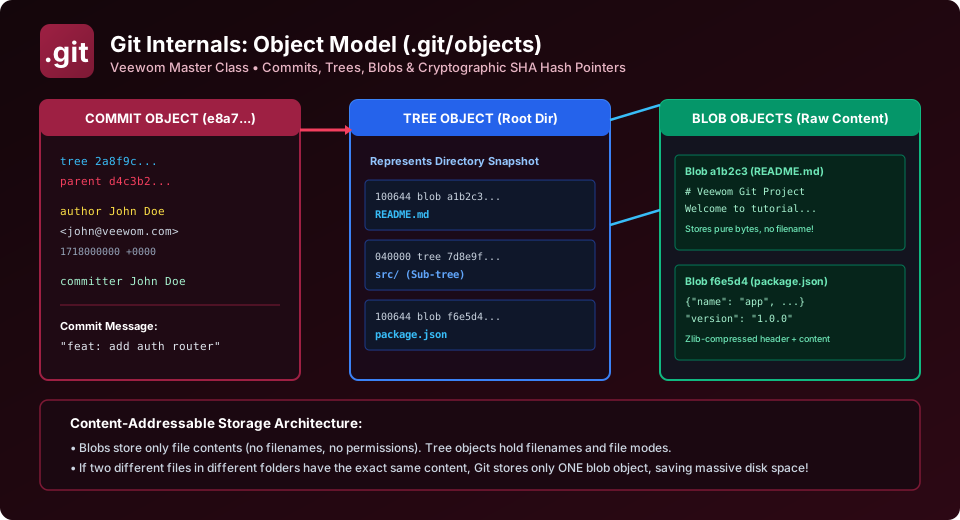
The 4 Core Git Object Types
Every piece of data stored in Git belongs to one of four fundamental object types:
1. The Blob Object (Binary Large Object)
A Blob stores only the raw bytes of a file's content. A blob does NOT store the file's name, its directory path, its creation date, or its executable permissions! It is simply a zlib-compressed byte stream.
Because blobs store only raw content, if you have ten identical 5MB image files in ten different directories, Git stores only one single blob object on disk!
2. The Tree Object (Directories & Hierarchy)
A Tree solves the problem of file names and directory structures. A tree corresponds directly to a directory on your filesystem. It contains a list of entries, where each entry consists of:
- File Mode (e.g.,
100644for normal files,100755for executable scripts,040000for subdirectories). - Object Type (blob or another sub-tree).
- SHA-1 Object Hash.
- Filename or directory name (e.g.,
app.jsorsrc/).
3. The Commit Object (Snapshots & Metadata)
A Commit object ties everything together. It points to a top-level root Tree object representing the project snapshot, points to zero, one, or two parent commit hashes, and records author metadata, timestamp, and the commit message.
4. The Annotated Tag Object
A Tag object points permanently to a commit object, containing the tagger's name, date, tag message, and optional GPG cryptographic signature.
Hands-on Inspection with Git Plumbing Commands
Git commands are split into two categories: Porcelain (user-friendly commands like add, commit, checkout) and Plumbing (low-level commands designed for scripts and internal execution).
1. Storing Raw Data Manually with git hash-object
# Hash content and store it directly in .git/objects database:
$ echo "Hello Veewom Git World" | git hash-object -w --stdin
b5b7b99320b92ee43ebf2b2b18598714eb612fe3
Git created a file inside .git/objects/b5/b7b99320b92ee43ebf2b2b18598714eb612fe3!
2. Inspecting Object Types with git cat-file -t
$ git cat-file -t b5b7b993
blob
3. Inspecting Object Contents with git cat-file -p
The -p flag pretty-prints the content of any object hash:
# Print blob content:
$ git cat-file -p b5b7b993
Hello Veewom Git World

# Print a commit object:
$ git cat-file -p HEAD
tree 2a8f9c1d0e4b8a2f1b4c3d2e1a0f9b8c7d6e5a4b
parent d4c3b2a10f9e8d7c6b5a4f3e2d1c0b9a8f7e6d5c
author John Doe  1718000000 +0000
committer John Doe  1718000000 +0000

feat: add user authentication router

# Print a tree object:
$ git cat-file -p 2a8f9c1d
100644 blob a1b2c3d4...    README.md
040000 tree 7d8e9f0a...    src
100644 blob f6e5d4c3...    package.json
BCA University Viva Question
Question: "What algorithm generates Git object hashes, and how long is the hash?"
Answer: "Historically, Git uses the SHA-1 cryptographic hashing algorithm, which produces a 40-character hexadecimal string (160 bits). Modern Git also supports the SHA-256 algorithm (64 hex characters) for enhanced collision resistance."
Explore Related Git & GitHub Tutorials & Next Steps
Strengthen your version control mastery by studying these connected classes:
Learn how branch refs in .git/refs/heads/ point to top-level commit objects.
Connect high-level staging workflows with underlying object database storage.
Apply individual commit diffs across disparate branches using commit hashes.
Master plumbing commands like git cat-file and git hash-object for interviews.
Frequently Asked Questions (FAQ) - Student & Interview Review
Next Step in Your Git & GitHub Learning Path:
Advance your software engineering skills with the next topic in our synchronized curriculum.
Continue to Refs, HEAD & Symrefs → Previous: ← Markdown & README | Full Syllabus


You may also like this!
© Veewom.com. | Managed by PinePL
