
- Home
- Tutorials
- Git & GitHub Tutorial
- Pull Requests (PR)
GitHub Pull Requests (PR): Drafting, Reviewing & Peer Code Approvals
The Pull Request (PR) is the crown jewel of GitHub collaboration. A pull request is not a Git CLI command; it is a collaborative platform mechanism that notifies teammates: "I have finished developing this feature on an isolated branch. Please review my code diff, discuss architectural decisions, run automated tests, and merge it into main."
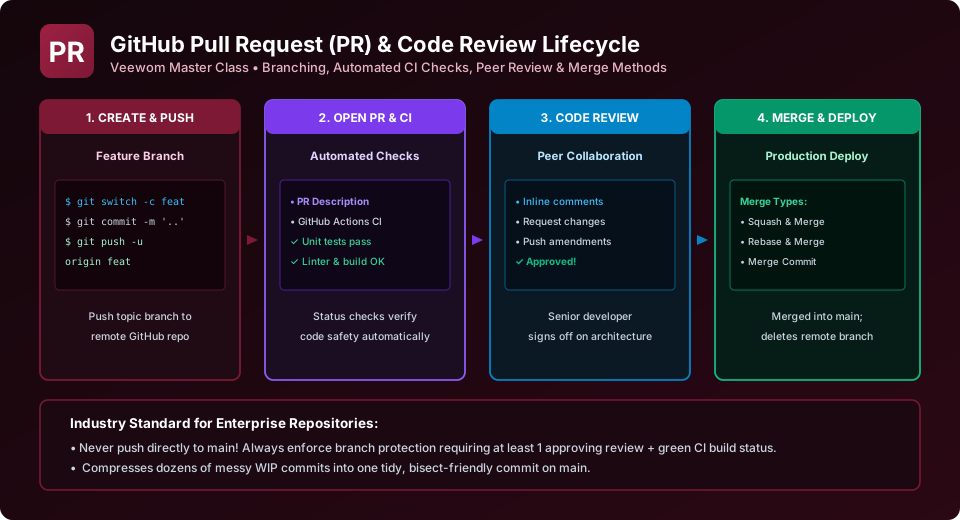
The 4 Stages of a Pull Request Lifecycle
Stage 1: Opening a Pull Request
- Push your local feature branch to GitHub:
git push -u origin feature/user-auth. - Navigate to your repository on GitHub. A yellow banner appears: "feature/user-auth had recent pushes... Compare & pull request". Click it!
- Verify the base branch (
main) and compare branch (feature/user-auth). - Write a clear PR title and descriptive summary detailing:
- What problem this PR solves.
- Key architectural changes.
- How reviewers can manually test it.
- Linked issues (e.g., "Fixes #104").
- Click Create pull request (or choose "Create draft pull request" if your work is still in progress).
Stage 2: Automated CI/CD Status Checks
As soon as a PR opens, configured GitHub Actions workflows trigger automatically. Virtual runners execute tests, run code linters, check for security vulnerabilities, and verify that the application compiles. Green checkmarks (✓) indicate passing builds, while red X marks (✗) block merging.
Stage 3: Peer Code Review
Reviewers navigate to the Files changed tab to inspect unified or side-by-side diffs. Reviewers can:
- Leave Inline Comments: Hover over any line of code, click the blue + icon, and write constructive feedback or questions.
- Suggest Code Replacements: Click the Insert a suggestion icon to propose exact code edits. The author can commit the suggestion directly with a single click!
- Submit Final Review: Reviewers choose one of three verdicts:
- Comment: General feedback without explicit approval or rejection.
- Approve: Code is verified, healthy, and ready to be merged.
- Request changes: Critical issues must be addressed before merging is permitted.
Stage 4: Merging & Deleting Branch
Once approvals are secured and automated CI checks pass green, an authorized maintainer clicks Merge pull request. GitHub automatically merges the code into main and provides a button to delete the feature branch, keeping the repository tidy.
Standardizing with Pull Request Templates
Create a file at .github/pull_request_template.md in your repository. GitHub will automatically pre-populate this markdown checklist whenever any developer opens a new PR!
Explore Related Git & GitHub Tutorials & Next Steps
Strengthen your version control mastery by studying these connected classes:
Evaluate Merge Commit, Squash and Merge, and Rebase and Merge options.
Require specific senior engineers to approve PRs based on file paths.
Run automated tests on every pull request push to guarantee code health.
Submit pull requests from forks to upstream open-source repositories.
Frequently Asked Questions (FAQ) - Student & Interview Review
Next Step in Your Git & GitHub Learning Path:
Advance your software engineering skills with the next topic in our synchronized curriculum.
Continue to PR Merge Methods → Previous: ← GitHub Repositories | Full Syllabus


You may also like this!
© Veewom.com. | Managed by PinePL
