
Python While Loop: Condition-Controlled Repetition & While-Else Mechanics
Loops automate repetitive computing tasks. In Python, the while loop is a condition-controlled loop: it repeatedly executes an indented block of statements as long as its test expression remains True. It is especially useful when the number of required iterations is not known in advance (e.g. reading user input until a valid password is provided).
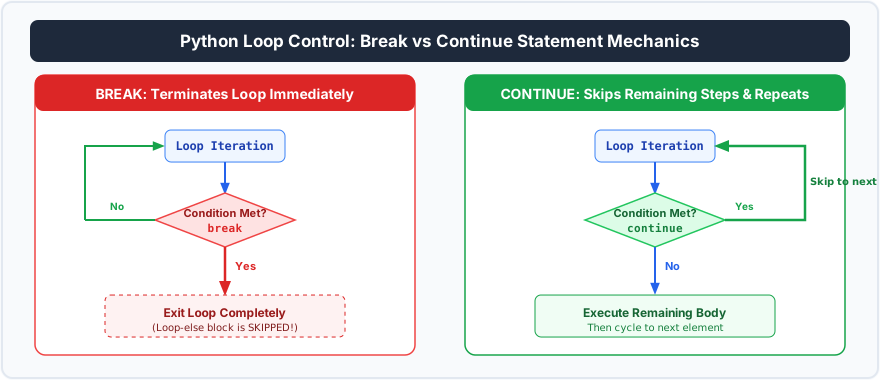
Figure 21.1: Loop execution cycle showing condition checks, break early exits, and continue bypass loops.
1. Syntax and the 3 Pillars of a While Loop
Every reliable while loop requires 3 elements:
• 1. Initialization: Setting up a loop control variable.
• 2. Condition Check: The test expression evaluated before each pass.
• 3. Updation (Increment/Decrement): Modifying the variable so the condition eventually becomes False.
# Print numbers 1 through 5:
count = 1            # 1. Initialization
while count <= 5:    # 2. Condition Check
    print(f"Iteration #{count}")
    count += 1       # 3. Updation
2. Python's Unique while...else Structure
Unlike C++ or Java, Python allows appending an else block directly to a while loop. The else block executes only when the loop terminates naturally (when the condition becomes False), and is completely bypassed if the loop was terminated by a break statement:
# Searching for a target value:
numbers = [10, 25, 40, 55, 70]
target = 55
index = 0

while index < len(numbers):
    if numbers[index] == target:
        print(f"Target {target} found at index {index}!")
        break  # Skips the else block!
    index += 1
else:
    print(f"Target {target} not found in the list.")
3. Preventing Infinite Loops
If the loop control variable is never updated, the condition remains permanently True, causing an infinite loop that consumes 100% CPU. To kill an infinite loop in terminal, press Ctrl + C.
Frequently Asked Questions (FAQ)
When should I choose while loop over for loop?
for loop when iterating over a known sequence or collection (strings, lists, ranges). Use a while loop when repetition depends on an external condition or user action whose iteration count is unpredictable.


You may also like this!
© Veewom.com. | Managed by PinePL
