
React Props: Data Passing, Immutability & Prop Drilling
Props (short for "properties") represent the communication channel in React's component hierarchy. Just as arguments are passed into a JavaScript function, props are passed down from parent components to child components via JSX attributes.
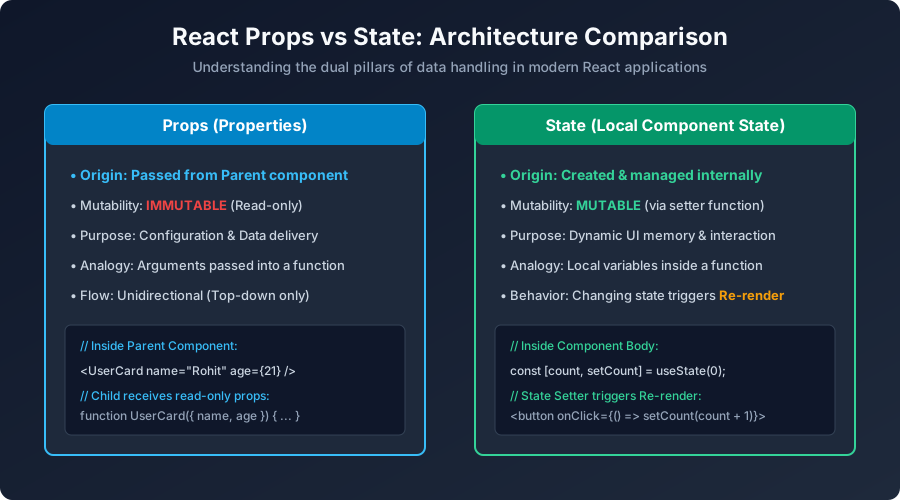
Figure 3: Props (Immutable top-down inputs) vs State (Mutable internal component memory).
Passing and Receiving Props in Functional Components
Props are received as a single JavaScript object argument in the child function. Using ES6 object destructuring makes your code clean and readable:
// 1. Child Component: StudentCard.jsx
function StudentCard({ name, rollNumber, marks, isGraduated }) {
  return (
    <div className="student-card">
      <h3>{name}</h3>
      <p>Roll No: <b>{rollNumber}</b></p>
      <p>Total Marks: {marks}/100</p>
      <span className={isGraduated ? "tag-pass" : "tag-pending"}>
        {isGraduated ? "Graduated" : "Enrolled"}
      </span>
    </div>
  );
}

// 2. Parent Component: App.jsx passes data down
function App() {
  return (
    <div className="app-container">
      <h2>Classroom Directory</h2>
      <StudentCard
        name="Aakash Sharma"
        rollNumber={101}
        marks={88}
        isGraduated={true}
      />
      <StudentCard
        name="Sneha Verma"
        rollNumber={102}
        marks={94}
        isGraduated={false}
      />
    </div>
  );
}
Default Props Values
You can specify default values directly using standard JavaScript default parameters. If the parent omits a prop, the fallback value is used:
function ActionButton({ label = "Click Me", theme = "primary" }) {
  return (
    <button className={`btn btn-${theme}`}>
      {label}
    </button>
  );
}
Passing Functions as Props (Child-to-Parent Communication)
Because props only flow downward, how can a child component notify its parent that a user clicked a button or changed an input? By passing a callback function down through props:
// Child Component
function DeleteButton({ itemId, onDelete }) {
  return (
    <button onClick={() => onDelete(itemId)} className="btn-danger">
      Delete Item #{itemId}
    </button>
  );
}

// Parent Component manages the deletion logic
function ItemManager() {
  const handleDelete = (id) => {
    console.log(`Parent received request to delete item ${id}`);
    // update parent state here
  };

  return <DeleteButton itemId={42} onDelete={handleDelete} />;
}
Special Prop: props.children
Every React component automatically receives a special prop called children. It represents whatever markup or elements are placed between the opening and closing component tags:
// Generic Modal / Card Container
function ModalBox({ title, children }) {
  return (
    <div className="modal-overlay">
      <div className="modal-content">
        <h2>{title}</h2>
        <div className="modal-body">
          {children} {/* Injects whatever is passed inside <ModalBox>...</ModalBox> */}
        </div>
      </div>
    </div>
  );
}

// Usage:
function App() {
  return (
    <ModalBox title="Confirm Subscription">
      <p>Are you sure you want to subscribe to Veewom?</p>
      <button>Yes, Subscribe</button>
    </ModalBox>
  );
}
What is Prop Drilling and How to Fix It?
When you have a deeply nested tree (e.g. App ➔ Dashboard ➔ Sidebar ➔ UserProfile ➔ Avatar), passing a user object through 4 intermediary components that do not care about it is called Prop Drilling.
Later in this tutorial series, we will study two robust solutions:
- React Context API (Class 17): Teleports state directly to any component in the tree without touching intermediary components.
- Component Composition: Passing pre-rendered components directly via
childrenor named slots.
Next Step: Component State & useState
Now that you can pass immutable data via props, let us learn how components store and update their own local data in React State & useState Hook.
Explore Related React JS Tutorials
Accelerate your React mastery by studying these tightly connected core tutorials:
Immutable external inputs vs mutable local state.
Broadcasting data across deep component hierarchies.
Passing props.children and specialized layouts.


You may also like this!
© Veewom.com. | Managed by PinePL
