
Redux Toolkit (RTK): Modern Enterprise State Management
While React's built-in useState and useReducer hooks handle local component state effectively, large enterprise applications often require a centralized, predictable global store that can be accessed, debugged, and inspected across hundreds of screens. Redux Toolkit (RTK) is the modern, official standard for writing Redux logic.
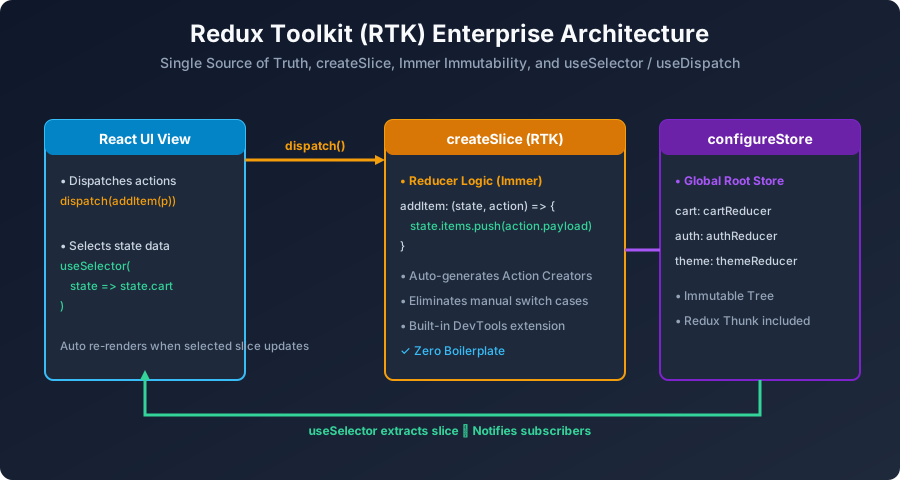
Figure 12: Redux Toolkit: Single Store, createSlice Reducers, and useSelector/useDispatch Subscriptions.
Step 1: Install Redux Toolkit & React-Redux
npm install @reduxjs/toolkit react-reduxStep 2: Create a Feature Slice (createSlice)
// src/features/counterSlice.js
import { createSlice } from '@reduxjs/toolkit';

const initialState = {
  value: 0
};

export const counterSlice = createSlice({
  name: 'counter',
  initialState,
  reducers: {
    increment: (state) => {
      // Immer allows direct mutation syntax safely!
      state.value += 1;
    },
    decrement: (state) => {
      state.value -= 1;
    },
    incrementByAmount: (state, action) => {
      state.value += action.payload;
    }
  }
});

// Auto-generated action creators
export const { increment, decrement, incrementByAmount } = counterSlice.actions;

// Reducer export
export default counterSlice.reducer;
Step 3: Configure the Redux Store
// src/app/store.js
import { configureStore } from '@reduxjs/toolkit';
import counterReducer from '../features/counterSlice';

export const store = configureStore({
  reducer: {
    counter: counterReducer
  }
});
Step 4: Provide Store to React & Consume with Hooks
// src/components/CounterView.jsx
import React from 'react';
import { useSelector, useDispatch } from 'react-redux';
import { increment, decrement, incrementByAmount } from '../features/counterSlice';

export default function CounterView() {
  // 1. Read state slice from Redux store
  const count = useSelector((state) => state.counter.value);
  // 2. Dispatch actions
  const dispatch = useDispatch();

  return (
    <div className="redux-card">
      <h3>Redux Global Count: {count}</h3>
      <button onClick={() => dispatch(increment())}>+1</button>
      <button onClick={() => dispatch(decrement())}>-1</button>
      <button onClick={() => dispatch(incrementByAmount(5))}>+5</button>
    </div>
  );
}
Next Step: Lightweight State with Zustand
Now let us explore the popular lightweight alternative to Redux in React Zustand Lightweight State.
Explore Related React JS Tutorials
Accelerate your React mastery by studying these tightly connected core tutorials:
Action creators and immutable state transformations.
Comparing boilerplate-free Zustand with enterprise Redux.
Separating remote API caches from global UI state.


You may also like this!
© Veewom.com. | Managed by PinePL
