
TanStack Query: Server State Management, Caching & Refetching
Most modern web applications are fundamentally about fetching, displaying, and mutating server data. Developers traditionally stored API responses inside global Redux stores or useEffect state variables. However, remote data requires continuous background synchronization, error retries, and caching. TanStack Query (React Query) is the undisputed industry standard for server state.
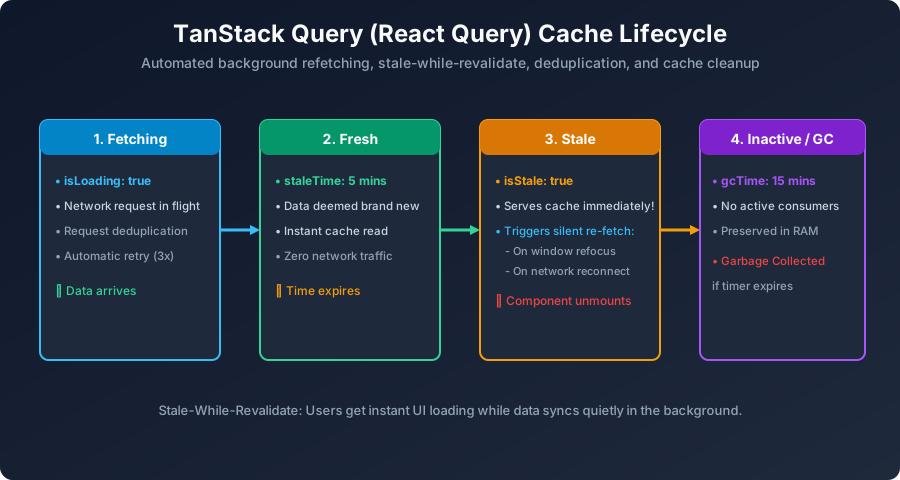
Figure 13: TanStack Query Lifecycle: Fetching ➔ Fresh (staleTime) ➔ Stale (Silent Background Sync) ➔ Inactive Cache GC.
Step 1: Install TanStack Query
npm install @tanstack/react-queryStep 2: Setup QueryClientProvider & Fetch with useQuery
// src/App.jsx
import React from 'react';
import { QueryClient, QueryClientProvider, useQuery } from '@tanstack/react-query';

const queryClient = new QueryClient();

// API fetcher function
async function getStudentPosts() {
  const res = await fetch('https://jsonplaceholder.typicode.com/posts?_limit=5');
  if (!res.ok) throw new Error('Failed to load posts');
  return res.json();
}

function PostsFeed() {
  // useQuery handles loading, error, caching, and auto-refetching
  const { data, isLoading, isError, error, isFetching } = useQuery({
    queryKey: ['posts'],
    queryFn: getStudentPosts,
    staleTime: 1000 * 60 * 5 // Cache data is fresh for 5 minutes!
  });

  if (isLoading) return <p>Loading articles from server...</p>;
  if (isError) return <p style={{ color: 'red' }}>Error: {error.message}</p>;

  return (
    <div>
      <h3>Latest Technical Tutorials {isFetching && '🔄'}</h3>
      <ul>
        {data.map(post => (
          <li key={post.id}><b>{post.title}</b></li>
        ))}
      </ul>
    </div>
  );
}

export default function App() {
  return (
    <QueryClientProvider client={queryClient}>
      <PostsFeed />
    </QueryClientProvider>
  );
}
Next Step: HTTP APIs & Axios
Now let us examine HTTP request clients, interceptors, and error handling in React API Calls & Axios Integration.
Explore Related React JS Tutorials
Accelerate your React mastery by studying these tightly connected core tutorials:
Underlying HTTP transport for Query functions.
Why caching, retries, and deduplication need TanStack.
Updating cached lists before server confirmation.


You may also like this!
© Veewom.com. | Managed by PinePL
