
Android App Security: KeyStore, Encryption & Best Practices
Mobile application security is non-negotiable. If an Android device is rooted, stolen, or analyzed by a security researcher using decompilation tools like JADX, sensitive user credentials, private API tokens, and local databases are exposed unless protected by Hardware-Backed Cryptography.
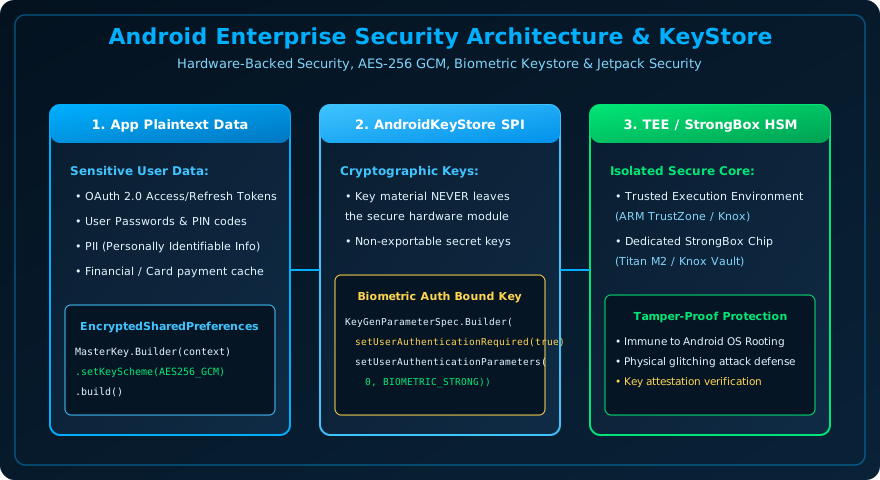
Figure 43.1: Android Hardware-Backed Security — Cryptographic Material Remains Confined to Isolated Secure Silicon (StrongBox / TEE).
The Android KeyStore Provider
The AndroidKeyStore SPI stores cryptographic keys in a container so they are much more difficult to extract from the device. Even if an attacker gains root access to the Linux operating system, the raw key bytes never enter application memory:
import android.security.keystore.KeyGenParameterSpec
import android.security.keystore.KeyProperties
import java.security.KeyStore
import javax.crypto.Cipher
import javax.crypto.KeyGenerator
import javax.crypto.SecretKey

object CryptoManager {
    private const val KEY_ALIAS = "veewom_secret_key"
    private const val ANDROID_KEYSTORE = "AndroidKeyStore"
    private const val TRANSFORMATION = "AES/GCM/NoPadding"

    private val keyStore = KeyStore.getInstance(ANDROID_KEYSTORE).apply {
        load(null)
    }

    private fun getOrCreateSecretKey(): SecretKey {
        val existingKey = keyStore.getEntry(KEY_ALIAS, null) as? KeyStore.SecretKeyEntry
        return existingKey?.secretKey ?: generateKey()
    }

    private fun generateKey(): SecretKey {
        return KeyGenerator.getInstance(KeyProperties.KEY_ALGORITHM_AES, ANDROID_KEYSTORE).apply {
            init(
                KeyGenParameterSpec.Builder(
                    KEY_ALIAS,
                    KeyProperties.PURPOSE_ENCRYPT or KeyProperties.PURPOSE_DECRYPT
                )
                .setBlockModes(KeyProperties.BLOCK_MODE_GCM)
                .setEncryptionPaddings(KeyProperties.ENCRYPTION_PADDING_NONE)
                .setUserAuthenticationRequired(false) // Set true for Biometric lock!
                .build()
            )
        }.generateKey()
    }

    fun encrypt(bytes: ByteArray): Pair<ByteArray, ByteArray> {
        val cipher = Cipher.getInstance(TRANSFORMATION)
        cipher.init(Cipher.ENCRYPT_MODE, getOrCreateSecretKey())
        val iv = cipher.iv
        val ciphertext = cipher.doFinal(bytes)
        return Pair(iv, ciphertext)
    }
}
EncryptedSharedPreferences (Jetpack Security)
To store sensitive user tokens with hardware-backed encryption in one line of code, use EncryptedSharedPreferences:
import androidx.security.crypto.EncryptedSharedPreferences
import androidx.security.crypto.MasterKey

fun createEncryptedPrefs(context: Context): SharedPreferences {
    val masterKey = MasterKey.Builder(context)
        .setKeyScheme(MasterKey.KeyScheme.AES256_GCM)
        .build()

    return EncryptedSharedPreferences.create(
        context,
        "secure_user_prefs",
        masterKey,
        EncryptedSharedPreferences.PrefKeyEncryptionScheme.AES256_SIV,
        EncryptedSharedPreferences.PrefValueEncryptionScheme.AES256_GCM
    )
}
Frequently Asked Questions (FAQ) - Student & Interview Review
Q1. What is Root Detection in Android?
Q2. Why is AES-GCM preferred over AES-CBC?
Q3. Should API secret keys be hardcoded in Kotlin files?
Explore Related Android Development Classes & Next Steps
Broaden your foundational and advanced Android application development skills across our curriculum:
Bind hardware KeyStore secret keys to BiometricPrompt credentials.
Encrypt sensitive user tokens and preferences with AES-256 GCM.
Protect API secrets and prevent reverse engineering with code obfuscation.
Prevent Man-In-The-Middle (MITM) attacks with SHA-256 certificate pins.


You may also like this!
© Veewom.com. | Managed by PinePL
