
Android Room Database: SQLite ORM, DAOs & Migrations
The Room Persistence Library is part of Android Jetpack. It provides an abstraction layer over native SQLite to allow fluent database access while harnessing the full power of SQLite. In older Android tutorials, developers wrote verbose SQLiteOpenHelper classes with raw SQL strings that failed silently until runtime. Room provides compile-time verification of SQL queries.
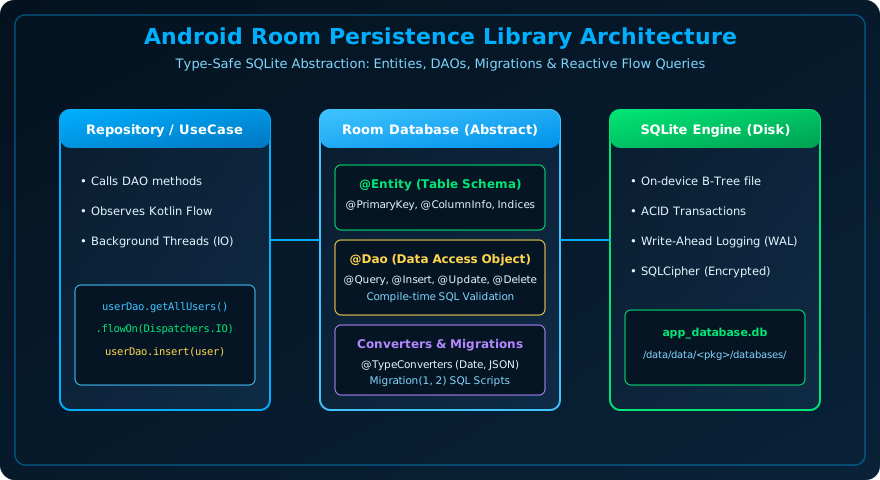
Figure 25.1: Room Database Architecture — Entities Define Table Schema, DAOs Provide Validated SQL Access, and RoomDatabase Coordinates ACID Storage.
The 3 Major Architectural Components of Room
- Database Class (
@Database): Serves as the main database holder and primary access point for the underlying connection to SQLite. - Data Entities (
@Entity): Represents tables within the database. Each field in the data class represents a column. - Data Access Objects (
@Dao): Contains the methods used for accessing and querying the database (SELECT, INSERT, UPDATE, DELETE).
Full Room Database Implementation in Kotlin
1. Define the Entity Table
import androidx.room.Entity
import androidx.room.PrimaryKey
import androidx.room.ColumnInfo

@Entity(tableName = "tutorials")
data class TutorialEntity(
    @PrimaryKey(autoGenerate = true)
    val id: Int = 0,

    @ColumnInfo(name = "title")
    val title: String,

    @ColumnInfo(name = "category")
    val category: String,

    @ColumnInfo(name = "is_completed")
    val isCompleted: Boolean = false
)
2. Define the DAO with Reactive Flow
import androidx.room.Dao
import androidx.room.Insert
import androidx.room.OnConflictStrategy
import androidx.room.Query
import androidx.room.Update
import androidx.room.Delete
import kotlinx.coroutines.flow.Flow

@Dao
interface TutorialDao {
    // Reactive query: Emits new list automatically whenever table changes!
    @Query("SELECT * FROM tutorials ORDER BY id DESC")
    fun getAllTutorials(): Flow<List<TutorialEntity>>

    @Query("SELECT * FROM tutorials WHERE id = :tutorialId")
    suspend fun getTutorialById(tutorialId: Int): TutorialEntity?

    @Insert(onConflict = OnConflictStrategy.REPLACE)
    suspend fun insert(tutorial: TutorialEntity)

    @Update
    suspend fun update(tutorial: TutorialEntity)

    @Delete
    suspend fun delete(tutorial: TutorialEntity)
}
3. Define the RoomDatabase Class & Migrations
import androidx.room.Database
import androidx.room.RoomDatabase
import androidx.room.migration.Migration
import androidx.sqlite.db.SupportSQLiteDatabase

@Database(entities = [TutorialEntity::class], version = 2, exportSchema = true)
abstract class AppDatabase : RoomDatabase() {
    abstract fun tutorialDao(): TutorialDao

    companion object {
        // Migration from Version 1 to Version 2
        val MIGRATION_1_2 = object : Migration(1, 2) {
            override fun migrate(db: SupportSQLiteDatabase) {
                db.execSQL("ALTER TABLE tutorials ADD COLUMN is_completed INTEGER NOT NULL DEFAULT 0")
            }
        }
    }
}
Frequently Asked Questions (FAQ) - Student & Interview Review
Q1. Why does Room forbid running database queries on the main UI thread?
Q2. How does Room work with Kotlin Flow for real-time reactivity?
Q3. What is the purpose of @TypeConverters in Room?
Explore Related Android Development Classes & Next Steps
Broaden your foundational and advanced Android application development skills across our curriculum:
Store structured relational data in Room vs key-value pairs in DataStore.
Paginate SQLite queries directly into LazyColumn with Room PagingSource.
Inject database and DAO singletons across repositories.
Encrypt on-device SQLite databases with 256-bit AES encryption.


You may also like this!
© Veewom.com. | Managed by PinePL
