
Android R8 Code Shrinking, Resource Stripping & Obfuscation
When you build a release version of an Android application, deploying raw, unoptimized bytecode results in a massive file size and leaves your proprietary business logic exposed to reverse engineering. Google integrates R8 — an advanced optimization and shrinking compiler that performs four major operations in a single build pass.
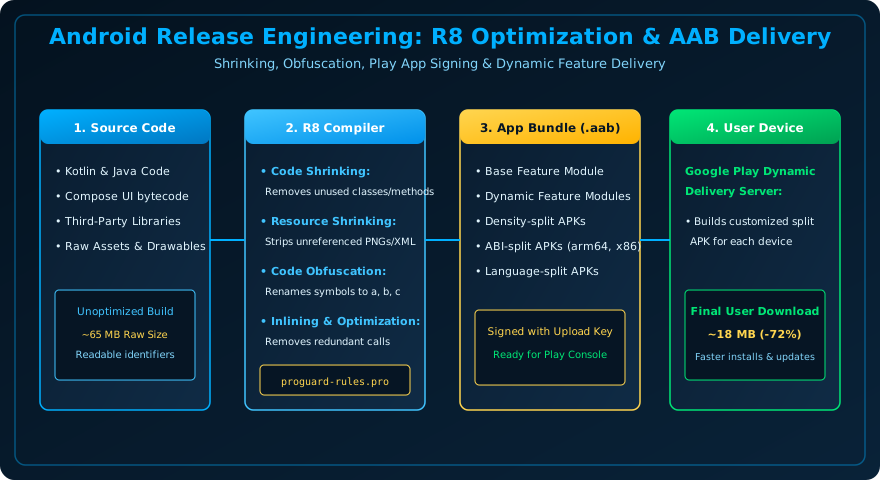
Figure 44.1: Release Engineering Pipeline — Source Code is Shrunk and Obfuscated by R8 into a Compact Android App Bundle (AAB).
The 4 Pillars of R8 Optimization
- Code Shrinking (Tree Shaking): Detects and safely removes unused classes, fields, methods, and library dependencies.
- Resource Shrinking: Works in tandem with code shrinking to identify and discard unused images, vector drawables, and XML layouts from your packaged APK.
- Optimization: Inlines small functions, rewrites enum classes into primitive integers, and removes unreachable code branches.
- Obfuscation: Renames packages, classes, and methods to short meaningless identifiers (e.g.,
com.veewom.OrderProcessorbecomesa.b.c), making decompiled code nearly impossible for hackers to read.
Enabling R8 in build.gradle.kts
android {
    buildTypes {
        release {
            isMinifyEnabled = true     // Activates R8 code shrinking and obfuscation
            isShrinkResources = true   // Strips unreferenced images and XML resources
            proguardFiles(
                getDefaultProguardFile("proguard-android-optimize.txt"),
                "proguard-rules.pro"
            )
        }
    }
}
Writing ProGuard Rules (proguard-rules.pro)
Libraries that rely on runtime reflection (such as Retrofit DTOs or Room entities) must be explicitly protected from identifier renaming using -keep rules:
# Keep Retrofit data models to prevent JSON serialization deserialization crashes
-keep class com.veewom.app.data.models.** { *; }

# Keep Room generated implementations
-keep class * extends androidx.room.RoomDatabase

# Keep Kotlinx Serialization generated companion serializers
-keepclassmembers class * {
    companion object *;
}
Frequently Asked Questions (FAQ) - Student & Interview Review
Q1. What is mapping.txt and why must you save it?
Q2. What is the difference between ProGuard and R8?
Q3. Why did my app crash in Release mode but work fine in Debug mode?
Explore Related Android Development Classes & Next Steps
Broaden your foundational and advanced Android application development skills across our curriculum:
Upload mapping.txt to Play Console for de-obfuscated crash reports.
Enable isMinifyEnabled and isShrinkResources in release build types.
Write ProGuard -keep rules for reflection-based JSON DTO models.
Deter decompilers (JADX, APKTool) with identifier renaming.


You may also like this!
© Veewom.com. | Managed by PinePL
