
Android App Development Tutorial: Complete 2026 Master Curriculum
Welcome to the Veewom Android Application Development Master Tutorial — a comprehensive, modern, and practical curriculum engineered for university students (BCA, MCA, B.Tech, Computer Science), mobile software engineers, bloggers, and advanced web developers transitioning to mobile apps. Operating on over three billion active smartphones, tablets, smart TVs, foldables, and automotive displays, Android is the world's most dominant mobile operating system.
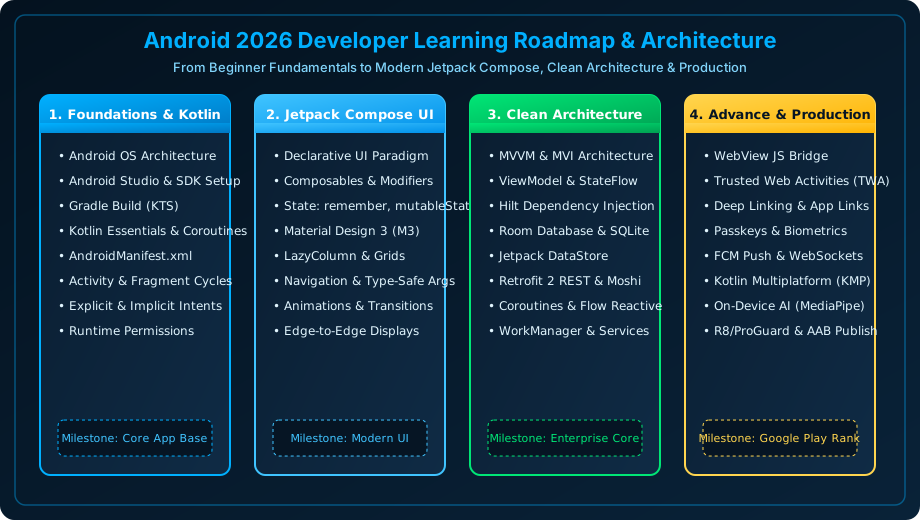
Figure 1.1: Complete Architectural Roadmap of Modern Android Development — From Kotlin Foundations to Production Play Store Release.
Why This Android Curriculum Stands Out in 2026
Most online tutorials are stuck in 2017 — teaching obsolete Java patterns, heavyweight XML View findById hierarchies, and deprecated AsyncTask loaders that have been removed from modern Android SDKs. This 52-class master curriculum is built from the ground up on modern industry standards: Kotlin 2.x, Jetpack Compose declarative UI, Material Design 3, Clean Architecture (MVVM/MVI), Coroutines & Flow, Room Database, and Advance Web Developer Bridges (WebView JS Bridge, Trusted Web Activities, Passkeys).
What is Android? An Engineering Definition
Android is an open-source, Linux-based software stack created for mobile and embedded devices. Developed originally by Android Inc. (founded by Andy Rubin in 2003) and acquired by Google in 2005, Android encompasses a modified Linux Kernel, a Hardware Abstraction Layer (HAL), native C/C++ runtimes and libraries, the high-performance Android Runtime (ART), a comprehensive Java API Framework, and a suite of pre-installed system applications.
Core Pillars of Modern Android Architecture
- Declarative UI (Jetpack Compose): Eliminates XML layout files; your user interface is constructed as composable Kotlin functions that react dynamically to state changes.
- Unidirectional Data Flow (UDF): State flows strictly down from ViewModels to UI components, while user actions and events flow strictly up, eliminating race conditions.
- Type-Safe Asynchronous Concurrency: Coroutines and Flow deliver structured concurrency, keeping the main UI thread buttery smooth at 120Hz while offloading I/O and database operations to background worker threads.
- Hardware-Backed Security: Critical credentials, OAuth tokens, and biometric signatures are safeguarded within isolated hardware modules (TEE / StrongBox KeyStore).
Traditional Android (2016) vs. Modern Android (2026)
To understand how radically Android development has improved, compare the historical development paradigm with the modern 2026 standards:
| Dimension | Legacy Android (2016 Paradigm) | Modern Android (2026 Paradigm) |
|---|---|---|
| Primary Language | Java with verbose boilerplate and NullPointerExceptions | Kotlin 2.x with first-class null-safety and expressive syntax |
| UI Layer | XML layout files, findViewById(), synthetic bindings | Jetpack Compose declarative reactive functions & Material 3 |
| Asynchronous Processing | AsyncTask, Handlers, Loaders, Raw Threads | Kotlin Coroutines & Flow with structured concurrency |
| Architecture Pattern | God Activities (MVC) mixing UI, logic, and networking | Clean Architecture + MVVM / MVI with Hilt DI and Use Cases |
| Database & Storage | SQLiteOpenHelper with raw SQL strings, SharedPreferences | Room Database ORM with compile-time checks, Jetpack DataStore |
| Web & Cross-Platform | Clunky WebViews with security holes and slow bridges | Trusted Web Activities (TWA), Passkeys, Kotlin Multiplatform (KMP) |
The 8 Comprehensive Learning Modules (52 Step-by-Step Classes)
This master curriculum is structured across eight progressive modules designed to take you from initial setup to enterprise production architecture:
Module 1 Android Foundations & Setup
Classes 1-7: Android evolution, System Architecture Stack (Kernel to ART), Android Studio & SDK, Gradle KTS build system, Kotlin essentials, and AndroidManifest.xml.
Module 2 UI Fundamentals & Jetpack Compose
Classes 8-14: XML vs Compose, Composables, Modifiers, State hoisting, Material 3 styling, LazyColumn lists, and Type-Safe Compose Navigation.
Module 3 Core Android Blocks & Lifecycle
Classes 15-21: Activity and Fragment lifecycles, Explicit & Implicit Intents, BroadcastReceivers, Background Services vs WorkManager, ContentProviders, and Runtime Permissions.
Module 4 Modern Architecture & Data Persistence
Classes 22-28: Clean Architecture (MVVM/MVI), ViewModel & StateFlow, Hilt Dependency Injection, Room SQLite ORM, Jetpack DataStore, and Paging 3.
Module 5 Networking, APIs & Real-Time
Classes 29-34: Retrofit 2 & OkHttp, Kotlinx Serialization, Coroutines & Flow pipelines, OkHttp WebSockets, Multipart file transfers, and Coil image caching.
Module 6 Advance Android for Web Developers
Classes 35-41: Modern WebView JavascriptInterface bridge, Trusted Web Activities (TWA), Deep Linking & App Links, WebAuthn Passkeys, FCM push notifications, KMP, and On-Device AI with Gemini Nano.
Module 7 Production, Performance & Publishing
Classes 42-47: Android Profiler, LeakCanary, Android KeyStore encryption, R8 shrinking & ProGuard, Unit/UI Testing with Mockk, CI/CD GitHub Actions, and Google Play Store App Bundle (AAB) release.
Module 8 Practice Labs, Q&A & Career Roadmap
Classes 48-52: 35+ Hands-on lab projects, 130+ technical interview questions with answers, University BCA viva-voce guide, Debugging & troubleshooting guide, and master cheat sheet.
Who is This Course For?
- BCA, MCA, and B.Tech Computer Science Students: Directly covers university syllabi (Activities, Intents, BroadcastReceivers, Services, SQLite, Menus) while preparing you for software company campus placements.
- Full-Stack & Web Developers: Transition your React, Vue, HTML5, or Node.js knowledge into native mobile apps using modern declarative paradigms, WebViews, and Trusted Web Activities.
- Aspiring Freelancers & Mobile Entrepreneurs: Build real-world portfolio applications, monetize through Google Play Store, and integrate cloud REST APIs and push notifications.
Frequently Asked Questions (FAQ) - Student & Interview Review
Q1. What prerequisites do I need before learning Android development?
Q2. Should I learn Java or Kotlin for Android development in 2026?
Q3. What hardware computer specifications do I need for Android Studio?
Q4. Does this tutorial cover university syllabus topics like SQLite and BroadcastReceivers?
Explore Related Android Development Classes & Next Steps
Broaden your foundational and advanced Android application development skills across our curriculum:
Understand Android's timeline from Cupcake 1.5 to modern Android 15 & 16.
Explore Linux Kernel, HAL, ART, Native C++ Libraries, and Java API Framework.
Master modern declarative UI design with Composables, Rows, Columns, and Modifiers.
Architect testable and modular enterprise Android apps with ViewModel, StateFlow, and Hilt.


You may also like this!
© Veewom.com. | Managed by PinePL
