
Google AdSense Approval Requirements for New Websites
Google AdSense Approval Requirements for New Websites | Welcome to another comprehensive tutorial by Veewom. If you have recently launched a new website or blog, getting your Google AdSense account approved is likely one of your highest priorities.
Google AdSense remains the most popular, trusted, and beginner-friendly contextual advertising network in the world. It connects website publishers directly with millions of global businesses advertising through Google Ads. When configured properly, AdSense allows you to monetize your traffic smoothly, displaying high-quality relevant ads while you focus on writing great content.
However, getting approved for Google AdSense is no longer as effortless as it was a decade ago. Every day, thousands of enthusiastic bloggers submit new websites for review, only to receive frustrating rejection emails citing generic reasons like “Low-value content”, “Site down or unavailable”, or “Policy violations”. This leads many beginners down a rabbit hole of internet myths—such as false claims that you must publish exactly 30 posts, write 2,000 words on every page, or wait six months before applying.
The truth is much simpler: Google AdSense approval is governed by transparent publisher policies and clear quality benchmarks. Google does not look for arbitrary shortcuts; they look for legitimate, user-focused websites that provide genuine value to human readers and maintain a safe environment for their advertisers.
In this in-depth guide, we at Veewom will demystify the complete Google AdSense approval process for new websites. Based directly on official Google Publisher Policies and Search Essentials, we will explain the exact eligibility criteria, content quality standards, mandatory legal disclosures, website architecture requirements, and a step-by-step troubleshooting plan to fix rejections and get approved quickly.
Also read this – How to Build an AdSense-Friendly Website Making $100 to $500/Month
What Is Google AdSense and How Does It Work?
Before preparing your application, it helps to understand the commercial ecosystem behind Google AdSense. AdSense is not a charity; it is a two-sided marketplace where Google acts as the trusted broker between advertisers and website publishers.
The Publisher-Advertiser Ecosystem
- Google Advertisers (Google Ads): Businesses, brands, and agencies pay Google to display advertisements promoting their products, software, or services.
- Website Publishers (Google AdSense): Content creators, bloggers, and site owners partner with Google by offering advertising real estate on their web pages.
- Revenue Sharing: When visitors view or click on these ads, Google collects money from the advertiser and shares the majority with the publisher (typically 68% of the revenue for content display ads).
Because advertisers spend real marketing budgets on Google Ads, Google has a strict responsibility to protect them from low-quality web pages, accidental clicks, bot traffic, and copyright infringement. That is why Google enforces rigorous approval reviews before letting any new site join the network.
How Ads Are Displayed
Modern AdSense uses sophisticated contextual and algorithmic machine learning to serve ads:
- Contextual Targeting: The AdSense crawler analyzes the text on your page and matches it with relevant advertisements (e.g., showing web hosting ads on a server tutorial).
- Personalized Targeting: Ads are matched based on visitor interests and previous web browsing history via advertising cookies.
- Auto Ads: An automated feature where Google’s artificial intelligence automatically detects your layout and places high-performing ad formats (banners, in-feed ads, vignettes) without requiring manual coding.
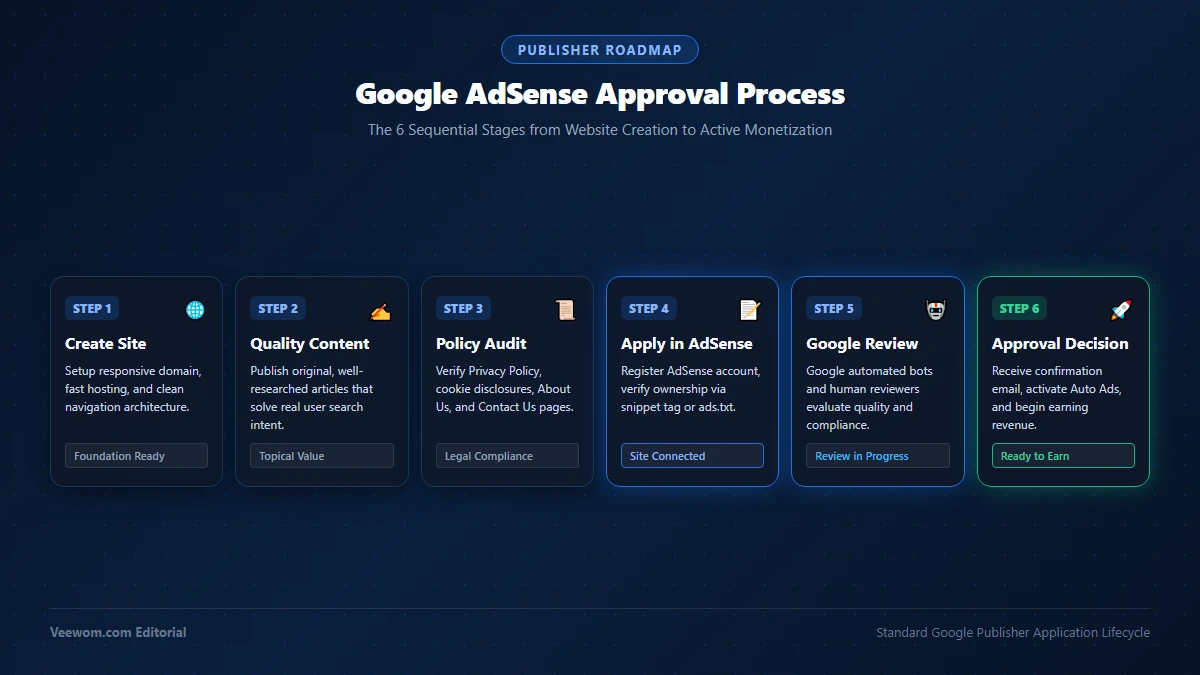
The standard six-stage application and verification lifecycle for Google AdSense publishers.
How Does the Google AdSense Approval Process Work?
Applying for AdSense is a multi-stage review workflow. Understanding each stage helps you track your application and avoid simple mistakes that cause unnecessary review delays.
Step 1: Account Registration & Eligibility Check
You begin by navigating to the official portal at https://adsense.google.com and signing in with your primary Google account. Note that you must be at least 18 years old to sign AdSense contractual terms. If you are younger, an adult parent or guardian must create and manage the account on your behalf.
Step 2: Submit Website URL & Payee Profile
Enter your website URL (e.g., veewom.com or yourdomain.com). Next, complete your customer information profile with your legal name, real physical mailing address, and phone number. This information must be 100% accurate because Google will later send a physical address verification PIN mailer to this address once you reach the verification earnings threshold.
Step 3: Connect Your Website to AdSense
To prove you own the website, Google requires you to connect your site using one of three verification methods:
- AdSense Code Snippet (Most Common): Copy the JavaScript snippet provided by AdSense and paste it directly between the
<head>and</head>tags of your website HTML. On WordPress, you can insert this using your theme options or header management plugins. - Meta Tag: Paste a verification HTML meta tag inside your site header.
- ads.txt File: Upload a plain text
ads.txtfile containing your publisher ID directly to your website root directory (yourdomain.com/ads.txt).
Step 4: The Review Period
Once you click Request Review, Google’s automated systems (the AdSense crawler) immediately check if the code is present and crawl your site. Following initial algorithmic screening, human policy specialists review your pages to ensure compliance. The review process generally takes anywhere from 48 hours to 2 weeks.
Step 5: Decision Notification
Google will send an email confirming whether your site is ready to show ads (“Good news, your site is now ready to show AdSense ads”) or detailing issues that require resolution before resubmission.
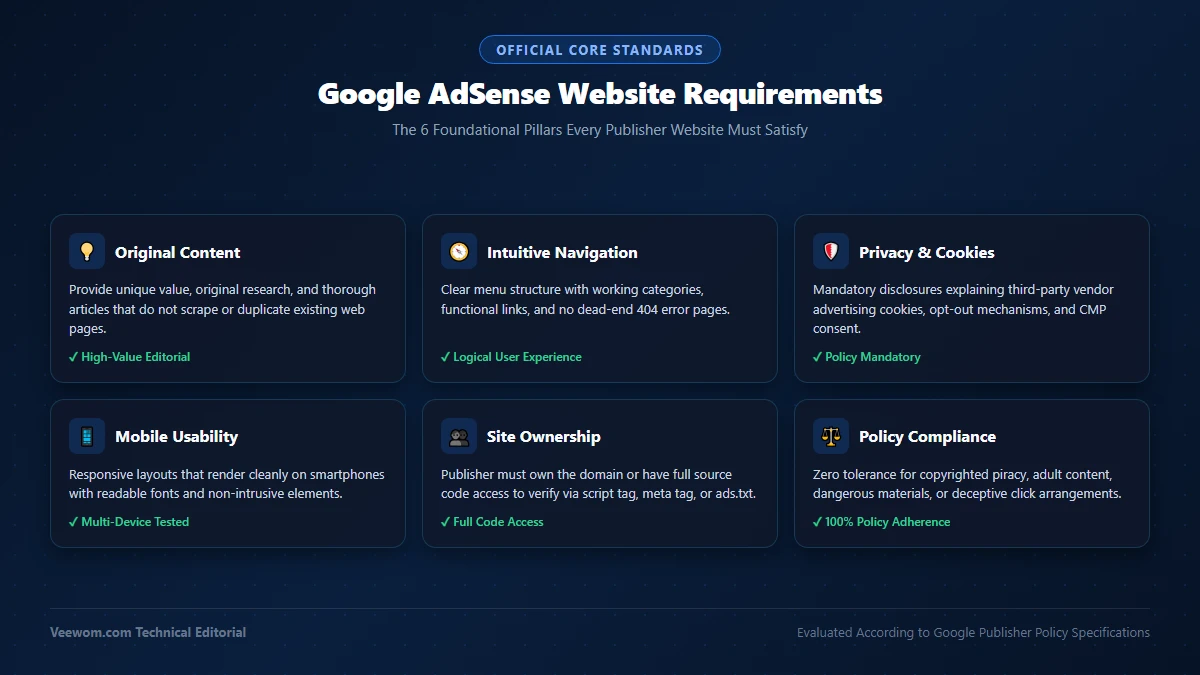
The six foundational eligibility and quality pillars every new website must establish.
Core Google AdSense Approval Requirements for New Websites
To avoid rejection, you must distinguish between mandatory eligibility rules (strict policy requirements) and recommended editorial best practices (quality signals that improve approval odds).
1. Unique, High-Value, Original Content (Mandatory)
This is Google’s number one requirement. According to the official AdSense Eligibility Requirements, your website must offer original, relevant content that provides unique value to users. Websites that simply rephrase news stories, scrape RSS feeds, curate basic link lists, or publish thin summaries without personal insight will fail under the “Low-value content” policy.
2. Clear Website Navigation and Structural Integrity (Mandatory)
Your website must be simple to navigate. Reviewers must easily find your articles, categories, and legal pages. A clean, responsive menu bar with working links is essential. If a reviewer clicks on a category in your menu and lands on an empty page or a 404 error, your application will be turned down for navigation issues.
3. Full Website Ownership and Unrestricted Server Access (Mandatory)
You must have administrative access to the root HTML or DNS of the domain. Additionally, your server must be completely accessible to Google’s crawler. If your web host experiences frequent downtime, or if aggressive security firewalls (such as Cloudflare Under Attack mode or geo-blocking plugins) block Googlebot, Google cannot inspect your pages and will report “Site down or unavailable”.
4. Publisher Age and Account Eligibility (Mandatory)
The account applicant must be at least 18 years old. In select geographical markets, Google historically evaluated domain age to prevent fly-by-night spam networks. While domain age itself is not a universal barrier today, submitting a domain that was registered just three days ago with hastily thrown-together placeholder posts looks unconvincing to reviewers.
5. Policy Compliance and Safe Content Environment (Mandatory)
Your site must completely comply with Google Publisher Policies. Websites containing adult content, illegal streaming links, pirated software, hacking tutorials, unverified dangerous health advice, or hate speech are strictly prohibited.
6. Mandatory Privacy and Cookie Disclosures (Mandatory)
Google legally requires publishers to maintain a compliant Privacy Policy explaining that third-party vendors use cookies to serve personalized ads based on past visits, along with clear opt-out instructions for users.
How Many Articles Are Required for Google AdSense Approval?
One of the most persistent misconceptions among new bloggers is that Google mandates a fixed minimum number of articles (such as “you must have 30 posts before applying”).
Let us be 100% clear: Google does NOT specify a mandatory article count anywhere in their official documentation.
There are verified instances of clean, focused websites getting approved with 10 to 15 in-depth articles, while other websites with over 100 poorly written, scraped posts get rejected repeatedly. Google does not evaluate your site using a basic post counter; they evaluate topical completeness, user value, and website structure.
Why Content Quality Outweighs Post Quantity
Imagine a Google reviewer visiting your new website. If you have only 3 short articles, the site feels like an unfinished draft or an abandoned project. The reviewer cannot determine if the website will remain active or what its core focus is.
Conversely, if you publish 15 to 25 thoroughly researched, genuinely helpful articles organized across 2 or 3 clean categories, your website demonstrates:
- Clear subject matter expertise and defined topical niche.
- Genuine commitment to serving real readers.
- Populated category archives with zero empty pages.
- Sufficient textual context for Google’s automated ad-matching algorithms.
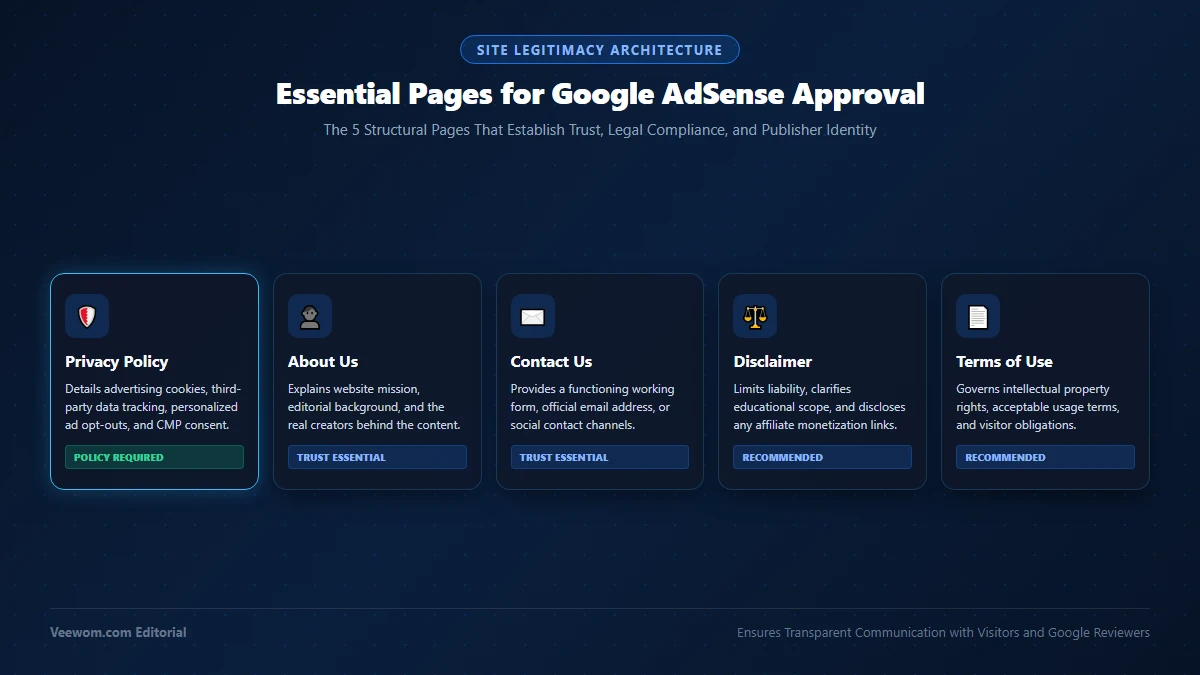
The essential site structure pages required to prove transparency, identity, and legal compliance.
Important Pages Every New Website Should Have
Trust and transparency are critical factors during Google’s review. When an anonymous website has no identifiable author, no contact options, and no legal disclosures, reviewers view it as a high-risk spam site. Establishing these five foundational pages immediately elevates your site’s credibility:
1. Privacy Policy (Strict Policy Requirement)
This is not merely a recommendation; it is an explicit contractual obligation under Google Publisher Policies. Your Privacy Policy page must accurately disclose:
- That third-party vendors, including Google, use cookies to serve ads based on a user’s prior visits to your website or other websites.
- Google’s use of advertising cookies enables it and its partners to serve ads to your users based on their visit to your sites and/or other sites on the Internet.
- Clear guidance informing users that they may opt out of personalized advertising by visiting www.aboutads.info or Google Ads Settings.
- Information regarding any Consent Management Platform (CMP) active on your site for visitors from the European Economic Area (EEA), UK, or California (CCPA).
2. About Us Page
Your About Us page establishes your editorial identity. Explain who is behind the website, your background or experience in the niche, what mission the website serves, and why readers should trust your content. A genuine About Us page proves to Google that real people run the website.
3. Contact Us Page
Legitimate publishers provide clear communication channels. Include a working contact form (using plugins like Contact Form 7 or WPForms), an official contact email address (e.g., contact@yourdomain.com), and links to active social media profiles. Test the form yourself to ensure emails arrive reliably.
4. Disclaimer Page
A Disclaimer clarifies the scope of your content. For example, if you write about technology, finance, health, or legal matters, state clearly that your content is published for educational and informational purposes only. If you participate in affiliate marketing programs, disclose affiliate relationships transparently.
5. Terms and Conditions Page
This page defines the rules governing the use of your website, copyright protections for your original writing, and limitation of liability. It confirms that your website operates under professional legal standards.
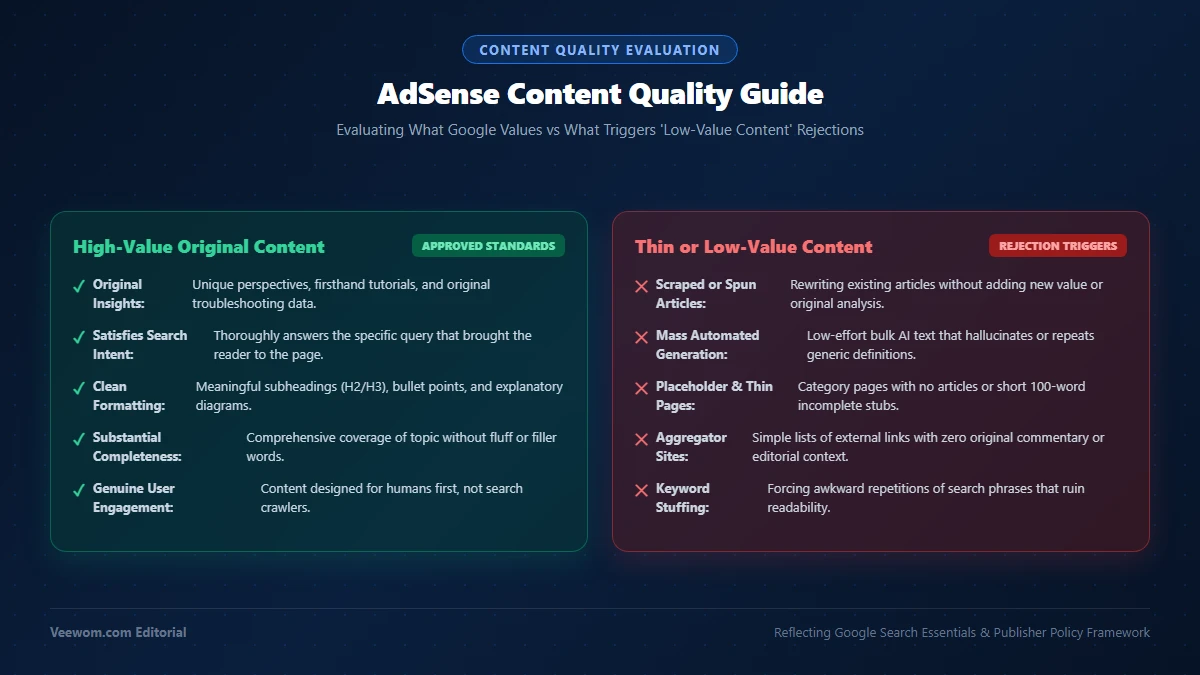
Evaluating high-value, intent-driven editorial content versus low-value rejection triggers.
How Much Content Is Required for AdSense Approval? (Depth vs. Word Count)
Another common question is: “How long should my articles be to get approved?”
Google does not measure content quality using a word counter. A concise, 600-word step-by-step troubleshooting guide that solves a specific technical error is far more valuable to a reader than a 2,500-word essay packed with fluffy, repetitive sentences.
According to Google Search Essentials (Creating Helpful Content), content quality is determined by helpfulness, originality, and user satisfaction:
- Firsthand Knowledge & Originality: Share personal observations, original tutorials, custom screenshots, or real-world problem solving. Do not simply summarize what the top three search results already say.
- Complete Search Intent Satisfaction: When a user searches for an answer, does your article answer it thoroughly so they do not need to click back to search results?
- Clean Editorial Presentation: Break your writing into short, comfortable paragraphs. Use descriptive subheadings (
<h2>and<h3>), bullet lists, and original diagrams to explain complex topics clearly. - Avoid Automated Low-Value Text: While Google does not ban the responsible use of AI tools for brainstorming or research, mass-generating dozens of unedited AI articles that restate generic definitions will trigger an immediate “Low-value content” rejection. Google prioritizes content with noticeable human effort, editing, and editorial care.
Website Design and Navigation Requirements
Your website design directly impacts how easily Google reviewers can evaluate your pages. You do not need an expensive custom-coded design, but you must provide a clean, professional, and accessible user experience.
Navigation Architecture Checklist
- Top Navigation Menu: Place a clean menu at the top of your site linking to your primary content categories and your About Us and Contact pages.
- No Empty Archives: Ensure every category listed in your menu has multiple published posts. Delete any unused categories, tags, or default placeholder pages like “Uncategorized”.
- Functional Footer: Place links to your Privacy Policy, Terms, Disclaimer, and About pages in your website footer so they remain accessible from every page.
- Zero Broken Links: Check for broken internal links or 404 errors. You can use free web audit tools or plugins to identify and fix missing links before applying.
Mobile Responsiveness and Readability
More than 60% of all global web traffic originates from mobile devices, and Google reviews websites using mobile-first indexing crawlers. Your theme must be fully responsive, rendering properly across smartphones and tablets with readable font sizes, adequate tap targets, and no elements overlapping text.
Domain Name and Hosting Requirements
Your technical infrastructure provides the physical foundation for your website. Here is what you need to know about domains and hosting when applying for AdSense:
Custom Domains vs. Free Subdomains
While Google AdSense technically permits monetization on certain approved partner platforms (such as Blogger’s .blogspot.com subdomains), having a custom top-level domain (TLD)—such as .com, .org, .net, or country-code domains like .in—is strongly recommended. A custom domain demonstrates long-term investment, professional credibility, and independent ownership. Learn how to secure legitimate domains in our guide on How to Register Free Domain Names.
Server Performance and Uptime
Your website must remain online 24/7. When Google’s review team visits your website, your server must respond quickly without timing out. Cheap, unreliable servers that frequently crash or serve 500 Internal Server Errors will cause immediate application rejection. Review our performance testing data in our Bluehost Review and Cloud Hosting Guide.
HTTPS and SSL Encryption
Serving your entire website over secure HTTPS with a valid SSL certificate is a mandatory modern web standard. Modern browsers display an insecure warning on plain HTTP pages, eroding visitor trust and triggering automated policy warnings. Most hosting providers include free Let’s Encrypt SSL certificates.
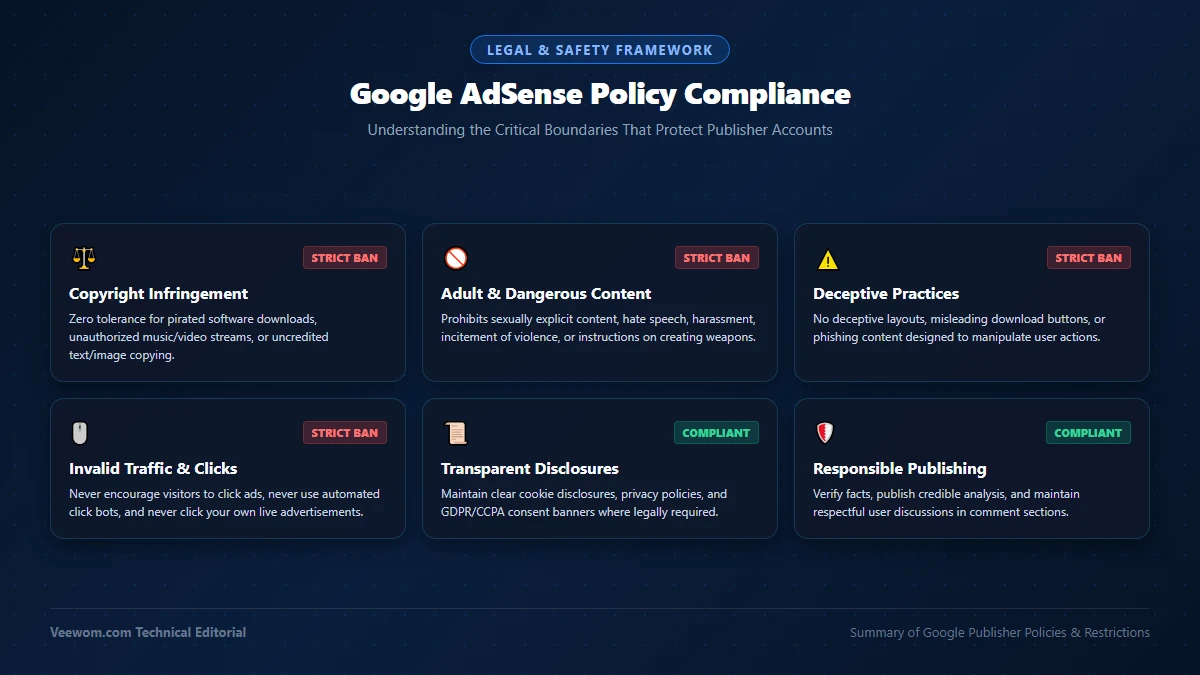
Key publisher policies governing copyright, safety, invalid traffic, and user disclosures.
Google AdSense Content Policies (Prohibited vs. Restricted)
Google maintains a strict distinction between content that is completely forbidden on the AdSense network and content that is permitted but subject to advertising restrictions.
1. Prohibited Content (Zero Tolerance)
Publishing any of the following content will lead to immediate rejection or permanent account termination:
- Copyright Infringement: Distributing copyrighted music, movies, cracked software, game ROMs, serial keys, or republishing copyrighted text and images without license.
- Adult & Sexually Explicit Content: Nudity, pornography, sexually suggestive imagery, or adult service promotions.
- Dangerous or Derogatory Content: Hate speech, harassment, cyberbullying, incitement of violence, or instructions on manufacturing weapons.
- Deceptive & Fraudulent Practices: Phishing, fake news, unproven miracle health cures, impersonation, or deceptive financial schemes.
2. Prohibited Behavioral Policies (Traffic & Ad Manipulation)
- Invalid Traffic: Never purchase traffic from traffic exchanges, automated bots, click farms, or suspicious pop-under networks. AdSense requires genuine, organic human engagement.
- Encouraging Clicks: Never ask friends, relatives, or visitors to “click ads to support the site”, and never place deceptive labels (like “Sponsored Resources” or “Click Here”) directly above advertisements.
- Clicking Your Own Ads: Never click on advertisements displayed on your own website, even once for testing. Google’s fraud detection algorithms immediately flag self-clicks and freeze earnings.
3. Google Publisher Restrictions (Limited Ads)
Content related to alcohol, tobacco, gambling, dating, or prescription pharmaceuticals is categorized under Google Publisher Restrictions. While not strictly illegal, fewer advertisers bid on this content, leading to restricted ad inventory and lower earnings.
SEO Practices Before Applying for AdSense
While Google does not explicitly state that you must rank on page one of Google to receive AdSense approval, implementing clean search engine optimization best practices demonstrates that your site is built to professional standards:
- Clean URL Structure: Use descriptive, human-readable permalinks (e.g.,
yourdomain.com/sample-guide/) rather than messy database query strings. - Descriptive Headings & Metadata: Ensure every article has a compelling title and an informative meta description. Clean up bloated headers using our tips in How to Clean Up WordPress Header Without Plugin.
- Search Console Integration: Connect your site to Google Search Console and submit your XML sitemap. This ensures Google’s web crawlers can discover, index, and evaluate your articles smoothly.
- Internal Linking: Link related articles together naturally using descriptive anchor text. This helps crawlers discover your content cluster and establishes topical authority.
- Page Speed Optimization: Slow websites have high bounce rates and frustrate visitors. Optimize your images and configure caching plugins. Check our complete guide on 10+ Proven Best Practices to Speed Up WordPress Sites.
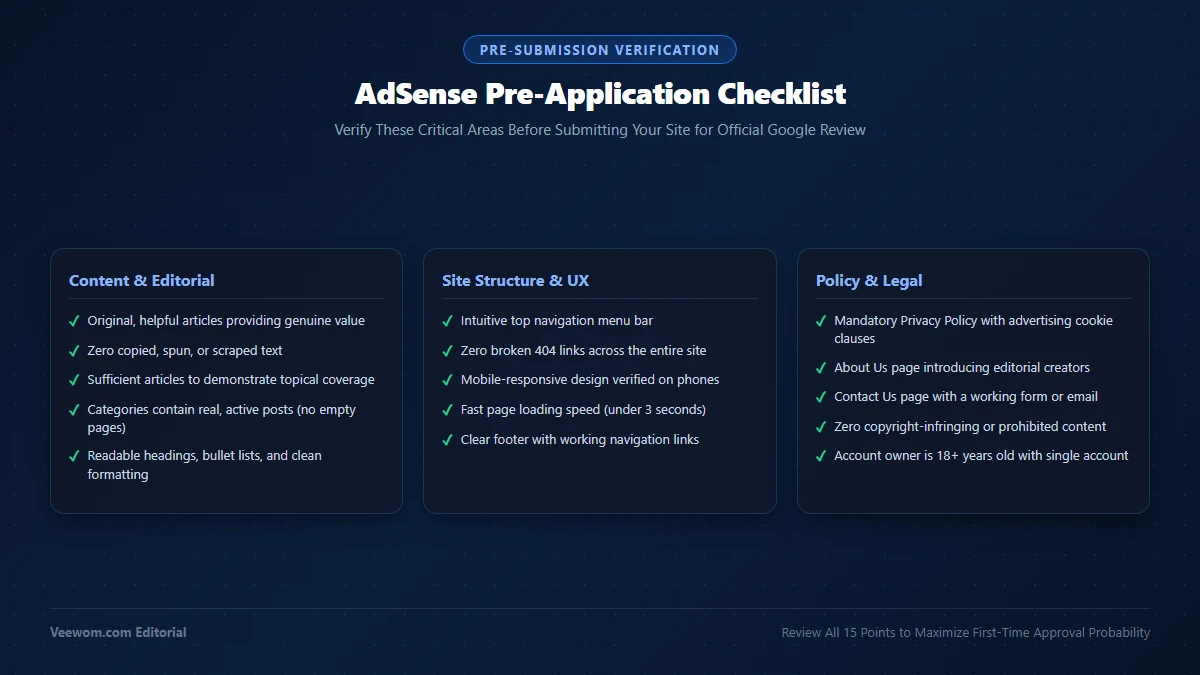
Essential pre-submission audit items across editorial quality, navigation, and legal pages.
Common Reasons Why New Websites Get Rejected (Troubleshooting Table)
If your application was rejected, review the comprehensive troubleshooting table below to diagnose the exact issue and apply the proven solution:
| Rejection Notice | Probable Cause | Recommended Solution |
|---|---|---|
| Low-Value Content | Articles are too brief, duplicated from other sites, generated with unedited AI, or lack original analysis and depth. | Audit all published posts. Delete thin, unhelpful articles. Write 5 to 10 comprehensive, original tutorials with personal insights, original screenshots, and unique data. Ensure every category archive contains multiple substantial articles. |
| Site Down or Unavailable | Googlebot was blocked by a server firewall, Cloudflare challenge, security plugin, or the AdSense code was placed incorrectly. | Temporarily disable aggressive Cloudflare security rules and security firewall plugins during review. Verify that the AdSense verification snippet sits cleanly between the <head> and </head> tags. Check server uptime with your host. |
| Navigation Issues | Menu items link to empty pages, dead-end 404 errors, confusing layouts, or broken pagination. | Test every single link in your top navigation menu, sidebar, and footer. Remove any menu categories that do not contain active posts. Ensure mobile navigation toggles open cleanly without overlapping content. |
| You Already Have an Existing Account | The applicant has an older AdSense account associated with a different email address, phone number, or tax ID. | Sign in to the older AdSense account and close it permanently via Account > Settings > Close Account, or log in to the existing approved account and simply add the new website under the Sites tab. |
| Site Does Not Comply with Policies | Content touches on copyright infringement, adult themes, pirated downloads, or deceptive claims. | Thoroughly review all articles against Google Publisher Policies. Remove any third-party copyrighted images, torrent links, cracked software references, or unverified claims. Re-read the policy guidelines carefully. |
| Missing Privacy Disclosures | The Privacy Policy is missing, generic, or does not mention third-party advertising cookies and opt-out links. | Update your Privacy Policy to explicitly mention that Google uses cookies to serve ads on your site and provide links to aboutads.info and Google Ad Settings for personalized ad opt-outs. |
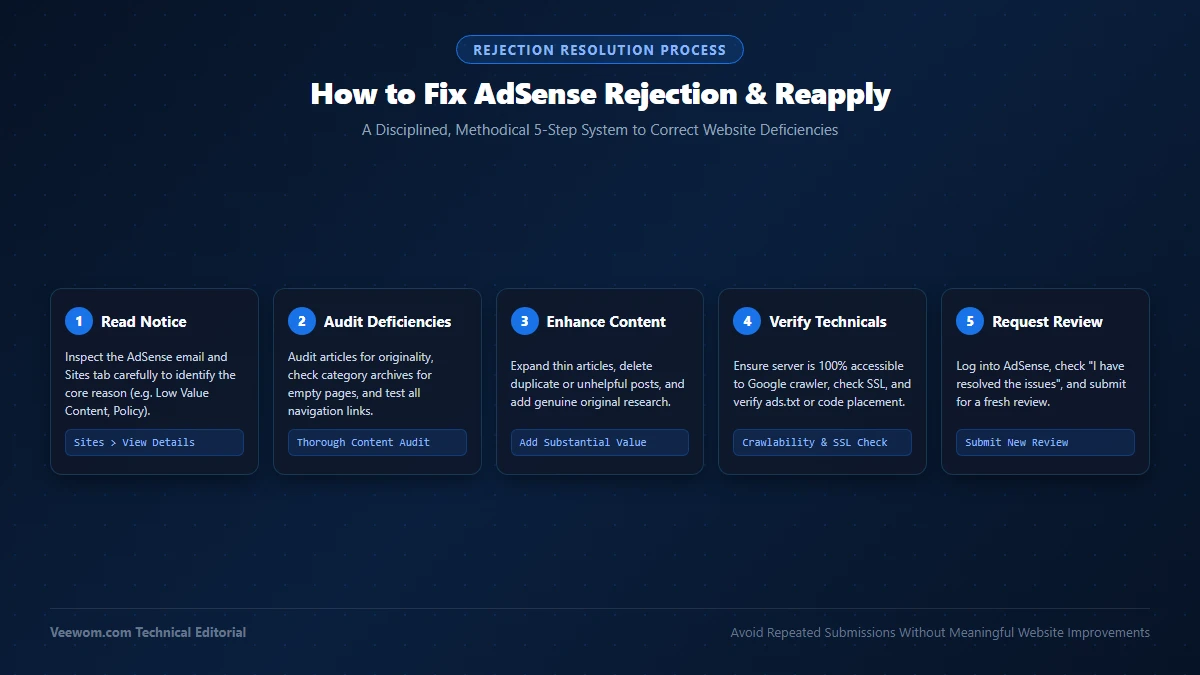
A structured five-step workflow to audit, improve, and resubmit a rejected website.
How to Fix AdSense Rejection and Apply Again
Receiving an AdSense rejection email can be discouraging, but it is a normal part of the learning curve for almost every professional blogger. The biggest mistake you can make is immediately clicking “Request Review” without making any changes to your site.
Follow this disciplined, five-step recovery process to turn your rejection into an approval:
- Carefully Analyze the Rejection Notice: Log in to your AdSense dashboard, go to the Sites tab, and click on your website to read the specific rejection feedback. Read between the lines—most “Low-value content” rejections mean your site lacks depth, has empty category archives, or offers nothing original over established competitors.
- Conduct a Brutally Honest Content Audit: Review every single article. Ask yourself: “Does this article provide genuine help, or did I simply rephrase someone else’s blog post?” Remove thin posts under 400 words, eliminate generic filler, and delete any placeholder test pages.
- Add Substantial Original Value: Write and publish 5 to 8 new, comprehensive, well-researched guides. Include custom illustrations, step-by-step screenshots, practical tips, and unique explanations. Ensure your website clearly demonstrates dedicated topical expertise.
- Verify Technical Accessibility & Legal Disclosures: Check that your Privacy Policy includes the required cookie clauses. Open an incognito browser window and verify that your website loads fast, displays zero console errors, and has a functional contact form.
- Submit for Re-Review: Once you have made genuine, noticeable improvements to your website, return to your AdSense dashboard, check the box confirming that you have resolved the issues, and click Submit.
Master AdSense Approval Checklist for New Websites
Before submitting your application, review this master checklist across five critical operational areas:
1. Account & Identity Eligibility
- [ ] Applicant is at least 18 years old (or operating under a verified parent/guardian account).
- [ ] Applicant does not possess any duplicate active or suspended AdSense accounts.
- [ ] Payee profile contains real legal name and accurate physical address.
2. Content & Editorial Standards
- [ ] 15 to 25+ original, thoroughly written articles published in a clear niche.
- [ ] Zero copied, scraped, or spun text from third-party blogs.
- [ ] Content provides distinct value, original tips, or firsthand problem-solving.
- [ ] No “Under Construction” notices, placeholder lorem ipsum, or empty drafts.
3. Site Structure & User Experience
- [ ] Clear top navigation menu bar linking to main active categories.
- [ ] Every category in the menu contains multiple published articles (no empty archives).
- [ ] Zero broken 404 links across all internal pages.
- [ ] Fully responsive layout tested on mobile devices and tablets.
4. Legal & Policy Pages
- [ ] Comprehensive Privacy Policy containing mandatory Google cookie and opt-out clauses.
- [ ] Genuine About Us page detailing editorial mission and author identity.
- [ ] Contact Us page with a functioning email or working contact form.
- [ ] Disclaimer and Terms of Use pages active in footer.
5. Technical Setup
- [ ] Custom top-level domain (e.g.,
.com,.org) connected cleanly. - [ ] Active SSL certificate enforcing HTTPS encryption across all pages.
- [ ] AdSense code snippet placed correctly inside the HTML
<head>tags. - [ ] Server firewalls or Cloudflare challenges disabled for Googlebot crawlers.
Frequently Asked Questions (FAQs)
#01. What are the Google AdSense approval requirements for new websites?
The official requirements include: being at least 18 years old, owning a website with original high-value content, full compliance with Google Publisher Policies, intuitive navigation, an active privacy policy with advertising cookie disclosures, and code access to verify site ownership.
#02. How many posts are required for AdSense approval?
Google has no official minimum article threshold. However, publishing 15 to 25 comprehensive, well-structured articles ensures that your website looks complete, demonstrates topical authority, and populates all menu categories with zero empty pages.
#03. Can a brand new website get approved for AdSense?
Yes. If a new website is technically sound, has an active SSL certificate, features high-value original articles, and includes all necessary legal pages, it can be approved within its first few weeks of operation.
#04. Does Google AdSense require a custom domain name?
While approved partner platforms like Blogger support free subdomains (.blogspot.com), a custom top-level domain (like .com or .org) is strongly recommended for independent websites. It signals serious commitment and long-term credibility.
#05. Can I get AdSense approval using free hosting?
Yes, provided the free hosting server is stable, supports HTTPS, and remains accessible to Google’s crawlers without frequent downtime. However, reliable budget hosting is recommended to prevent server timeouts during review.
#06. How much daily traffic is required for AdSense approval?
Google does not mandate a minimum traffic threshold for AdSense approval. Your application is evaluated on content quality, site design, and policy compliance rather than visitor volume. However, having modest organic traffic demonstrates that real people find your content helpful.
#07. Is a Privacy Policy strictly required for AdSense?
Yes. Having a comprehensive Privacy Policy that explicitly discloses third-party advertising cookies, personalized ad matching, and opt-out links (via aboutads.info) is a mandatory contractual requirement under Google Publisher Policies.
#08. Does every website need an About Us and Contact page?
While not explicitly cited as separate laws, these pages are essential trust signals. Google reviewers look for demonstrable human ownership and legitimate communication channels before approving a publisher account.
#09. How long does Google AdSense take to review a website?
The review typically takes between 48 hours and two weeks. During high-volume periods or if human review is required, it can occasionally take slightly longer.
#10. Can I apply for AdSense without Google Search Console?
Yes, but connecting your site to Google Search Console is highly recommended. It allows you to verify that Google is actively indexing your articles and identifies any crawl errors that could interfere with your AdSense review.
#11. Why does Google AdSense reject new websites with ‘Low-Value Content’?
“Low-value content” is Google’s most common rejection reason. It indicates that the site has thin articles, duplicates existing information, uses unedited mass AI text, lacks unique insights, or contains empty category pages.
#12. Can I reapply immediately after being rejected?
You can reapply, but you should never do so immediately without making noticeable improvements. Audit your content, expand thin articles, resolve navigation flaws, and re-submit only after your site provides substantially greater value.
#13. Can I use AI-assisted content on my website for AdSense?
Google does not penalize AI-assisted content simply because it was generated with AI tools. However, content must be thoroughly edited, fact-checked, original, and helpful to users. Low-effort mass-generated text lacking personal expertise will trigger quality rejections.
#14. Does getting AdSense approval guarantee high earnings?
No. Approval simply grants you the right to show ads. Your actual revenue depends on your traffic volume, geographic audience location, niche, and keyword Cost-Per-Click (CPC). Explore high-paying niches in our guide on Google AdSense Highest CPC Keywords List.
Conclusion
Securing Google AdSense approval for a new website is not about finding hidden tricks, gaming algorithms, or stuffing arbitrary word counts into web pages. It is about building a legitimate, user-focused digital resource that respects Google’s publisher policies.
When you focus on creating original, intent-driven articles that genuinely solve problems for your audience, present your content in a clean mobile-responsive layout, and provide transparent privacy and contact disclosures, Google AdSense approval becomes a natural, straightforward milestone in your website’s journey.
Take the time to work through our Pre-Application Checklist before submitting your site. Fix broken links, populate every category archive, write a comprehensive Privacy Policy, and verify that your server is fast and accessible.
We hope this comprehensive tutorial gives you the clarity and confidence needed to get your website approved for Google AdSense! If you have any questions about specific policy requirements, review notices, or fixing a rejection, leave a comment below, and our team at Veewom will gladly help you troubleshoot your website.
If you found this guide helpful, please share it with fellow bloggers and web creators. Connect with Veewom on Twitter, Facebook, and Instagram for the latest website monetization tutorials, SEO best practices, and blogging tips.
Also Read this
- How to Build an AdSense-Friendly Website Making $100 to $500/Month
- Google AdSense Highest CPC Keywords List (Top Paying Niches)
- 10+ Proven Best Practices to Speed Up WordPress Sites in 2026
- How to Register Free Domain Names (Top Legit Methods)
- Top 10 Best Free Web Hosting Providers (Tested & Ranked)
- Bluehost Review: Performance, Features, Speed & Pricing Tested
- Cloud Hosting Explained: Complete Architecture & Buying Guide
- How to Clean Up WordPress Header Without Plugin (Speed Up WP)
- Top 10 Easiest Ways to Earn Money Online in 2026


Editorial Staff
Editorial Staff at Veewom is a Team of Experts led by sandeep Kumar.
You may also like this!
© Veewom.com. | Managed by PinePL
