
Best Free Keyword Research Tools for Bloggers in 2027
Best Free Keyword Research Tools for Bloggers in 2027 | Welcome to another comprehensive tutorial by Veewom. If you have recently launched a blog or want to increase your organic search traffic without spending hundreds of dollars every month on expensive SEO subscriptions, discovering the best free keyword research tools is one of the most important steps you can take.
Keyword research is the backbone of successful blogging. It reveals what your audience is actively searching for, the exact phrases they type into Google, and the specific problems they need solved. When you understand search demand before writing, you can create targeted, genuinely helpful articles that rank organically, attract consistent readers, and build long-term topical authority.
However, many beginners believe a dangerous myth: that you cannot succeed in SEO unless you pay for premium subscriptions costing $100 to $250 each month. That is completely untrue. While enterprise tools offer convenient automation, the world’s most accurate search data comes directly from search engines and powerful free keyword tools that cost nothing to use.
In this in-depth guide, we at Veewom will review the best free keyword research tools for bloggers in 2027. Based on verified free plans and real-world testing, we will examine what each tool offers, its exact daily or monthly limitations, how to uncover low-competition long-tail keywords, and how to build a repeatable keyword research workflow that drives real organic traffic.
Also read this – Google AdSense Highest CPC Keywords List: Top Paying Niches
1. What Is Keyword Research and Why Does It Matter for Bloggers?
Keyword research is the methodical process of discovering, analyzing, and selecting the search terms that people type into search engines when looking for information, tutorials, products, or services. For bloggers, keyword research bridges the gap between what you want to write and what people are actually searching to find.
Keywords vs. Search Queries: Understanding the Difference
While people often use these terms interchangeably, there is an important technical distinction:
- Search Query: The real-world word or phrase a human user types into a search box (e.g., “why is my wordpress site loading so slow on mobile”). Search queries are often conversational, messy, and highly specific.
- Target Keyword: The standardized, strategic topic that content creators and SEOs target in their articles (e.g., “speed up wordpress website”).
Modern search engines like Google no longer match exact strings of text word-for-word. Through machine learning algorithms like RankBrain, BERT, and neural matching, search engines interpret the underlying search intent and topical meaning behind queries. Effective keyword research helps you identify that core intent so your blog post provides the exact answer the searcher needs.
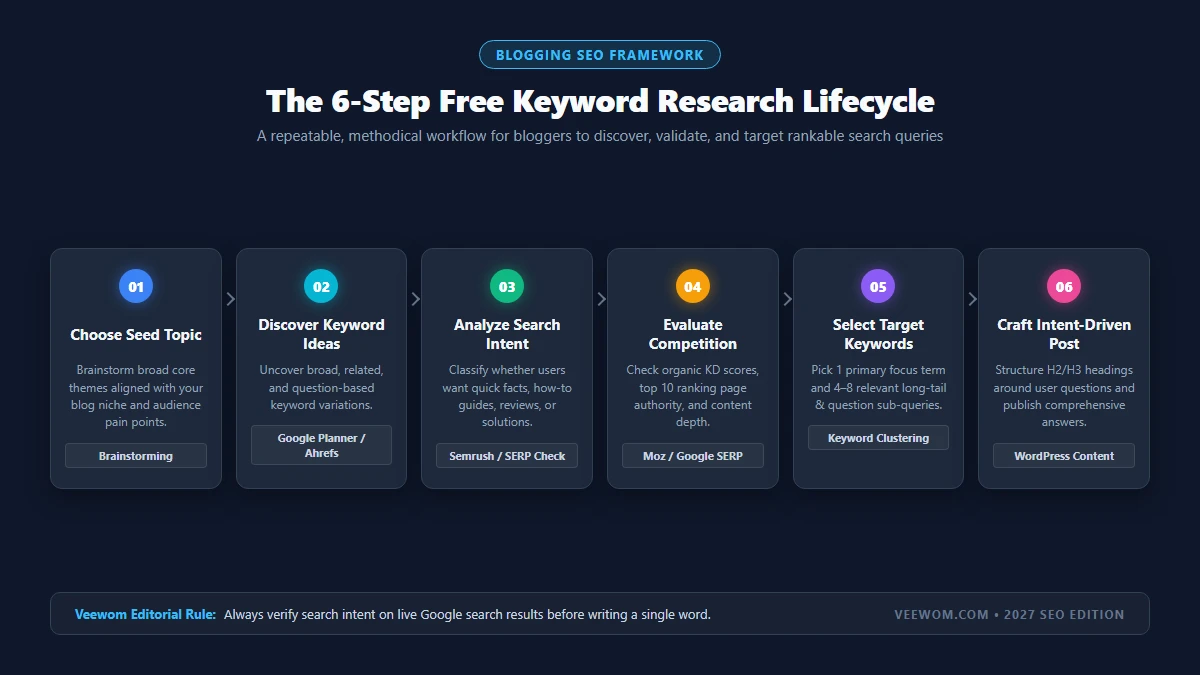
The six-step keyword research and validation framework for bloggers.
2. Why Do Bloggers Need Free Keyword Research Tools?
Publishing blog posts without keyword research is like driving in a foreign city without a map. You might occasionally stumble upon a scenic view, but most of your journey will be wasted time and fuel. Here is why every blogger needs free keyword research tools:
- Validating Real Search Demand: Before spending five hours writing an in-depth tutorial, keyword tools confirm whether anyone is actually searching for that topic.
- Uncovering High-Value Long-Tail Keywords: Specific 4+ word queries usually have lower competition, making it significantly easier for new blogs to rank on Google’s first page.
- Deciphering Search Intent: Keyword tools reveal whether searchers want a fast factual definition, a step-by-step how-to guide, an objective product comparison, or a direct download.
- Structuring Content Categories: Keyword clustering helps you organize your blog into logical silos and categories, creating a clear internal linking structure that search engine bots can crawl easily.
- Optimizing Existing Articles: Free tools like Google Search Console reveal search queries where your published articles already receive impressions on page two, highlighting quick optimization wins.
- Avoiding Random Publishing: Content consistency requires an organized editorial calendar. Keyword tools provide a continuous stream of relevant topic ideas so you never run out of things to write.
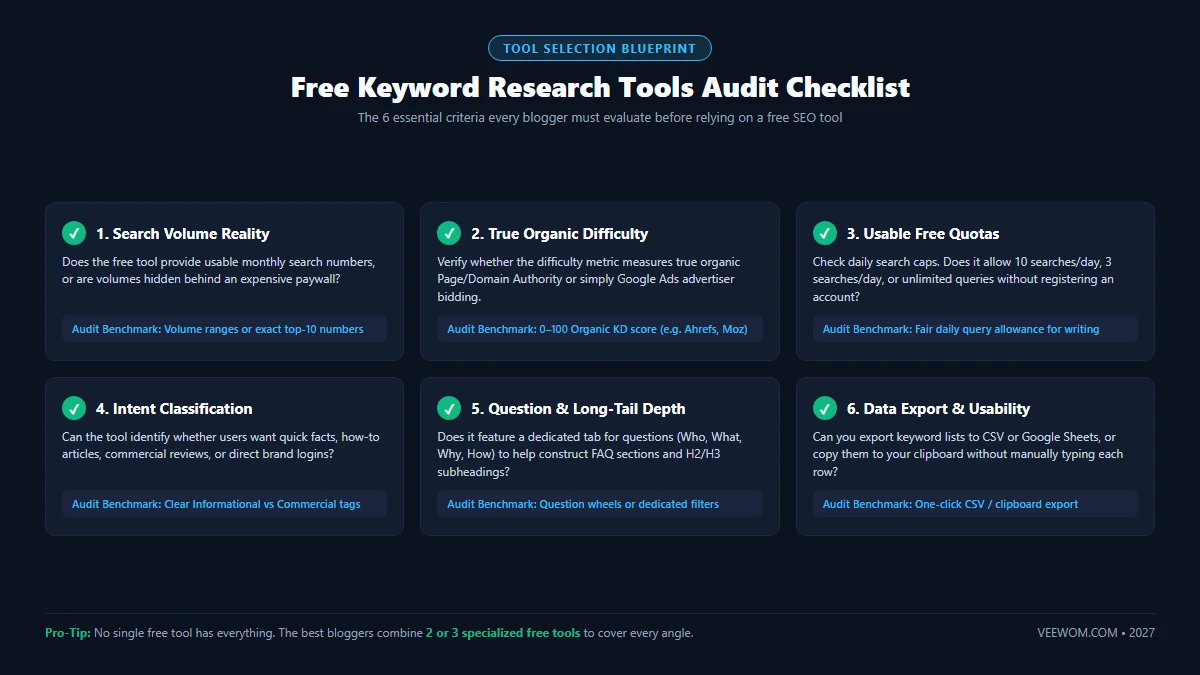
The six-point audit checklist before adopting a free SEO keyword research tool.
3. What Should You Look for in a Free Keyword Research Tool?
Not all free keyword tools are created equal. Some offer unlimited searches but hide search volume behind a paywall; others show exact search volumes but limit you to three searches per day. When evaluating a free tool, pay attention to these core capabilities:
- Search Volume Estimates: An approximation of how many times a query is searched per month. Note that Google Keyword Planner provides ranges for unpaid accounts, while tools like Ahrefs and Moz provide modeled estimates.
- True Organic Keyword Difficulty (KD): Ensure the difficulty score measures actual organic competition (the strength of top-ranking web pages), rather than paid Google Ads advertiser competition.
- Cost-Per-Click (CPC): While CPC is an advertising metric, high CPC numbers indicate commercial value, which is vital if you monetize with contextual ads or affiliate partnerships.
- Search Intent Classification: Tools that categorize queries into Informational, Navigational, Commercial, or Transactional intent save valuable planning time.
- Question and Long-Tail Discovery: Dedicated filters for questions (“How”, “What”, “Why”) allow you to craft high-converting FAQ sections and targeted headings.
- Export Functionality: The ability to export keyword lists to CSV or Google Sheets makes building an editorial calendar much simpler.
- Fair Usage Quotas: Transparent daily or monthly query limits so you can plan your research sessions without surprise lockouts.
4. Best Free Keyword Research Tools for Bloggers in 2027
Below are in-depth, hands-on reviews of the most effective free keyword research tools available. Each tool has been tested to verify its current free capabilities, registration requirements, and practical limitations.
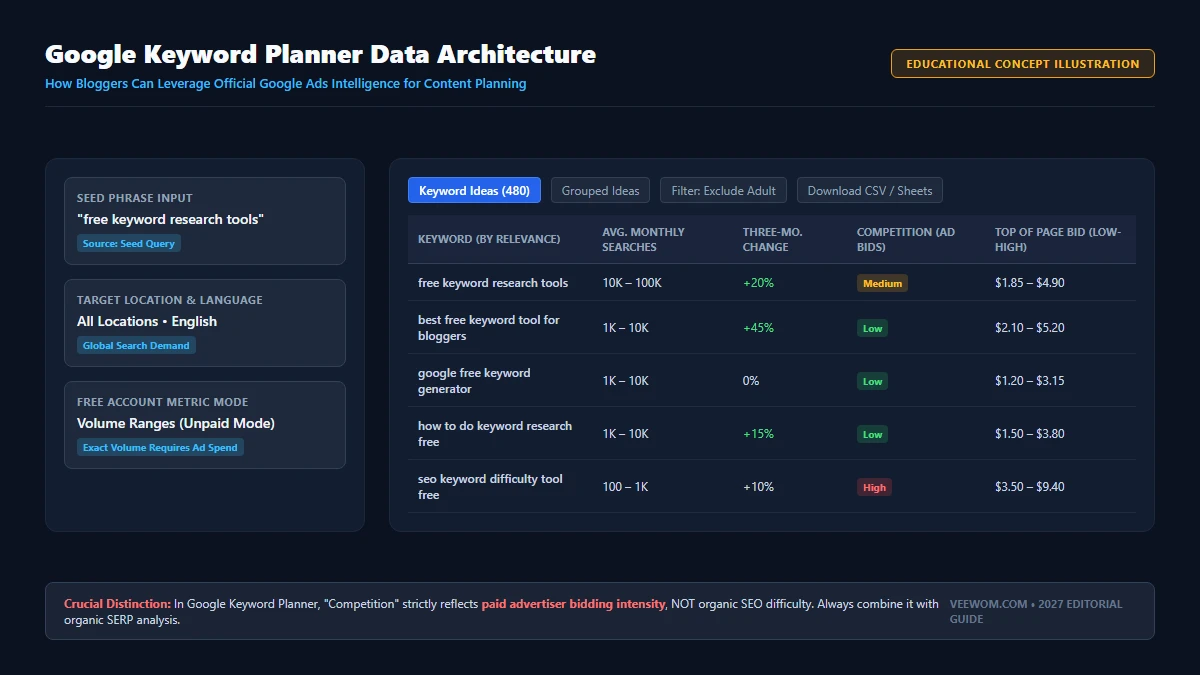
Educational architecture of Google Keyword Planner data outputs and advertiser bidding metrics.
4.1 Google Keyword Planner
Google Keyword Planner is Google’s official keyword research engine, built inside the Google Ads platform. Because the data comes straight from Google’s internal search repository, it remains the primary source that many third-party SEO tools aggregate and model.
- Official Website: https://ads.google.com/home/tools/keyword-planner/
- Account Requirements: Requires a free Google account. When creating your Google Ads account, select “Switch to Expert Mode” and choose “Create an account without a campaign” to access Keyword Planner without entering credit card billing information.
- Available Free Features: Uncovers hundreds of related keyword ideas from seed phrases or website URLs; filters by language, geographic region, and date range; shows historical search trends and category groupings; allows unlimited CSV and Google Sheets exports.
- Search Volume & Metrics: Unpaid accounts see search volumes as broad range brackets (e.g., 100–1K, 1K–10K, 10K–100K). Exact numbers require an active paid advertising campaign.
- Keyword Difficulty: Shows “Competition” (Low, Medium, High). Important: This strictly reflects the density of paid advertisers bidding on the keyword in Google Ads, NOT organic SEO difficulty.
- CPC Metrics: Shows Top of Page Bid (low and high range), which provides an excellent benchmark for ad monetization potential.
- Advantages: Official Google search database; unlimited searches; reliable monetization data; powerful location filters.
- Limitations: Broad search volume ranges for non-paying users; no organic SEO difficulty score.
- Best Use Case: Discovering authentic search term clusters, validating geographic demand, and assessing ad monetization potential.
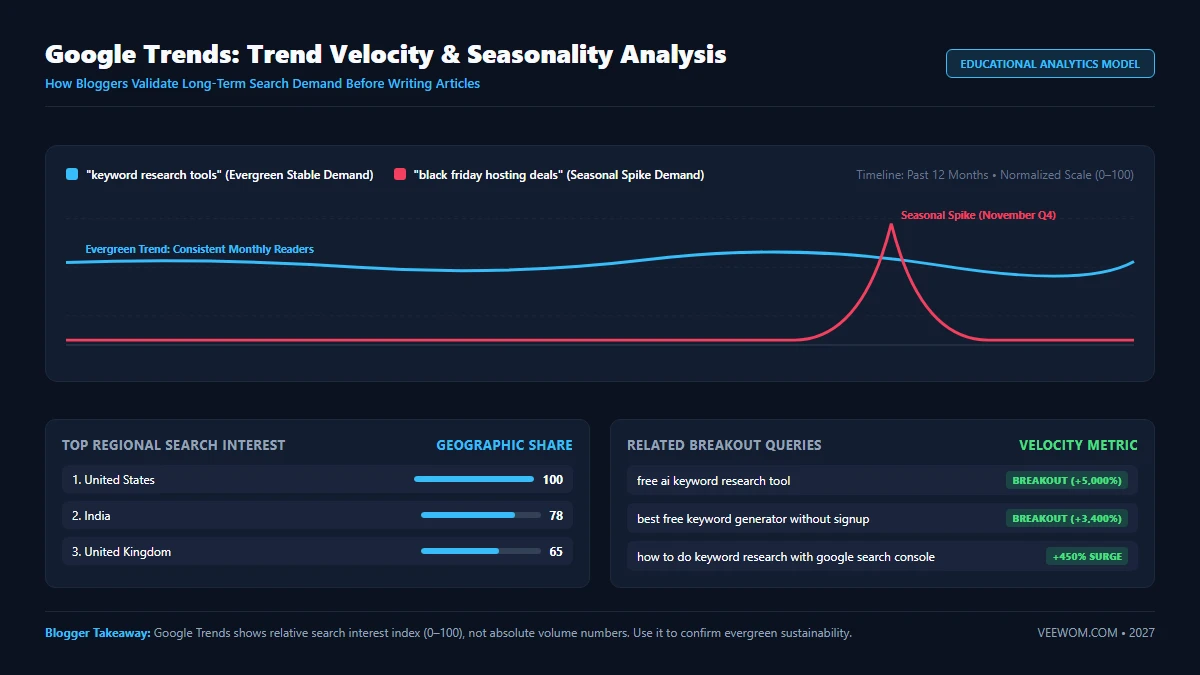
Comparing evergreen versus seasonal search trends and regional interest in Google Trends.
4.2 Google Trends
Google Trends is a 100% free search analytics service that visualizes the relative popularity and momentum of search terms over time, across regions, and between different queries.
- Official Website: https://trends.google.com/
- Account Requirements: None. Completely accessible without logging in.
- Available Free Features: Normalized interest score (0 to 100) across custom date ranges (past hour to 2004–present); geographic interest maps down to state and city levels; comparative search analysis for up to 5 terms; filtering across Web Search, YouTube, Image, and News; CSV data downloads.
- Breakout Topics: Highlights “Related queries” with “Breakout” badges, indicating that search interest has grown by more than 5,000% over the chosen timeframe.
- Search Volume & Metrics: Does not display absolute monthly search numbers; instead, displays relative interest indexes.
- Advantages: Instant identification of rising trends; reveals seasonal peaks (e.g., Black Friday deals or summer travel); prevents bloggers from targeting dying topics.
- Limitations: No exact search volumes; no organic difficulty scores.
- Best Use Case: Checking whether a blog topic is growing or declining, planning seasonal content schedules, and discovering breakout viral queries.
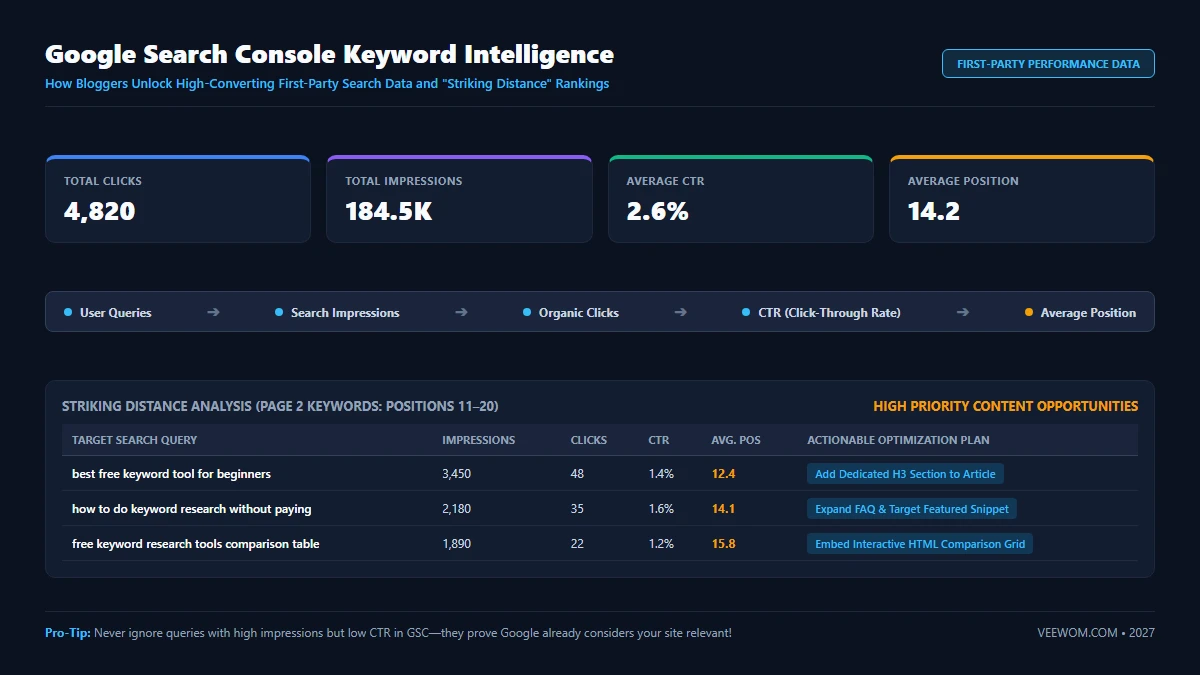
The GSC performance metric pipeline and striking distance keyword identification.
4.3 Google Search Console (Performance Report)
Google Search Console (GSC) is Google’s official webmaster dashboard. It provides direct, first-party data on how your published website performs in Google’s organic search results.
- Official Website: https://search.google.com/search-console/
- Account Requirements: Free Google account plus domain ownership verification (via DNS TXT record, HTML tag, or file upload).
- Available Free Features: The Performance report displays exact organic Impressions, Clicks, Click-Through Rate (CTR), and Average Position for all queries your blog ranks for; page-level query breakdown; 16 months of historical data; export to Sheets, CSV, or BigQuery.
- Striking Distance Opportunities: Filter queries by average position between 11.0 and 25.0. These are “page two” keywords where Google already views your blog as relevant. By updating the post with a dedicated sub-heading and clearer answers, you can often push these keywords onto page one.
- Advantages: 100% accurate first-party data; zero estimation models; identifies unexpected queries real visitors use to find your posts.
- Limitations: Only shows data for websites you own; cannot analyze competitor domains.
- Best Use Case: Content refreshes, improving meta descriptions to boost CTR, and discovering untapped secondary keywords for existing articles.
4.4 Ahrefs Free Keyword Generator
Ahrefs Free Keyword Generator is a fast, web-based tool powered by Ahrefs’ database of billions of search queries across global markets.
- Official Website: https://ahrefs.com/keyword-generator
- Account Requirements: Completely free. No account registration, login, or credit card required.
- Available Free Features: Generates up to 100 keyword suggestions and up to 50 question ideas per query; displays exact estimated monthly Search Volume and Ahrefs Keyword Difficulty (KD from 0 to 100) for the top 10 results; multi-platform support (Google, Bing, YouTube, Amazon); country selector covering 170+ locations.
- Limitations: Volume and KD metrics are blurred for results beyond the top 10; no one-click bulk CSV export button.
- Advantages: Clean, responsive interface; genuine organic Keyword Difficulty (KD) based on backlink profiles; excellent for rapid topic validation.
- Best Use Case: Checking organic keyword difficulty scores and discovering question-based headings without logging into an account.
4.5 Ahrefs Webmaster Tools (AWT)
Ahrefs Webmaster Tools (AWT) is Ahrefs’ free tier for verified website owners, offering features typically reserved for high-tier paid plans.
- Official Website: https://ahrefs.com/webmaster-tools
- Account Requirements: Free account registration plus site ownership verification via Google Search Console.
- Available Free Features: Organic Keywords report showing all search terms your verified website ranks for in the top 100; exact search volumes, KD scores, ranking URLs, and estimated organic traffic; monthly SEO site audits scanning up to 5,000 URLs for technical issues; backlink monitoring.
- Limitations: Operates strictly on websites you own; cannot be used for competitor domain research.
- Best Use Case: In-depth keyword rank tracking, discovering keywords your blog is already ranking for, and ongoing technical SEO health monitoring.
4.6 Semrush Keyword Magic Tool (Free Account Tier)
Semrush Keyword Magic Tool is one of the most comprehensive keyword databases in the industry. Semrush provides limited free access that is remarkably useful for bloggers.
- Official Website: https://www.semrush.com/analytics/keywordmagic/
- Account Requirements: Free Semrush account registration (no credit card needed).
- Available Free Features: 10 free searches per 24-hour period across Semrush tools; displays the top 10 keyword rows per search; exact Search Volume, Keyword Difficulty percentage (KD%), Search Intent tags (Informational, Navigational, Commercial, Transactional), and CPC estimates; topical keyword grouping filters along the left rail; dedicated Questions tab.
- Limitations: Strict limit of 10 queries per day; results past row 10 are hidden; data export is disabled on free accounts.
- Advantages: Best-in-class search intent tags; helpful topical clustering to build topical authority silos.
- Best Use Case: Checking exact search intent classifications and evaluating competitive keyword difficulty on your top 5–10 focus keywords each day.
4.7 Ubersuggest (Free Plan)
Ubersuggest, developed by Neil Patel, is a beginner-oriented SEO suite combining keyword ideas, content suggestions, and competitor insights.
- Official Website: https://neilpatel.com/ubersuggest/
- Account Requirements: Free usage without login (1–2 searches); free Google account login provides 3 free searches per day.
- Available Free Features: Keyword suggestions, related terms, questions, and comparisons; monthly Search Volume estimates, SEO Difficulty (SD), and estimated CPC; historical 12-month search volume charts; top-ranking pages for the query.
- Limitations: Daily search cap of 3 queries per account; export options are limited on the free plan.
- Best Use Case: Quick visual checks on keyword difficulty and brainstorming related subheadings for bloggers who prefer an intuitive dashboard.
4.8 Keyword Tool (keywordtool.io – Free Version)
Keyword Tool utilizes Google Autocomplete to generate extensive lists of long-tail search terms across different languages and platforms.
- Official Website: https://keywordtool.io/
- Account Requirements: Completely free. Zero registration required.
- Available Free Features: Generates up to 750+ long-tail keyword suggestions per search query; separate tabs for Questions, Prepositions, and Alphabetical modifiers (A to Z); multi-platform search support (Google, YouTube, Bing, Amazon, App Store); one-click “Copy All” and Excel export.
- Limitations: Search Volume, Trend data, CPC, and Competition scores are blurred on the free tier.
- Best Use Case: Scraping hundreds of real-world long-tail variations and questions to build comprehensive blog outlines.
4.9 AnswerThePublic
AnswerThePublic visualizes search query data by mapping Google Autocomplete searches into circular question wheels and organized lists.
- Official Website: https://answerthepublic.com/
- Account Requirements: Free account registration required.
- Available Free Features: 3 free searches per day; organizes queries into question groups (Who, What, Where, When, Why, How, Can, Are, Which); preposition variations (for, with, near, without, to); comparison queries (vs, like, and, or); high-resolution image export and CSV data download.
- Limitations: Cap of 3 daily searches; numerical search volumes require a paid plan.
- Best Use Case: Uncovering the exact phrasing readers use when asking questions, making it the premier tool for building FAQ sections.
4.10 AlsoAsked
AlsoAsked aggregates and visualizes nested “People Also Ask” (PAA) data from live Google search results, revealing how Google understands topical relationships.
- Official Website: https://alsoasked.com/
- Account Requirements: Free account registration required.
- Available Free Features: 3 free search credits per month; hierarchical tree diagram showing how primary questions branch into secondary and tertiary questions; country and language selection; PNG and CSV export.
- Limitations: Very low free query allowance (3 searches/month); free tier limits search depth to Level 2.
- Best Use Case: Architecting comprehensive pillar articles and structuring H2 and H3 headings to answer search queries thoroughly.
4.11 WordStream Free Keyword Tool
WordStream Free Keyword Tool is a Google Ads Premier Partner tool designed to provide keyword suggestions along with commercial advertising benchmarks.
- Official Website: https://www.wordstream.com/keywords
- Account Requirements: Free web access; entering an email address unlocks full CSV report downloads.
- Available Free Features: Generates hundreds of keyword ideas from a seed keyword or website URL; displays estimated Google Search Volume, Top of Page Bid (low/high range), and Google Ads Competition; industry niche filtering; country targeting across 50+ countries.
- Limitations: Focused on paid search advertising metrics rather than organic SEO difficulty scores.
- Best Use Case: Evaluating commercial search queries and estimating CPC values for bloggers planning AdSense-monetized articles.
4.12 Moz Keyword Explorer
Moz Keyword Explorer is a venerable SEO research engine known for its proprietary Keyword Difficulty scoring and organic Click-Through Rate modeling.
- Official Website: https://moz.com/explorer
- Account Requirements: Free Moz Community account registration required.
- Available Free Features: 10 free keyword queries per calendar month; monthly search volume ranges; Moz Keyword Difficulty (0–100 scale) measuring Page Authority (PA) and Domain Authority (DA) of the top 10 ranking pages; Organic CTR percentage score; “Priority” metric combining volume, difficulty, and CTR; SERP Analysis table showing top 10 ranking URLs; CSV export.
- Limitations: Strict limit of 10 queries per month.
- Best Use Case: Benchmarking organic domain authority requirements for your most important cornerstone blog articles each month.
4.13 Google Native Search Intelligence (Autocomplete, PAA & Related Searches)
Never overlook Google itself. The native search engine interface provides 100% free, real-time insights straight from Google’s ranking algorithms.
- Google Autocomplete: Start typing your seed keyword into the search bar. Google dynamically suggests queries based on real user search volume. Pro-Tip: Use the wildcard asterisk (
*) before or between words (e.g.,best free * tools for bloggers) to reveal hidden long-tail phrases. - People Also Ask (PAA): The interactive accordion boxes displayed in SERPs reveal related user questions. Clicking to expand an answer dynamically prompts Google to load additional relevant questions.
- Related Searches: Located at the bottom of the search results page, this section reveals related search concepts that Google’s algorithm associates with your primary query.
- Advantages: Zero cost, zero query limits, and 100% current live data.
- Best Use Case: Immediate validation of search intent and identifying natural language subheadings before publishing.
4.14 Bing Webmaster Tools (Keyword Research)
Bing Webmaster Tools features a full-fledged, completely free keyword research tool built directly inside its webmaster portal.
- Official Website: https://www.bing.com/webmasters
- Account Requirements: Free Microsoft account plus site verification (instant verification by importing from Google Search Console).
- Available Free Features: Displays organic search volumes, historical trend charts, related keywords, and question queries based on Bing search data; country, language, and date range filters (up to past 6 months); top 10 URLs currently ranking in Bing for each keyword; completely free with generous query allowances.
- Limitations: Data reflects Microsoft Bing search volume (approximately 8–10% of desktop searches), though search interest trends correlate closely with Google patterns.
- Best Use Case: Exploring organic search trends, related queries, and question ideas without artificial daily query limits.
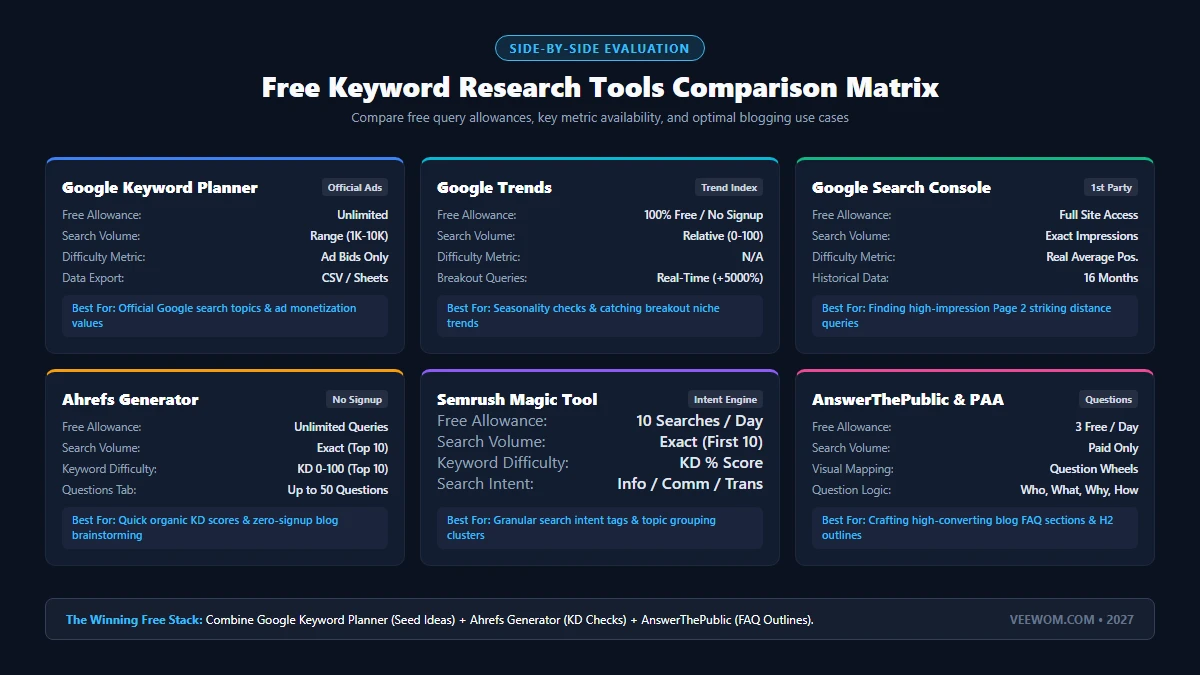
Side-by-side comparison of the top free keyword research tools for bloggers.
5. Best Free Keyword Research Tools Comparison Table
The comparison table below provides a verified overview of each tool’s free tier capabilities, metric availability, and ideal use cases:
| Tool Name | Free Allowance | Search Volume | Keyword Difficulty | Question Keywords | Best Use Case |
|---|---|---|---|---|---|
| Google Keyword Planner | Unlimited (Google Ads) | Ranges (1K–10K) | Ad Bids Only | Yes (via filters) | Official Google search ideas & monetization CPC bids |
| Google Trends | Unlimited (No login) | Relative (0–100) | Not available | Yes (Related queries) | Validating evergreen stability & breakout seasonal queries |
| Google Search Console | Full Site Data | Exact Impressions | Average Position | Yes (Queries report) | First-party rankings & Page 2 striking distance opportunities |
| Ahrefs Keyword Generator | Unlimited queries | Exact (Top 10) | Organic KD (Top 10) | Yes (Dedicated tab) | Quick organic KD checks without account registration |
| Ahrefs Webmaster Tools | 5,000 URLs/mo audit | Exact (Top 100) | Full KD metrics | Yes (Ranked queries) | Ongoing rank tracking & technical health for your domain |
| Semrush Magic Tool | 10 searches / day | Exact (First 10) | Organic KD % | Yes (Dedicated tab) | Search Intent tags & topic clustering for target posts |
| Ubersuggest | 3 searches / day | Estimated numbers | SEO Difficulty (SD) | Yes (Dedicated tab) | Beginner-friendly visual difficulty & content ideas |
| Keyword Tool (.io) | Unlimited queries | Blurred in free | Not available | Yes (Questions tab) | Scraping 750+ Google autocomplete long-tail variations |
| AnswerThePublic | 3 searches / day | Paid tier only | Not available | Yes (Question wheels) | Visual question mapping for blog outlines & FAQ sections |
| AlsoAsked | 3 searches / month | Not available | Not available | Yes (Nested PAA) | Hierarchical People Also Ask relationship mapping |
| WordStream Free Tool | Unlimited (Email CSV) | Estimated volume | Ad Bids Only | Yes | Commercial ad bid benchmarking & AdSense research |
| Moz Keyword Explorer | 10 queries / month | Volume ranges | Organic KD (0–100) | Yes (Suggestions) | Accurate SERP difficulty & organic CTR benchmarks |
| Bing Webmaster Tools | Generous / Unlimited | Bing search data | Not available | Yes (Questions tab) | Unrestricted search volume trends & question discovery |
| Google Native SERP | Unlimited (Zero cost) | SERP Analysis | Live Competitors | Yes (PAA & Autocomplete) | Direct reality check on current Google ranking intent |
6. Best Free Keyword Research Tools for Different Types of Bloggers
Every blogging niche has distinct research needs. Here is how to select the right free tools for your specific content strategy:
- Beginner Bloggers: Google Keyword Planner + Ahrefs Free Keyword Generator. Google Planner provides official search ideas, while Ahrefs gives you quick KD checks on the top 10 suggestions without requiring an account.
- Technology & Software Bloggers: Semrush Keyword Magic Tool + Google Search Console. Tech readers often have specific commercial intent (“best vs alternatives”). Semrush’s intent tags and GSC’s striking distance metrics provide a significant competitive advantage.
- News & Educational Bloggers: Google Trends + Google Autocomplete. Breaking topics and seasonal educational curricula require real-time breakout detection rather than trailing historical databases.
- Affiliate Marketers: Ahrefs Free Generator + WordStream / Google Keyword Planner. Affiliate blogging depends on commercial search terms. Keyword Planner reveals high advertiser bid rates, while Ahrefs helps identify low-KD buyer guides.
- Food & Recipe Bloggers: AnswerThePublic + Google Autocomplete. Food searches are heavily question-driven (e.g., “can you freeze baked cheesecake” or “substitute for almond flour in brownies”). Visual question wheels simplify recipe FAQ generation.
- Travel Bloggers: Google Trends + Google Keyword Planner. Travel searches are inherently seasonal and location-dependent. Trends highlights peak booking months, while Keyword Planner pinpoints regional interest.
- WordPress & Web Development Bloggers: Google Search Console + Ahrefs Webmaster Tools. Technical blogs thrive on troubleshooting queries. GSC shows the exact phrasing users typed before finding your code snippets.
- Local Business Bloggers: Google Keyword Planner + Bing Webmaster Tools. Keyword Planner excels at granular geographic filtering (targeting specific cities or states), which is essential for local ranking.
- International Multi-Language Bloggers: Keyword Tool (.io) + Google Trends. Keyword Tool supports search scraping across dozens of localized Google country domains and languages.
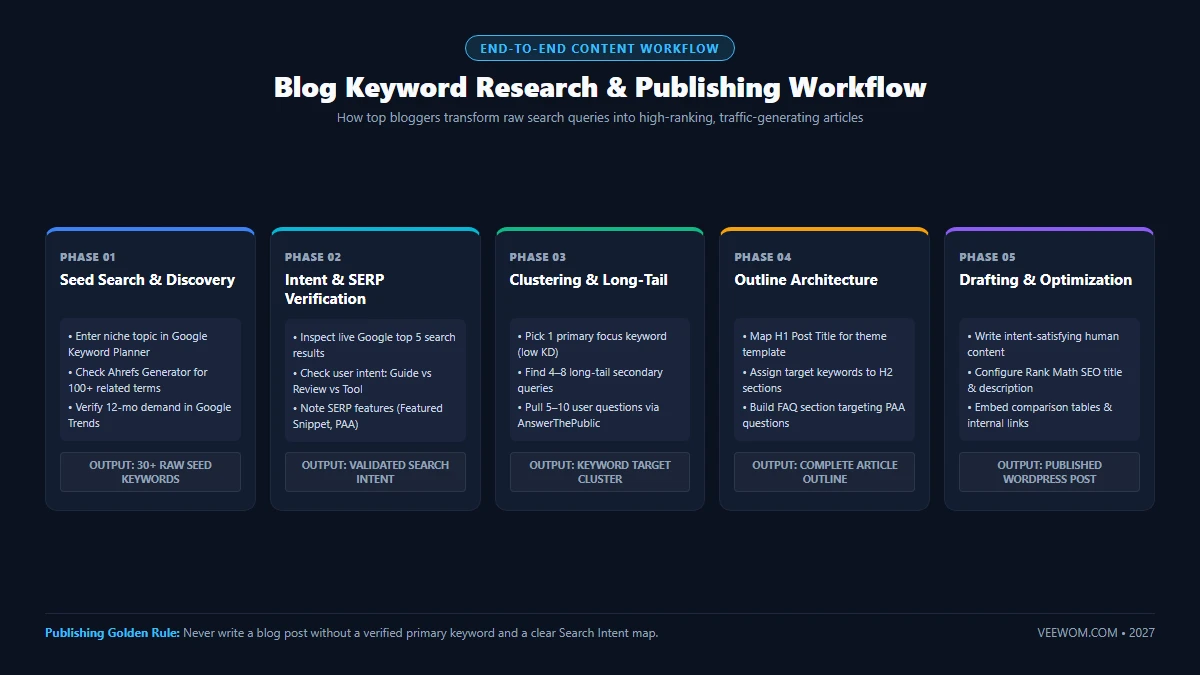
End-to-end editorial workflow from seed keyword discovery to published post.
7. How to Find Low-Competition Keywords Using Free Tools (Step-by-Step Tutorial)
Finding low-competition keywords does not require expensive software. Follow this disciplined 10-step process using 100% free tools:
- Choose a Specific Seed Topic: Avoid broad one-word ideas like “hosting”. Narrow it down to a focused sub-topic, such as “free web hosting for students”.
- Generate Broad Ideas in Google Keyword Planner: Enter your seed term to pull 200+ related search ideas and confirm general search demand.
- Expand Long-Tail Variations via Google Autocomplete: Type your seed keyword into Google and insert an asterisk wildcard (
*) before or between words to uncover specific phrasing. - Gather Real User Questions with AnswerThePublic: Pull questions starting with “How”, “Why”, “Can”, and “Which” to use as sub-topics.
- Validate Topic Momentum in Google Trends: Verify that search interest is stable or growing over a 12-month timeline, avoiding dying search trends.
- Check Organic Keyword Difficulty in Ahrefs Generator: Paste your top 5 favorite keyword variations into Ahrefs Free Keyword Generator. Look for terms with a KD score under 20.
- Analyze the Live Google SERP: Open an incognito browser window and search for the target phrase. Examine the top 5 ranking results:
- Are they massive authoritative websites (Wikipedia, Forbes) or smaller niche blogs?
- Do the top results answer the search intent directly, or are they outdated forum threads?
- If smaller blogs or community forums rank on page one, the keyword has low competitive resistance.
- Identify Content Gaps: Read the top 3 ranking articles. Note what they missed: Did they omit step-by-step screenshots? Is their information outdated? Are their explanations confusing?
- Select One Primary & 4–6 Secondary Keywords: Choose one primary low-KD keyword for your post title and assign related secondary phrases to your subheadings.
- Construct an Outline That Solves User Intent: Write descriptive
<h2>and<h3>subheadings directly addressing the questions you uncovered, providing a more thorough, current, and readable answer than existing pages.
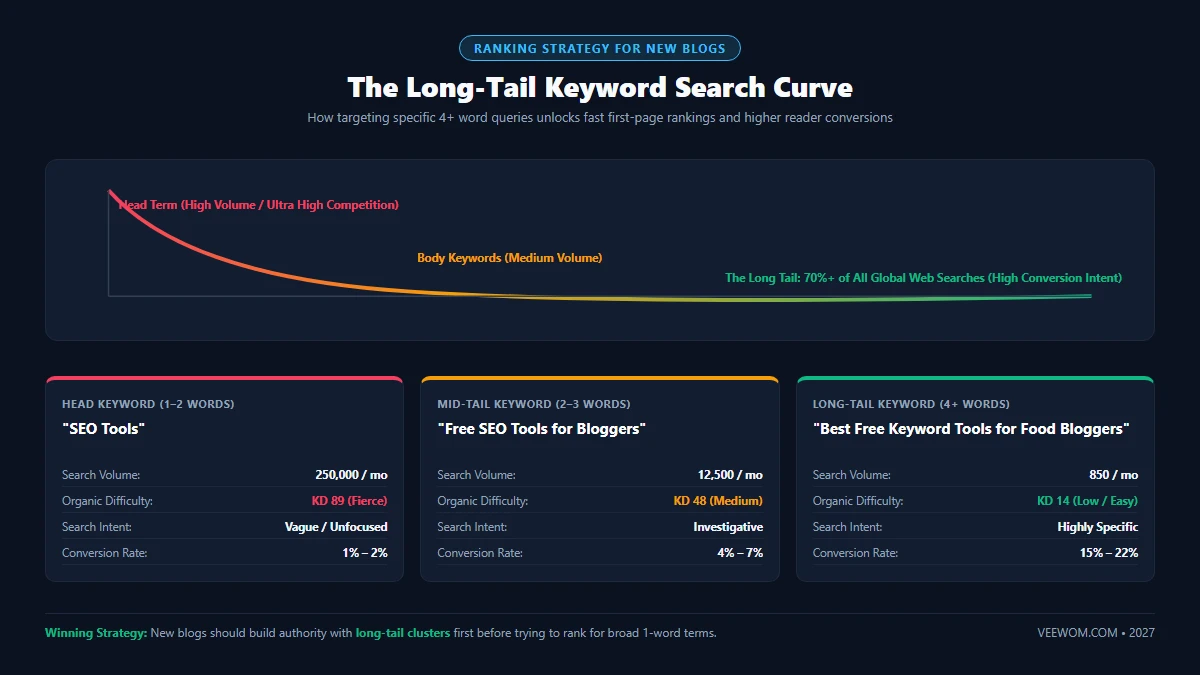
The long-tail search demand curve and conversion efficiency comparison for new blogs.
8. How to Find Long-Tail Keywords for Blog Posts
Long-tail keywords are specific, multi-word search queries (typically 4 or more words). While individual long-tail terms receive fewer searches than broad head keywords, collectively they account for more than 70% of all global search traffic.
Why Long-Tail Keywords Are Essential for New Blogs
- Lower Organic Resistance: Established authority sites focus their resources on broad high-volume terms, leaving thousands of specific long-tail queries underserved.
- Clearer Search Intent: A user searching for “shoes” has vague intent. A user searching for “best waterproof running shoes for flat feet” knows exactly what they want and is ready to take action.
- Faster Ranking Velocity: Thorough, intent-focused articles targeting low-KD long-tail queries can rank on Google’s first page within weeks, rather than waiting months or years.
Practical Technology Blog Example: “Best Free Website SEO Tools”
To see how long-tail keyword clustering works in practice, imagine we are planning an article for a technology blog on the seed topic: “Website SEO Tools”.
| Keyword Classification | Search Query Example | Search Intent | Target Placement in Post |
|---|---|---|---|
| Broad Head Keyword | SEO Tools | Informational (Vague) | Topic Category / Tag |
| Primary Focus Keyword | Best Free Website SEO Tools | Commercial Investigation | Post Title (H1) & Meta Description |
| Long-Tail Variation 1 | free seo tools for small business website | Commercial / Informational | Dedicated H2 Section |
| Long-Tail Variation 2 | best free on page seo analysis tools | Commercial Investigation | Dedicated H3 Subheading |
| Question Query 1 | how can I check my website seo for free | Informational (Tutorial) | H2 Tutorial Section |
| Question Query 2 | are free seo tools accurate for bloggers | Informational | FAQ Item #01 |
| Long-Tail Variation 3 | free seo tools without monthly subscription | Commercial Investigation | Comparison Table Header |
By organizing your post around this unified keyword cluster, your single article can rank for dozens of related search queries simultaneously while maintaining a natural, reader-friendly flow.
9. How to Use Google Search Console for Keyword Research
Most bloggers treat Google Search Console merely as an error monitor. In reality, it is one of the most powerful free keyword research tools in existence because it reveals the exact queries real visitors use to find your website.
Step-by-Step Optimization Process
- Open the Performance Report: Sign in to Google Search Console, select your verified domain, and click Performance > Search results in the left sidebar.
- Enable All Four Metric Cards: Check the boxes for Total Clicks, Total Impressions, Average CTR, and Average Position so all four metrics appear on the chart.
- Filter by Target Blog Post: Click + New > Page and enter the URL of a blog post published at least 60 days ago.
- Review the Queries Table: Scroll down to inspect the queries generating impressions for that specific URL.
- Identify “Page 2” Striking Distance Keywords: Sort the table by Average Position descending. Look for queries ranking between position 11.0 and 25.0 with significant impressions.
- Assess Content Alignment: Ask yourself: Does my article thoroughly answer this query? Often, you will find queries your article mentions only once in passing.
- Expand Your Content: Edit the published post. Add a dedicated
<h3>subheading addressing the striking distance query, provide a clear 2-paragraph answer, and include a helpful list or diagram. - Optimize the Meta Description: If a query has high impressions but low CTR, rewrite your meta description to include that specific phrase and a compelling call-to-action.
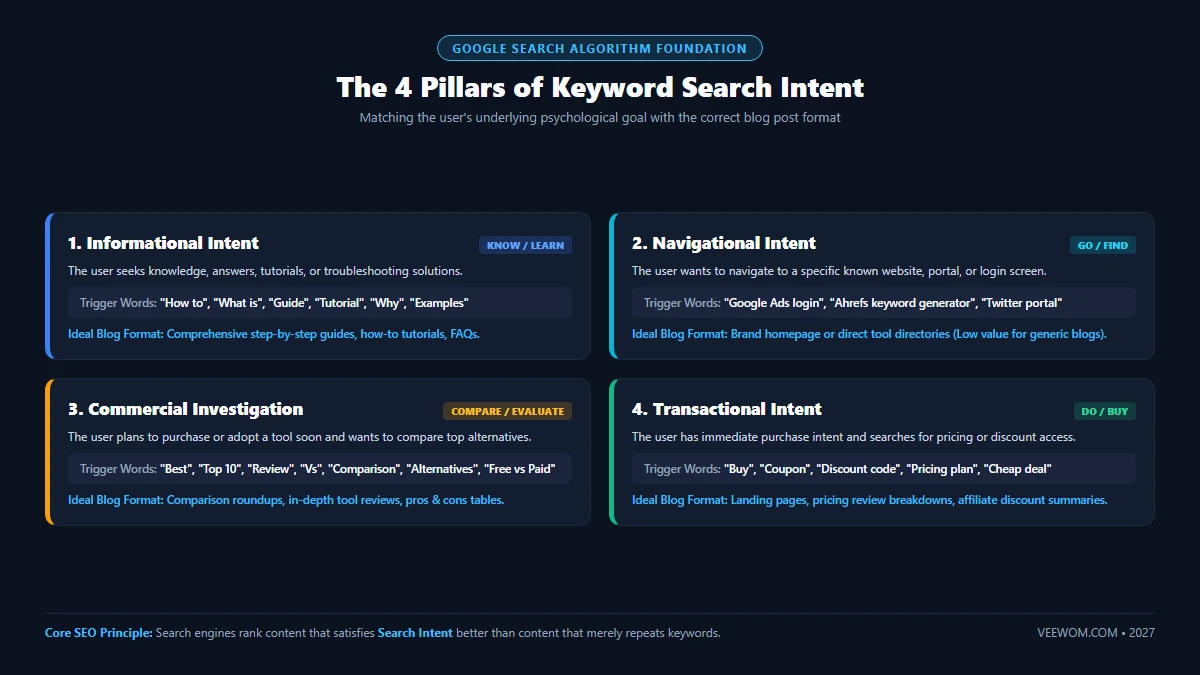
The four core pillars of keyword search intent and corresponding blog post formats.
10. How to Choose the Right Keyword for Your Blog Post
When you have a list of 50 potential keyword ideas, how do you pick the single best keyword to target? Evaluate each candidate against these seven strategic criteria:
- Search Intent Alignment: Does the keyword match the type of article you intend to publish? If searchers want a 3-minute video tutorial, a 4,000-word text essay will struggle to satisfy them.
- Topical Relevance: Does this keyword naturally fit your blog’s core niche? Ranking for a high-volume keyword completely unrelated to your audience will only inflate bounce rates without building loyal readers.
- Genuine Search Demand: Ensure the keyword has consistent monthly demand (verified in Keyword Planner or Trends) rather than being a temporary anomaly.
- Realistic Competitive Resistance: For blogs under a year old, prioritize keywords with low KD scores and top-10 SERPs that feature fellow independent bloggers rather than mega-portals.
- Content Differentiation Opportunity: Can you create something substantially more thorough, updated, or readable than the current top results? If you cannot add unique value, pick a different angle.
- Monetization & Business Value: Does this keyword attract visitors who might click on your affiliate recommendations, interact with relevant AdSense ads, or subscribe to your newsletter?
- SERP Layout Realities: Look at the search result page. Is page one dominated by five Google Ads, a huge local map pack, and video carousels? If organic results are pushed below the fold, organic CTR will be significantly lower.
11. Common Keyword Research Mistakes Bloggers Should Avoid
Avoiding common keyword research mistakes saves months of wasted effort. Watch out for these 10 pitfalls:
- Chasing Vanity Search Volume: Targeting a keyword with 100,000 monthly searches when your new blog has zero backlinks is an exercise in frustration. Focus on low-competition long-tail keywords first.
- Ignoring Search Intent: Writing a product comparison when Google’s top results are all step-by-step beginner guides will prevent your post from ranking.
- Keyword Stuffing: Artificially forcing your primary keyword into every paragraph destroys readability and triggers search engine spam penalties. Write naturally for human readers.
- Blindly Copying Competitor Keywords: Just because an established authority site ranks for a keyword does not mean a new blog can duplicate that success without comparable authority.
- Confusing Ad Competition with SEO Difficulty: Remembering that “Low Competition” in Google Keyword Planner only measures Google Ads bidding intensity, not organic SEO difficulty.
- Relying on a Single Tool: Every keyword tool has different database sizes and estimation methods. Combining two or three free tools provides a much more balanced picture.
- Ignoring Question-Based Keywords: Overlooking interrogative queries (“How”, “Why”, “What”) means missing out on Google’s People Also Ask and Featured Snippet positions.
- Targeting Unrelated Queries: Publishing articles outside your niche dilutes your site’s topical authority and confuses search engine crawlers.
- Keyword Cannibalization: Writing three different articles targeting nearly identical keywords causes your own pages to compete against each other in Google SERPs.
- Ignoring Search Console Data: Neglecting the first-party impression data already accumulating in your Google Search Console dashboard.
12. Free vs. Paid Keyword Research Tools: Which Is Better?
One of the most frequent questions from bloggers is whether they eventually need to purchase an expensive paid SEO subscription like Ahrefs, Semrush, or Moz Pro.
Here is an honest, practical comparison:
| Feature Dimension | Free Keyword Tools Stack | Paid SEO Subscriptions ($100–$250/mo) |
|---|---|---|
| Direct Financial Cost | $0 / month (100% free) | $1,200 to $3,000+ per year |
| Search Volume Data | Brackets in Google Planner; exact top 10 in Ahrefs; exact impressions in GSC | Exact monthly estimates across all queries |
| Organic Keyword Difficulty | Available on top 10 rows (Ahrefs Generator, Moz 10/mo, Semrush 10/day) | Unlimited bulk KD filtering and sorting |
| Competitor Backlink Audits | Limited to your own domain via Ahrefs Webmaster Tools | Full competitor backlink and gap analysis |
| Workflow Speed & Convenience | Requires combining 2–3 tools and manual CSV aggregation | Single dashboard with one-click bulk keyword clustering |
| Ideal User Profile | Beginners, hobby bloggers, niche site builders, affiliate creators | SEO agencies, enterprise teams, full-time publishers |
The Bottom Line: If you are a beginner or intermediate blogger earning under $1,000 per month from your website, you do NOT need a paid SEO tool subscription. A thoughtful combination of Google Keyword Planner, Google Trends, Google Search Console, and the free tiers of Ahrefs, Semrush, and AnswerThePublic gives you more than enough actionable data to build a successful, high-traffic blog.
Frequently Asked Questions (FAQs)
#01. What is the best free keyword research tool for bloggers?
For seed topic discovery and monetization data, Google Keyword Planner is the best tool. For checking organic SEO keyword difficulty and question suggestions without creating an account, Ahrefs Free Keyword Generator is the top choice. Combining both provides an ideal free workflow.
#02. Can I do keyword research without paying for software?
Yes, absolutely. By combining Google Keyword Planner (search volume and related terms), Google Trends (trend momentum), Google Search Console (first-party impressions), and free query generators like Ahrefs, you can conduct thorough, professional keyword research completely free.
#03. Is Google Keyword Planner free to use?
Yes. Google Keyword Planner is free. While it is housed within Google Ads, you can set up an account in “Expert Mode” without activating a billing campaign or spending any money on advertising.
#04. Is Google Trends useful for SEO?
Google Trends is extremely valuable for SEO. It reveals whether interest in a topic is growing or declining, uncovers seasonal spikes (such as holiday shopping), and identifies breakout queries experiencing sudden surges in search volume.
#05. Can I find low-competition keywords for free?
Yes. You can identify low-competition keywords by using Ahrefs Free Keyword Generator (looking for KD scores below 20), scraping long-tail variations in Google Autocomplete, and inspecting live Google search results to see if smaller blogs or forums rank on page one.
#06. Which free tool shows keyword search volume?
Google Keyword Planner shows search volume ranges (e.g., 1K–10K) for free accounts. Ahrefs Free Keyword Generator displays exact monthly search volumes for the top 10 results per search, and WordStream provides free monthly search estimates.
#07. What is the best free long-tail keyword research tool?
Keyword Tool (keywordtool.io) and AnswerThePublic are outstanding for long-tail discovery. Keyword Tool scrapes hundreds of autocomplete suggestions, while AnswerThePublic organizes search queries into question wheels (Who, What, Why, Where, How).
#08. Is Ahrefs Keyword Generator really free?
Yes. Ahrefs Free Keyword Generator is accessible on their website without creating an account, entering credit card information, or signing up for a trial. It provides up to 100 suggestions and 50 questions per search, with volume and KD for the top 10 items.
#09. Is Semrush Keyword Magic Tool free?
Semrush offers a free account tier that allows up to 10 searches per 24-hour period. Each search displays the top 10 keyword rows with full Search Volume, Keyword Difficulty percentage, and Search Intent tags.
#10. How can Google Search Console help with keyword research?
Google Search Console provides first-party data showing the exact queries your site already ranks for. By identifying “striking distance” queries ranking on page two (positions 11–25) with high impressions, you can optimize existing posts to win page-one traffic.
#11. How many keywords should I target in one blog post?
Target one primary focus keyword for your post title, URL, and introduction, supported by 4 to 8 closely related secondary and long-tail keywords integrated naturally into your subheadings (<h2> and <h3>) and body text.
#12. Are free keyword research tools accurate?
Free keyword research tools provide reliable approximations and relative demand patterns. Because search engines do not publish exact real-time census numbers, every tool uses algorithmic modeling. Combining multiple free tools gives you an accurate, practical picture of search interest.
#13. What is the difference between search volume and keyword difficulty?
Search volume measures the estimated number of times a keyword is searched per month. Keyword difficulty (KD) estimates how difficult it will be to rank on page one for that term, based on the strength and backlink profiles of currently ranking pages.
#14. Do bloggers need paid SEO tools to rank on Google?
No. Many successful, high-traffic blogs were built entirely using free SEO tools. Paid tools offer workflow convenience and deep competitor analysis, but search engines rank content based on quality, relevance, and user satisfaction, not the software used to plan it.
Conclusion
Mastering keyword research is the single most impactful skill you can develop as a blogger. It transforms your writing from blind guesswork into an intentional, data-driven strategy that consistently connects your articles with eager readers.
You do not need to invest hundreds of dollars into premium SEO suites to achieve outstanding results. By combining the official search intelligence of Google Keyword Planner, the real-time trend validation of Google Trends, the first-party performance tracking of Google Search Console, and the rapid difficulty checks of Ahrefs Free Keyword Generator, you possess a complete, professional keyword research toolkit at zero financial cost.
Focus on uncovering specific long-tail keywords, thoroughly satisfying search intent, and organizing your posts with clear, helpful subheadings. Over time, this disciplined approach will compound into higher rankings, growing traffic, and a thriving blog.
We hope this comprehensive guide helps you uncover incredible keyword opportunities for your blog in 2027! If you have questions about specific keyword tools, analyzing search intent, or finding low-competition niches, leave a comment below, and our team at Veewom will gladly assist you.
If you found this article helpful, please share it with fellow bloggers and web creators. Connect with Veewom on Twitter, Facebook, and Instagram for the latest SEO tutorials, WordPress tips, and blogging strategies.
Also Read this
- Google AdSense Highest CPC Keywords List (Top Paying Niches)
- Top 10 Best SEO Blogs to Follow for Search Rankings in 2026
- 100+ High DA PA Free Guest Posting Sites List (Updated Guide)
- 100+ .Org Sites to Get High PR DoFollow Backlinks
- 10+ Proven Best Practices to Speed Up WordPress Sites in 2026
- How to Clean Up WordPress Header Without Plugin (Speed Up WP)
- How to Register Free Domain Names (Top Legit Methods)
- Top 10 Best Free Web Hosting Providers (Tested & Ranked)
- Cloud Hosting Explained: Complete Architecture & Buying Guide
- Top 10 Easiest Ways to Earn Money Online in 2026


Editorial Staff
Editorial Staff at Veewom is a Team of Experts led by sandeep Kumar.
You may also like this!
© Veewom.com. | Managed by PinePL
