
- Home
- Tutorials
- Cloud Computing
- Kubernetes (K8s) Architecture
Kubernetes (K8s) Architecture: Control Plane & Worker Nodes Deep Dive
Originally developed by Google engineers based on their internal cluster management system (Borg) and open-sourced in 2014, Kubernetes (often abbreviated as K8s) has become the de facto operating system of the modern cloud. A production Kubernetes cluster consists of two distinct operational planes: the Control Plane (Master Node) and the Worker Nodes (Data Plane).
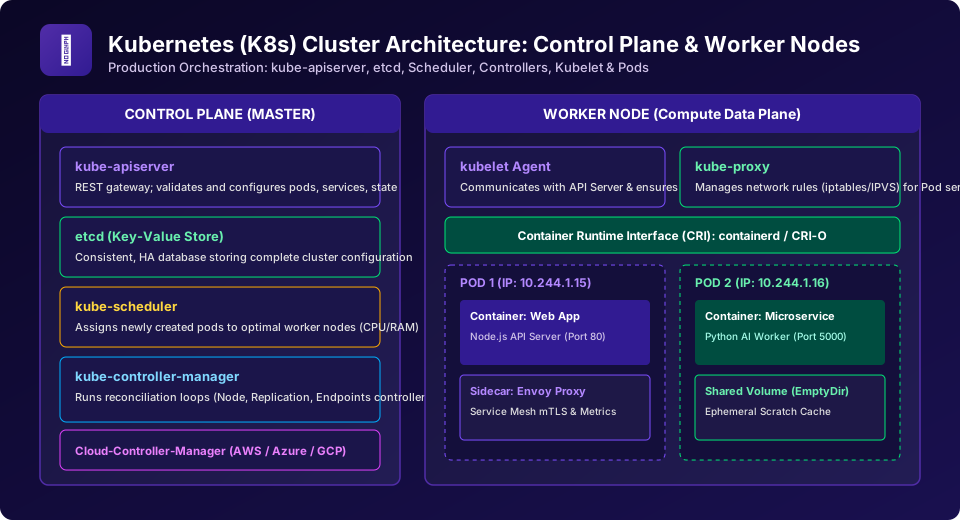
Figure 7: Production Kubernetes (K8s) Cluster Architecture: Control Plane master components (API Server, etcd, Scheduler, Controller Manager) orchestrating Worker Node pods via Kubelet and Kube-Proxy.
1. The Control Plane (Master Node Components)
The Control Plane makes global decisions about the cluster (such as scheduling), detecting and responding to cluster events (such as starting up a new pod when a deployment's replica count is unsatisfied):
| Control Plane Component | Internal Architecture & Function |
|---|---|
| kube-apiserver | The central REST gateway and front door of the control plane. All internal and external commands (from kubectl, worker nodes, and controllers) communicate exclusively via the API server. Validates and configures data for API objects. |
| etcd | Consistent, highly available distributed key-value database that stores the complete cluster state, configuration data, and secrets. It is the single source of truth for the entire cluster. |
| kube-scheduler | Watches for newly created Pods that have no assigned worker node, and selects the optimal node for them to run on based on resource requests (CPU/RAM), affinity rules, and taints/tolerations. |
| kube-controller-manager | Runs background reconciliation loops. Continuously compares the desired state (declared in YAML manifests) with the actual current state (reported by worker nodes) and executes corrections if drift occurs. |
2. The Worker Node (Compute Data Plane)
Worker nodes are the physical or virtual cloud servers that actually execute containerized application workloads:
- kubelet: An agent that runs on each worker node in the cluster. It ensures that containers described in
PodSpecsare running and healthy. Reports node status and metrics back to the central API server. - kube-proxy: A network proxy running on each node that maintains network rules (using Linux
iptablesorIPVS) to forward traffic to the correct Pods behind a Kubernetes Service. - Container Runtime (CRI): The underlying software responsible for running containers (e.g.,
containerdorCRI-O). Pulls images from registries and starts/stops container processes. - Pod: The smallest, most fundamental deployable compute unit in Kubernetes. A Pod encapsulates one or more closely coupled containers that share the same network namespace (IP address), storage volumes, and port space.
University Exam Corner (BCA / B.Sc CS)
Question: "What is a 'Sidecar Container' pattern in Kubernetes Pods?"
Answer: The Sidecar Pattern involves placing an auxiliary helper container inside the same Pod alongside the main application container. Because both containers share the same local network interface (localhost) and storage volumes, the sidecar can execute secondary tasks (such as streaming logs, collecting metrics, or handling mTLS encryption via an Envoy proxy) without modifying the main application source code.
Frequently Asked Questions (FAQ) - Student & Interview Review
Q1. Why does Kubernetes use etcd instead of a relational SQL database?
Q2. What is the difference between a Deployment and a StatefulSet in Kubernetes?
Explore Related Cloud Computing Tutorials & Next Steps
Broaden your enterprise cloud architecture and DevOps expertise across our curriculum:
Discover how AWS, Azure, and Google Cloud manage the K8s control plane, etcd, and worker nodes.
Implement advanced sidecar proxy routing, telemetry, and circuit breaking in Kubernetes clusters.
Automate continuous deployment to Kubernetes using Git repositories as the single source of truth.
Essential kubectl commands for inspecting pods, services, deployments, logs, and ingress controllers.


You may also like this!
© Veewom.com. | Managed by PinePL
