
Django REST Framework (DRF): Architecture & First API View
Modern web and mobile architectures are overwhelmingly decoupled: backend servers serve JSON data endpoints, while frontend applications (React, Next.js, Flutter, iOS, Android) consume those endpoints. Django REST Framework (DRF) is the industry standard for turning Django applications into production-grade RESTful APIs.
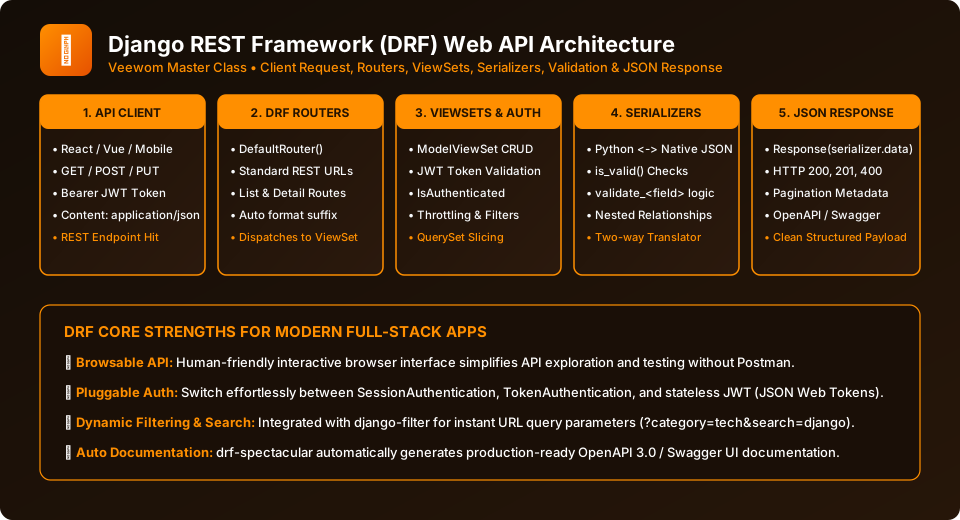
Figure 32.1: The DRF Request-Response Pipeline — Serialization, Authentication, ViewSets, and JSON Payloads.
Step 1: Installation & Settings Configuration
# Install DRF
pip install djangorestframework
Register DRF and configure sensible defaults in settings.py:
# mywebsite/settings.py
INSTALLED_APPS = [
    # ...
    'rest_framework',
    'blog',
]

REST_FRAMEWORK = {
    # Default Permissions: Read-only for public, write for logged-in users
    'DEFAULT_PERMISSION_CLASSES': [
        'rest_framework.permissions.IsAuthenticatedOrReadOnly',
    ],
    # Default Authentication Schemes
    'DEFAULT_AUTHENTICATION_CLASSES': [
        'rest_framework.authentication.SessionAuthentication',
        'rest_framework.authentication.BasicAuthentication',
    ],
    # Default JSON Pagination
    'DEFAULT_PAGINATION_CLASS': 'rest_framework.pagination.PageNumberPagination',
    'PAGE_SIZE': 10,
}
Building Your First API Endpoint in 3 Steps
1. Define the Serializer:
# blog/serializers.py
from rest_framework import serializers
from .models import BlogPost

class BlogPostSerializer(serializers.ModelSerializer):
    class Meta:
        model = BlogPost
        fields = ['id', 'title', 'slug', 'summary', 'content', 'created_at']
2. Define the View:
# blog/views.py
from rest_framework.response import Response
from rest_framework.decorators import api_view
from .models import BlogPost
from .serializers import BlogPostSerializer

@api_view(['GET'])
def api_posts_list(request):
    posts = BlogPost.objects.filter(is_published=True)[:10]
    serializer = BlogPostSerializer(posts, many=True)
    return Response(serializer.data)
3. Register the Route:
# blog/urls.py
from django.urls import path
from . import views

urlpatterns = [
    path('api/posts/', views.api_posts_list, name='api_posts_list'),
]
Test the Browsable API
Navigate to http://127.0.0.1:8000/api/posts/ in your browser. DRF will render a rich HTML page showing the JSON payload, HTTP status code (200 OK), request headers, and an interactive form to test submissions!
Frequently Asked Questions (FAQ) - Student & Interview Review
Q1. What is Django REST Framework (DRF)?
Q2. What is the Web-Browsable API in DRF?
Q3. How do you install and register DRF in a Django project?
Q4. Can DRF work with both session authentication and token authentication?
Explore Related Django Tutorials & Next Steps
Broaden your backend architecture, REST API design, and production engineering expertise:
Transform model instances into JSON representations.
Construct complete RESTful CRUD endpoints in minutes.
Secure your API endpoints with JSON Web Tokens.
Why DRF remains the gold standard for enterprise API development.


You may also like this!
© Veewom.com. | Managed by PinePL
