
Django Authentication System: Login, Logout & Password Management
Building authentication from scratch is dangerous — subtle mistakes lead to credential leaks, session hijacking, and brute-force vulnerabilities. Django includes a complete, enterprise-hardened Authentication System (django.contrib.auth) out of the box.
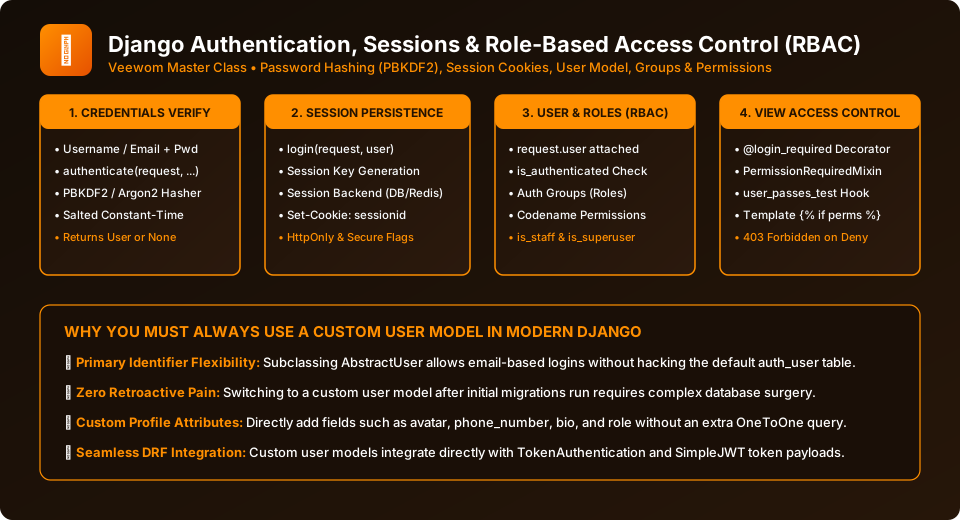
Figure 28.1: The 4-Stage Authentication and Authorization Pipeline in Django.
The Authentication Lifecycle Functions
# accounts/views.py
from django.contrib.auth import authenticate, login, logout
from django.shortcuts import render, redirect
from django.contrib.auth.forms import AuthenticationForm

def custom_login_view(request):
    if request.method == 'POST':
        form = AuthenticationForm(request, data=request.POST)
        if form.is_valid():
            username = form.cleaned_data.get('username')
            password = form.cleaned_data.get('password')

            # 1. Verify credentials against salted hashes
            user = authenticate(request, username=username, password=password)

            if user is not None:
                # 2. Establish session and write sessionid cookie
                login(request, user)

                # 3. Redirect to destination or default
                next_url = request.GET.get('next', 'dashboard')
                return redirect(next_url)
    else:
        form = AuthenticationForm()

    return render(request, 'registration/login.html', {'form': form})

def custom_logout_view(request):
    # Flushes session and destroys session cookie
    logout(request)
    return redirect('login')
Using Django's Built-in Auth Views in urls.py
Rather than writing custom views, you can leverage Django's pre-built generic authentication views:
# accounts/urls.py
from django.urls import path
from django.contrib.auth import views as auth_views

urlpatterns = [
    path('login/', auth_views.LoginView.as_view(template_name='registration/login.html'), name='login'),
    path('logout/', auth_views.LogoutView.as_view(), name='logout'),

    # Password Reset Flow
    path('password_reset/', auth_views.PasswordResetView.as_view(), name='password_reset'),
    path('password_reset/done/', auth_views.PasswordResetDoneView.as_view(), name='password_reset_done'),
    path('reset/<uidb64>/<token>/', auth_views.PasswordResetConfirmView.as_view(), name='password_reset_confirm'),
    path('reset/done/', auth_views.PasswordResetCompleteView.as_view(), name='password_reset_complete'),
]
Key Settings in settings.py
Configure redirection destinations in settings.py:
LOGIN_URL = 'login' — where unauthorized users are redirected.
LOGIN_REDIRECT_URL = 'dashboard' — where users are redirected after successful login.
LOGOUT_REDIRECT_URL = 'home' — where users land after logging out.
Frequently Asked Questions (FAQ) - Student & Interview Review
Q1. How does Django store user passwords securely?
Q2. What is the difference between authenticate() and login() in Django?
Q3. How do you protect a view so only logged-in users can access it?
Q4. How does Django's built-in Password Reset system work?
Explore Related Django Tutorials & Next Steps
Broaden your backend architecture, REST API design, and production engineering expertise:
Build authentication around email-based login rather than usernames.
Assign role-based access rights to authenticated users.
Understand how login() persists user IDs across HTTP requests.
Extend authentication from session cookies to stateless JWT API tokens.


You may also like this!
© Veewom.com. | Managed by PinePL
