
Laravel 11 Streamlined Directory Structure & Configuration
Laravel 11 introduced the most significant and elegant directory structure overhaul in the framework's history. By eliminating clutter, deprecating legacy Kernel classes, and moving to a streamlined "opt-in" architecture, Laravel 11 provides a clean canvas where you only see the configuration files and middleware you actually modify.
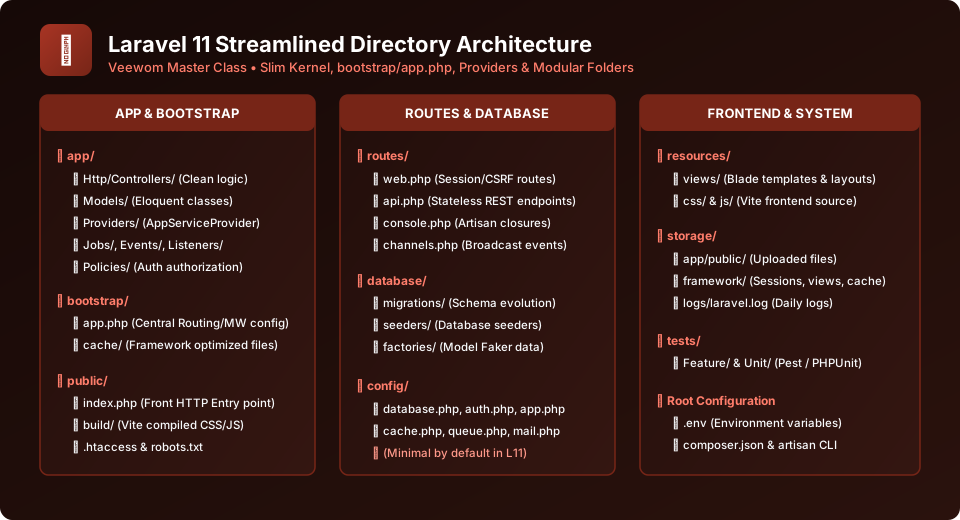
Figure 5.1: Complete Visual Architecture of the Streamlined Laravel 11 Directory Hierarchy
Tour of Root Folders & Their Purpose
1. app/
The core heart of your application. Contains Http/Controllers/ (controller business logic), Models/ (Eloquent active record models), and Providers/AppServiceProvider.php. Additional directories like Jobs/, Events/, and Policies/ are created automatically by Artisan when you scaffold them.
2. bootstrap/
Houses app.php — the single central file that configures routing, middleware, and exception handling for the entire application in Laravel 11. Also holds the cache/ folder for optimized framework artifacts.
3. config/
In Laravel 11, the config folder is intentionally slimmed down. Default configuration values cascade from framework core. If you need to customize database, auth, or mail configurations, simply run php artisan config:publish.
4. database/
Houses migrations/ (database schema definition scripts), seeders/ (populating initial database tables), and factories/ (generating massive sets of fake mock test records using Faker).
5. public/
The only directory accessible to the public internet! Contains index.php (the front controller), build/ (Vite compiled JavaScript & CSS), robots.txt, and user assets.
6. resources/
Contains uncompiled frontend assets: views/ (Blade template files ending in .blade.php), css/, and js/ processed by Vite.
The Revolutionary bootstrap/app.php in Laravel 11
In previous Laravel versions, developers had to navigate between Http/Kernel.php, Console/Kernel.php, and multiple service provider files. In Laravel 11, routing, middleware, and exceptions are unified inside bootstrap/app.php:
<?php

use Illuminate\Foundation\Application;
use Illuminate\Foundation\Configuration\Exceptions;
use Illuminate\Foundation\Configuration\Middleware;

return Application::configure(basePath: dirname(__DIR__))
    ->withRouting(
        web: __DIR__.'/../routes/web.php',
        commands: __DIR__.'/../routes/console.php',
        health: '/up',
    )
    ->withMiddleware(function (Middleware $middleware) {
        // Register custom middleware aliases or global middleware here
        $middleware->alias([
            'admin' => \App\Http\Middleware\EnsureUserIsAdmin::class,
        ]);
    })
    ->withExceptions(function (Exceptions $exceptions) {
        // Configure custom exception rendering
    })->create();
Environment Configuration (.env) Best Practices
Laravel utilizes the PHP dotenv library to separate environment-specific variables from application source code. The .env file in your project root contains secret credentials that should NEVER be committed to Git version control:
APP_NAME="Veewom Laravel"
APP_ENV=local
APP_KEY=base64:XyZ123...
APP_DEBUG=true
APP_TIMEZONE=Asia/Kolkata
APP_URL=http://localhost:8000

DB_CONNECTION=mysql
DB_HOST=127.0.0.1
DB_PORT=3306
DB_DATABASE=veewom_laravel
DB_USERNAME=root
DB_PASSWORD=secret
Critical Security Warning: APP_DEBUG in Production
Never leave APP_DEBUG=true on a live public production server! If an unexpected error occurs, Laravel's error page will display your database passwords, environment variables, and full stack trace to any visitor.
Frequently Asked Questions (FAQ) - Student & Interview Review
Q1. Where did Http/Kernel.php go in Laravel 11?
Q2. Why must the web server document root point to the 'public' folder?
Q3. How do I read a variable from the .env file in my code?
Explore Related Laravel Tutorials & Next Steps
Broaden your backend architecture, REST API design, and enterprise production engineering expertise:
Learn how Artisan scaffolds files into app/, database/, and routes/ directories.
Protect your .env secrets, APP_KEY encryption, and file storage permissions.
Declare web and API endpoints in routes/web.php and routes/api.php.
Reinforce directory layout and configuration with hands-on coding exercises.


You may also like this!
© Veewom.com. | Managed by PinePL
