
Laravel Routing: Basic Routes, Route Parameters & Named Routes
Routing is the front door of your Laravel application. Whenever an HTTP request arrives, the Laravel router inspects the incoming URI and HTTP verb (GET, POST, PUT, PATCH, DELETE) and resolves which controller action or closure should process the request. In this tutorial class, you will master basic route definitions, optional and required parameters, regular expression constraints, and named routes.
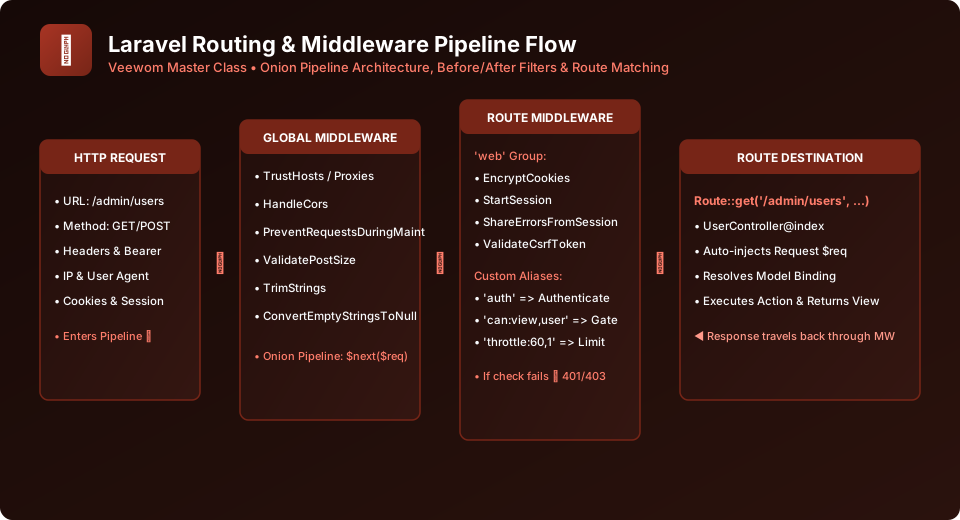
Figure 7.1: Flow of Incoming HTTP Request URI Resolution Across Router Tables
1. Basic Route Definitions in routes/web.php
All web-facing routes are declared in routes/web.php. These routes automatically receive session state, CSRF protection, and cookie encryption through the web middleware group:
use Illuminate\Support\Facades\Route;
use App\Http\Controllers\ArticleController;

// Simple closure returning a string
Route::get('/welcome', function () {
    return 'Welcome to Veewom Laravel Master Class!';
});

// Route returning a Blade view
Route::get('/', function () {
    return view('home');
});

// Route directing traffic to a dedicated controller action
Route::get('/articles', [ArticleController::class, 'index']);
Route::post('/articles', [ArticleController::class, 'store']);
2. Route Parameters & Optional Parameters
Web applications frequently capture variable segments from the URL, such as a product ID or a blog post slug. Route parameters are enclosed in curly braces {param} and injected directly into your controller action or closure:
// 1. Required Parameter
Route::get('/users/{id}', function (string $id) {
    return "Displaying profile for User #{$id}";
});

// 2. Multiple Parameters
Route::get('/posts/{post}/comments/{comment}', function (string $postId, string $commentId) {
    return "Viewing Post {$postId}, Comment #{$commentId}";
});

// 3. Optional Parameter (appended with ? and default value in callback)
Route::get('/catalog/{category?}', function (string $category = 'all-products') {
    return "Browsing category: " . strtoupper($category);
});
3. Regular Expression Constraints (where)
To prevent malicious input or routing collisions, you can constrain the format of your route parameters using fluent where() regex helpers:
// Restrict ID to digits only
Route::get('/users/{id}', [UserController::class, 'show'])
    ->whereNumber('id');

// Restrict slug to lowercase alphabets and hyphens
Route::get('/blog/{slug}', [BlogController::class, 'show'])
    ->whereAlphaNumeric('slug');

// Custom Regex Constraint
Route::get('/orders/{orderRef}', [OrderController::class, 'show'])
    ->where('orderRef', 'ORD-[0-9]{5}');
4. Named Routes & URL Generation
Named routes allow you to generate URLs or redirects conveniently without hardcoding absolute URI strings in your views and controllers. If your URL structure changes in the future, named routes prevent broken links:
// Assign a name to a route
Route::get('/user/profile', [UserProfileController::class, 'show'])->name('profile.show');

// Generating URLs in controllers:
$url = route('profile.show');

// Redirecting in controllers:
return redirect()->route('profile.show');

// Passing route parameters to route() helper:
Route::get('/post/{id}', [PostController::class, 'show'])->name('post.show');
$link = route('post.show', ['id' => 42]); // Outputs: http://veewom.test/post/42
Using Named Routes in Blade Templates
Inside your Blade HTML templates, always generate anchor links using the route helper: <a href="{{ route('profile.show') }}">My Profile</a> instead of hardcoding /user/profile.
Frequently Asked Questions (FAQ) - Student & Interview Review
Q1. What is the difference between routes/web.php and routes/api.php?
Q2. How do I define global parameter constraints across all routes?
Q3. How does route caching improve production speed?
Explore Related Laravel Tutorials & Next Steps
Broaden your backend architecture, REST API design, and enterprise production engineering expertise:
Organize large route files with prefixes, names, and middleware groups.
Connect route endpoints cleanly to dedicated controller action methods.
Intercept route requests with authentication and rate limiting filters.
Extract route parameters and validated input safely from $request.


You may also like this!
© Veewom.com. | Managed by PinePL
