
Laravel Real-Time Broadcasting: Reverb, WebSockets & Echo
Traditional web requests follow a strict pull model: the browser requests data, and the server responds. But modern applications (live chats, multiplayer dashboards, stock tickers, order delivery trackers) require the server to push updates to the browser instantly without polling. Laravel Reverb is Laravel's official, blazing-fast first-party WebSocket server capable of maintaining hundreds of thousands of concurrent connections.
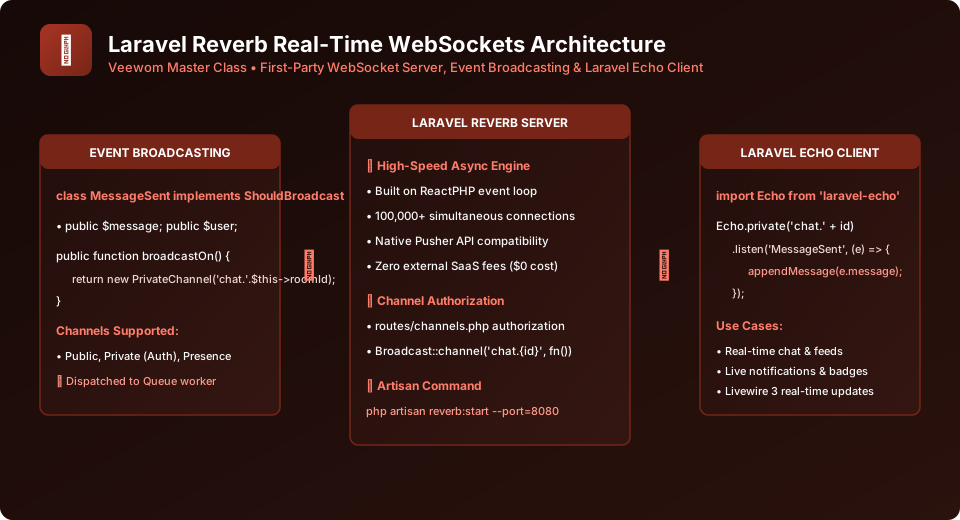
Figure 36.1: Laravel Reverb Event Broadcasting and Client-Side Echo Architecture
1. Installing and Configuring Laravel Reverb
Install Reverb with a single Artisan setup command:
# Install Reverb server and publish channels.php
php artisan install:broadcasting

# Choose Reverb as your broadcaster
Artisan configures your .env with Reverb credentials and installs the laravel-echo and pusher-js JavaScript packages:
BROADCAST_CONNECTION=reverb

REVERB_APP_ID=123456
REVERB_APP_KEY=veewom-key
REVERB_APP_SECRET=veewom-secret
REVERB_HOST="localhost"
REVERB_PORT=8080
REVERB_SCHEME="http"
2. Defining an Event that ShouldBroadcast
Generate an event class that implements the ShouldBroadcast contract:
php artisan make:event MessageSentEventOpen app/Events/MessageSentEvent.php:
<?php

namespace App\Events;

use App\Models\User;
use App\Models\Message;
use Illuminate\Broadcasting\PrivateChannel;
use Illuminate\Contracts\Broadcasting\ShouldBroadcast;
use Illuminate\Queue\SerializesModels;

class MessageSentEvent implements ShouldBroadcast
{
    use SerializesModels;

    // Public properties are automatically serialized into the WebSocket JSON payload!
    public function __construct(
        public User $user,
        public Message $message,
        public int $chatRoomId
    ) {}

    /**
     * Broadcast on private authenticated channel
     */
    public function broadcastOn(): array
    {
        return [
            new PrivateChannel('chat-room.' . $this->chatRoomId),
        ];
    }

    public function broadcastAs(): string
    {
        return 'message.sent';
    }
}
3. Authorizing Private Channels in routes/channels.php
Before a user can listen on a private WebSocket channel, Laravel must verify they have permission:
use App\Models\User;

// Authorize private channel: chat-room.{roomId}
Broadcast::channel('chat-room.{roomId}', function (User $user, int $roomId) {
    // Only users who are members of this room can listen
    return $user->chatRooms()->where('chat_rooms.id', $roomId)->exists();
});
4. Listening on the Frontend with Laravel Echo
In your JavaScript application (resources/js/bootstrap.js), configure Echo and subscribe to real-time events:
import Echo from 'laravel-echo';
import Pusher from 'pusher-js';
window.Pusher = Pusher;

window.Echo = new Echo({
    broadcaster: 'reverb',
    key: import.meta.env.VITE_REVERB_APP_KEY,
    wsHost: import.meta.env.VITE_REVERB_HOST,
    wsPort: import.meta.env.VITE_REVERB_PORT,
    wssPort: import.meta.env.VITE_REVERB_PORT,
    forceTLS: false,
    enabledTransports: ['ws', 'wss'],
});

// Subscribe to private channel and listen for events
window.Echo.private(`chat-room.${currentRoomId}`)
    .listen('.message.sent', (event) => {
        console.log('New Message Arrived!', event.message);
        appendMessageToChatUI(event.user.name, event.message.content);
    });
Start the Reverb WebSocket daemon with Artisan:
php artisan reverb:start --debugFrequently Asked Questions (FAQ) - Student & Interview Review
Q1. What makes Laravel Reverb different from Pusher or Ably?
Q2. Do broadcast events block standard web HTTP requests?
Q3. What is a Presence Channel in WebSockets?
Explore Related Laravel Tutorials & Next Steps
Broaden your backend architecture, REST API design, and enterprise production engineering expertise:
Implement ShouldBroadcast interfaces on events to stream data over WebSockets.
Process broadcast job payloads asynchronously without stalling HTTP threads.
Connect Laravel Echo with Livewire components to trigger real-time UI rerenders.
Configure Nginx WebSocket proxying (Upgrade headers) and supervisor daemons.


You may also like this!
© Veewom.com. | Managed by PinePL
