
Laravel HTML Form Handling & CSRF Token Protection
HTML web forms are the primary bridge through which users input data into your web application. However, web forms are vulnerable to Cross-Site Request Forgery (CSRF) attacks if left unguarded. Laravel provides zero-configuration CSRF protection out of the box, alongside form method spoofing and session error bag helpers.
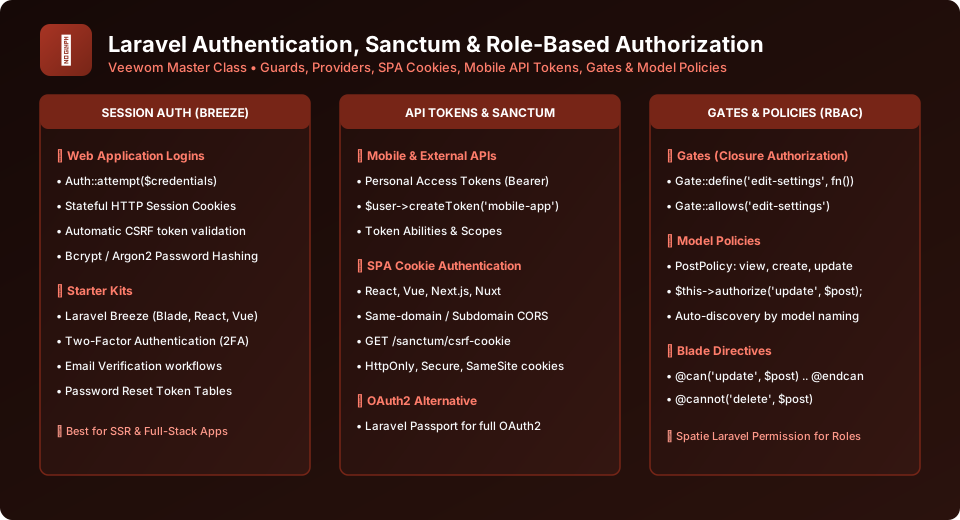
Figure 26.1: CSRF Token Verification and Authentication Guard Architecture
1. Understanding Cross-Site Request Forgery (CSRF)
A CSRF attack occurs when a malicious website tricks a user's browser into executing an unauthorized HTTP request against an application where the user is currently authenticated (for example, triggering POST /transfer-funds). Because the user's browser automatically transmits session cookies, the target application cannot distinguish between a legitimate submission and an attacker's forge.
Laravel defeats CSRF attacks by generating a secret, cryptographically random CSRF token for each active session. Any POST, PUT, PATCH, or DELETE request lacking this matching token is immediately terminated with an HTTP 419 Page Expired error.
2. Building a Robust Form with @csrf and Old Input
In your Blade template, simply add the @csrf directive inside your form. Use the old('field') helper so users never lose their typed input when validation errors occur:
<form action="{{ route('articles.store') }}" method="POST">
    <!-- Inserts hidden input with cryptographic CSRF token -->
    @csrf

    <div class="form-group mb-4">
        <label for="title">Article Title</label>
        <input type="text" name="title" id="title"
               value="{{ old('title') }}"
               class="form-control @error('title') is-invalid @enderror" />

        @error('title')
            <div class="text-danger mt-1 text-sm">{{ $message }}</div>
        @enderror
    </div>

    <div class="form-group mb-4">
        <label for="body">Article Content</label>
        <textarea name="body" id="body" rows="6"
                  class="form-control @error('body') is-invalid @enderror">{{ old('body') }}</textarea>

        @error('body')
            <div class="text-danger mt-1 text-sm">{{ $message }}</div>
        @enderror
    </div>

    <button type="submit" class="btn btn-primary">Publish Article</button>
</form>
3. Form Method Spoofing (@method)
Standard HTML <form> elements only support GET and POST HTTP methods. They cannot natively send PUT, PATCH, or DELETE verbs required by RESTful APIs. Laravel provides method spoofing using the @method() directive:
<!-- Editing an Article with PUT -->
<form action="{{ route('articles.update', $article) }}" method="POST">
    @csrf
    @method('PUT')
    <!-- Form fields here -->
    <button type="submit" class="btn btn-success">Save Changes</button>
</form>

<!-- Deleting an Article with DELETE -->
<form action="{{ route('articles.destroy', $article) }}" method="POST">
    @csrf
    @method('DELETE')
    <button type="submit" class="btn btn-danger" onclick="return confirm('Are you sure?')">Delete Article</button>
</form>
Handling CSRF in AJAX & Fetch Requests
If submitting requests via JavaScript Fetch or Axios, place <meta name="csrf-token" content="{{ csrf_token() }}"> in your HTML header. Configure Axios to pass it via the X-CSRF-TOKEN header automatically: axios.defaults.headers.common['X-CSRF-TOKEN'] = document.querySelector('meta[name="csrf-token"]').getAttribute('content');.
Frequently Asked Questions (FAQ) - Student & Interview Review
Q1. What does the 419 Page Expired error mean in Laravel?
Q2. Can I exclude specific routes from CSRF protection (e.g. Stripe webhooks)?
Q3. How does @method('PUT') work under the hood?
Explore Related Laravel Tutorials & Next Steps
Broaden your backend architecture, REST API design, and enterprise production engineering expertise:
Validate form submissions using dedicated FormRequest classes and error bags.
Understand how encrypted CSRF cookies and token headers stop cross-site attacks.
Spoof PUT, PATCH, and DELETE HTTP verbs easily in HTML web forms.
Retain user inputs on validation errors using the old('field') helper function.


You may also like this!
© Veewom.com. | Managed by PinePL
