
- Home
- Tutorials
- Bootstrap Tutorial
- JavaScript APIs & Events
Bootstrap 5 JavaScript API: Programmatic Control & Memory Management
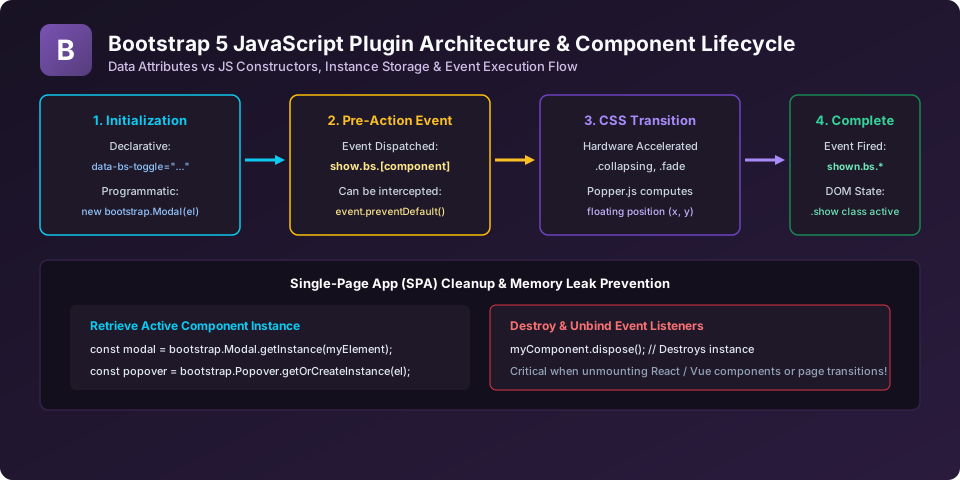
While HTML data-bs-* attributes enable interactive components without writing a line of JavaScript, complex web applications (especially Single Page Applications built with React, Vue, or Vanilla JS) require Programmatic JavaScript Control. In this class, we explore the static methods, constructors, custom events, and memory disposal patterns in Bootstrap 5.
1. The getOrCreateInstance() Method (Best Practice)
In Bootstrap 5, you should avoid creating duplicate component instances on the same DOM element. Use getOrCreateInstance() to safely retrieve an existing instance or initialize a fresh one:
// Best Practice: Retrieve existing instance or create if absent
const modalEl = document.getElementById('myModal');
const modal = bootstrap.Modal.getOrCreateInstance(modalEl, {
  backdrop: 'static',
  keyboard: false
});

// Control via API
modal.show();
// modal.hide();
// modal.toggle();
2. Custom DOM Events & Preventing Actions
All Bootstrap 5 JavaScript plugins dispatch custom namespaced events (e.g. show.bs.modal, shown.bs.modal). You can intercept pre-action events using event.preventDefault() to cancel an action:
const confirmModal = document.getElementById('confirmModal');

// Intercept the hide event to verify unsaved user changes
confirmModal.addEventListener('hide.bs.modal', (event) => {
  if (hasUnsavedChanges()) {
    const confirmExit = confirm("You have unsaved changes. Discard and close?");
    if (!confirmExit) {
      // Cancels modal dismissal!
      event.preventDefault();
    }
  }
});
3. Single Page App Cleanup with dispose()
In modern frameworks (React, Vue, Svelte), component elements are mounted and unmounted dynamically. Failing to clean up Bootstrap instances leaves orphaned DOM event listeners, causing severe memory leaks:
// When unmounting a component or navigating between pages:
const popover = bootstrap.Popover.getInstance(myButtonEl);
if (popover) {
  // Destroys the instance, unbinds Popper.js, and removes event listeners
  popover.dispose();
}
Explore Related Bootstrap Tutorials & Next Steps
Strengthen your responsive web design mastery by studying these connected classes:
Trigger, hide, and listen to modal dialog events via vanilla JavaScript.
Configure custom placement, triggers, and containers for tooltips.
Create dynamic notification toasts on the fly using JavaScript.
Reduce bundle size by importing only the plugins you actually use.
Frequently Asked Questions (FAQ) - Student & Interview Review
getInstance(el) returns the active instance or null if none exists. getOrCreateInstance(el) returns the active instance or creates and returns a new instance if none exists.
_popper property: const dd = bootstrap.Dropdown.getInstance(el); console.log(dd._popper);.
dispose() unbinds all global event listeners (like ESC key handlers and window resize events) registered by Bootstrap and Popper, preventing memory leaks.
Next Step in Your Bootstrap Learning Path:
Advance your practical frontend engineering skills with the next topic in our synchronized curriculum.
Continue to Class 43: PurgeCSS & Performance → Previous: ← Class 41: Utility API in Sass | Full Syllabus


You may also like this!
© Veewom.com. | Managed by PinePL
