
JVM, JRE, and JDK Differences: Complete Architectural Guide
One of the most foundational concepts in Java is understanding the distinction and hierarchy between three interconnected components: JVM (Java Virtual Machine), JRE (Java Runtime Environment), and JDK (Java Development Kit).
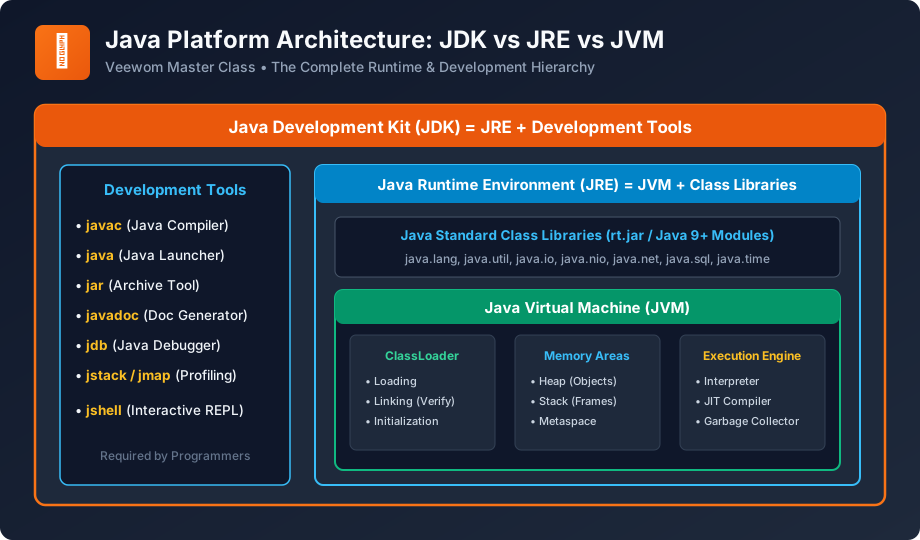
Figure 2: Architectural Nesting: JDK = JRE + Development Tools; JRE = JVM + Class Libraries.
1. Java Virtual Machine (JVM)
The JVM is an abstract computing machine that provides the runtime execution environment for Java bytecode. It performs four vital operational duties:
- Loads Code: Via the ClassLoader subsystem.
- Verifies Code: Through the Bytecode Verifier, ensuring no illegal memory operations or stack corruptions occur.
- Executes Code: Using the Interpreter and the Just-In-Time (JIT) optimizing compiler.
- Manages Memory: Automatically allocates Heap memory to new objects and reclaims unreferenced objects via the Garbage Collector.
2. Java Runtime Environment (JRE)
The JRE is the physical software installation package that bundles the JVM along with the core Java Standard Class Libraries (such as java.lang, java.util, java.io, java.sql). If an end-user only desires to run pre-compiled Java applications (e.g. running a desktop application or a microservice JAR), they only need the JRE.
3. Java Development Kit (JDK)
The JDK is the comprehensive software package targeted at software engineers. It encompasses everything inside the JRE, plus an array of command-line developer utilities:
javac: The Java compiler that converts.javasource files into.classbytecode.java: The application launcher that initializes the JVM and runs your application.jar: Utility for packaging classes into Java Archive (.jar) zip containers.javadoc: Generates HTML API documentation from formatted source comments.jdb: The command-line Java debugger for diagnosing runtime errors.jshell: Interactive REPL (Read-Eval-Print Loop) introduced in Java 9 for quick prototyping.
Side-by-Side Comparison Matrix
| Parameter | JVM | JRE | JDK |
|---|---|---|---|
| Full Form | Java Virtual Machine | Java Runtime Environment | Java Development Kit |
| Nature | Abstract specification & engine | Physical software package for running code | Complete software development kit |
| Target Audience | Internal runtime subsystem | End users running Java apps | Software developers writing Java code |
| Contains Compiler? | No | No | Yes (javac) |
| Platform Nature | Platform-dependent | Platform-dependent | Platform-dependent |
University Exam Corner (BCA / B.Sc CS)
Exam Question: "If Java is platform-independent, why is the JVM platform-dependent?"
Master Answer: Java bytecode is completely generic and knows nothing about the underlying OS or CPU instruction set. To translate this generic bytecode into actual machine instructions (x86, ARM, RISC-V) and issue operating system system calls (Windows Win32 vs Linux POSIX), the JVM itself must be custom-compiled for each specific operating system. The platform-dependent JVM acts as the universal translator that gives Java its platform independence!
Next Step
Now that you master JVM mechanics, let us dissect the syntax, rules, and anatomy of a Java source file. Proceed to: Java Syntax & Program Structure →
Frequently Asked Questions (FAQ)
Explore Related Java Tutorials
Accelerate your Java mastery by studying these tightly connected core tutorials:
Tutorial overview.
Advanced ClassLoader and Memory layout.
How objects are stored in RAM.
Constructing classes and methods.


You may also like this!
© Veewom.com. | Managed by PinePL
