
PHP RESTful API Development: JSON Endpoints, HTTP Verbs & Architecture
In modern full-stack web and mobile development, backend web servers rarely render full HTML pages directly. Instead, modern single-page applications (React, Angular, Vue, Next.js) and mobile apps (Flutter, React Native, Swift, Kotlin) communicate with backend servers via RESTful APIs (Application Programming Interfaces). A PHP REST API acts as a headless data service, receiving HTTP requests and responding with standardized JSON data.
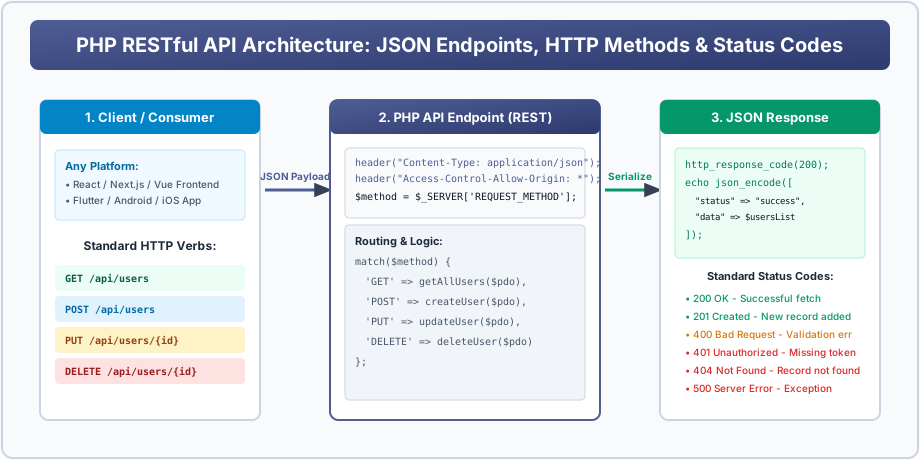
Figure 9: REST API Architecture showing Client Requests (GET/POST/PUT/DELETE) and PHP JSON Responses.
Mapping HTTP Verbs to Database Operations (CRUD)
REST architecture maps standard HTTP request methods to database actions:
| HTTP Verb | Endpoint Example | Database Action (CRUD) | Expected HTTP Status |
|---|---|---|---|
GET |
/api/students.php |
Read / Fetch records | 200 OK |
POST |
/api/students.php |
Create / Insert a new record | 201 Created |
PUT |
/api/students.php?id=10 |
Update / Replace an existing record | 200 OK |
DELETE |
/api/students.php?id=10 |
Delete a record | 200 OK or 204 No Content |
Complete Working Single-File RESTful API in PHP
Below is a complete, production-ready REST endpoint handling GET, POST, and DELETE requests:
<?php
    // Step 1: Set mandatory API response headers & CORS
    header("Content-Type: application/json; charset=UTF-8");
    header("Access-Control-Allow-Origin: *"); // Allows React/Vue clients
    header("Access-Control-Allow-Methods: GET, POST, PUT, DELETE, OPTIONS");
    header("Access-Control-Allow-Headers: Content-Type, Authorization");

    // Handle pre-flight CORS OPTIONS request
    if ($_SERVER['REQUEST_METHOD'] === 'OPTIONS') {
        http_response_code(200);
        exit();
    }

    // Connect to database via PDO
    $pdo = new PDO("mysql:host=localhost;dbname=veewom_academy;charset=utf8mb4", "root", "", [
        PDO::ATTR_ERRMODE => PDO::ERRMODE_EXCEPTION,
        PDO::ATTR_DEFAULT_FETCH_MODE => PDO::FETCH_ASSOC
    ]);

    $method = $_SERVER['REQUEST_METHOD'];

    switch ($method) {
        // 1. GET: Fetch all students
        case 'GET':
            $stmt = $pdo->query("SELECT id, name, course, marks FROM students LIMIT 50");
            $data = $stmt->fetchAll();

            http_response_code(200);
            echo json_encode(["status" => "success", "count" => count($data), "data" => $data]);
            break;

        // 2. POST: Create a new student (Reads raw JSON payload)
        case 'POST':
            $rawInput = file_get_contents("php://input");
            $body = json_decode($rawInput, true);

            if (empty($body['name']) || empty($body['course'])) {
                http_response_code(400); // Bad Request
                echo json_encode(["status" => "error", "message" => "Missing required fields: name, course."]);
                break;
            }

            $stmt = $pdo->prepare("INSERT INTO students (name, course, marks) VALUES (:name, :course, :marks)");
            $stmt->execute([
                ':name'   => htmlspecialchars($body['name']),
                ':course' => htmlspecialchars($body['course']),
                ':marks'  => (float)($body['marks'] ?? 0.0)
            ]);

            http_response_code(201); // Created
            echo json_encode(["status" => "success", "message" => "Student registered successfully.", "id" => $pdo->lastInsertId()]);
            break;

        // 3. DELETE: Remove a student by ID
        case 'DELETE':
            $id = (int)($_GET['id'] ?? 0);
            if ($id <= 0) {
                http_response_code(400);
                echo json_encode(["status" => "error", "message" => "Valid ID required."]);
                break;
            }

            $stmt = $pdo->prepare("DELETE FROM students WHERE id = :id");
            $stmt->execute([':id' => $id]);

            http_response_code(200);
            echo json_encode(["status" => "success", "message" => "Student #$id deleted."]);
            break;

        default:
            http_response_code(405); // Method Not Allowed
            echo json_encode(["status" => "error", "message" => "Method $method not allowed."]);
            break;
    }
?>
BCA / CS University Exam Corner
High-Frequency Exam Question:
Q: What are the essential HTTP response status codes every API developer must know?
• 200 OK - Successful request.
• 201 Created - New resource created successfully.
• 400 Bad Request - Malformed input / missing parameters.
• 401 Unauthorized - Authentication token missing or invalid.
• 404 Not Found - Endpoint or requested ID does not exist.
• 500 Internal Server Error - Uncaught server exception.
Interactive Student Practice Session
Exercise 40.1: Test the API above using Postman or Thunder Client by issuing GET, POST, and DELETE requests.
Exercise 40.2: Add a PUT route to the API script that accepts JSON data to update a student's marks.


You may also like this!
© Veewom.com. | Managed by PinePL
