
C++ File Handling: Text Streams, Binary Serialization & File Pointer Seeking
File handling in C++ is managed through the <fstream> library, which provides three stream classes: std::ifstream (reading), std::ofstream (writing), and std::fstream (bidirectional read and write).
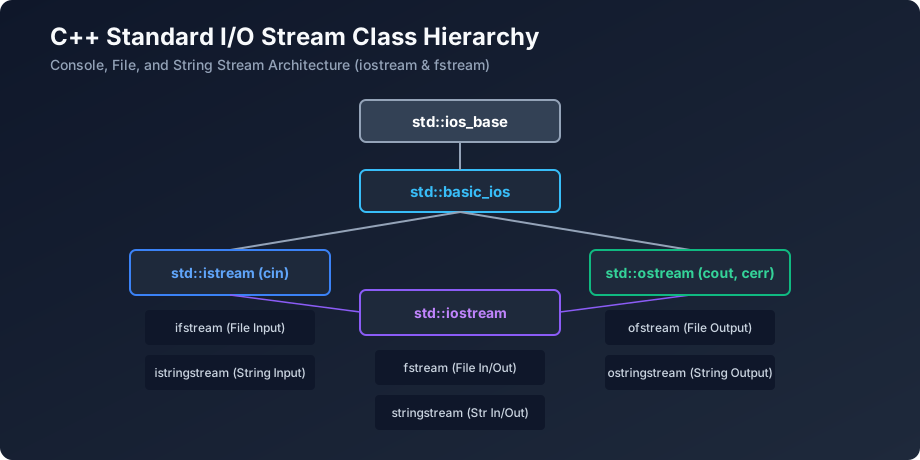
Figure 16: The C++ Stream I/O Class Hierarchy Architecture
1. Writing and Reading Text Files
#include <iostream>
#include <fstream>
#include <string>

int main() {
    // 1. Write text to a file
    {
        std::ofstream outFile("veewom_notes.txt");
        if (outFile.is_open()) {
            outFile << "Mastering C++ File Streams\n";
            outFile << "Built with RAII principles.\n";
        }
    } // Automatically flushed and closed on scope exit!

    // 2. Read text line-by-line
    {
        std::ifstream inFile("veewom_notes.txt");
        std::string line;
        while (std::getline(inFile, line)) {
            std::cout << "[READ]: " << line << "\n";
        }
    }

    return 0;
}
2. Binary File I/O: Serializing Structs Directly to Disk
#include <iostream>
#include <fstream>

struct PlayerData {
    int id;
    int score;
    double health;
};

int main() {
    PlayerData p1{101, 4500, 98.5};

    // Write binary bytes directly to file
    std::ofstream out("save.dat", std::ios::binary);
    out.write(reinterpret_cast<const char*>(&p1), sizeof(PlayerData));
    out.close();

    // Read binary bytes back from file
    PlayerData loadedPlayer{};
    std::ifstream in("save.dat", std::ios::binary);
    in.read(reinterpret_cast<char*>(&loadedPlayer), sizeof(PlayerData));
    in.close();

    std::cout << "Loaded Player ID: " << loadedPlayer.id << " | Score: " << loadedPlayer.score << "\n";
    return 0;
}
Frequently Asked Questions (FAQ) - Student & Interview Review
Q1. Why don't you need to explicitly call file.close() in modern C++?
Because std::ifstream and std::ofstream obey RAII. When the file stream object goes out of scope, its destructor is automatically called, flushing buffers and closing the file handle deterministically.
Q2. What is the difference between Text Mode and Binary Mode in file I/O?
Text mode translates newline characters (e.g., translating \n to \r\n on Windows). Binary mode (std::ios::binary) writes and reads raw memory bytes verbatim without any character translation.
Explore Related C++ Tutorials & Next Steps
Boost your C++ proficiency by studying these closely connected core modules:
C++ Basic I/O
Console stream manipulators and format flags.
C++ RAII
Automatic deterministic file closing via destructors.
Exception Handling
Throwing exceptions on file open errors.


You may also like this!
© Veewom.com. | Managed by PinePL
